
**
Update:
**
minor correction to the build process about the build.xml issue in the Codename One project.
To me the biggest advantage in Codename One over pretty much any other mobile solution is that it’s realistically open source. Realistically means that even an average developer can dig into 90% of the Codename One source code, change it and contribute to it!
However, sadly most developers don’t even try and most of those who do focus only on the aspect of building for devices rather than the advantage of much easier debugging. By incorporating the Codename One sources you can instantly see the effect of changes we made in SVN without waiting for a plugin update. You can debug into Codename One code which can help you pinpoint issues in your own code and also in resolving issues in ours!
It’s REALLY easy too!
Start by
checking out the Codename One
sources from SVN
, use the following URL
http://codenameone.googlecode.com/svn/trunk/
which should allow for anonymous readonly checkout of the latest sources!
Now that you have the sources open the CodenameOne project that is in the root and the JavaSEPort that is in the Ports directory using NetBeans. Notice
that these projects might be marked in red and you will probably need to right click on them and select Resolve Reference Problems. You will probably need to fix the JDK settings, and the libraries to point at the correct local paths.
Once you do that you can build both projects without a problem. Notice that you will probably get a minor compilation error due to a build.xml line in the Codename One project, don’t fret. Just edit that line and comment it out.
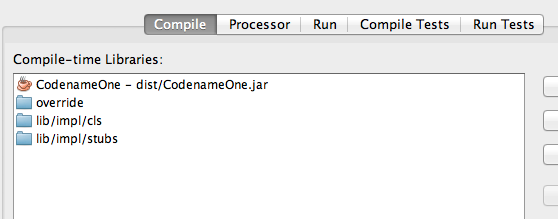
Now the fun part, select any Codename One project in NetBeans, right click and click properties.
Now select “Libraries” from the tree to your right select all the jars within the compile tab. Click remove.
Click the Add Project button and select the project for Codename One in the SVN.
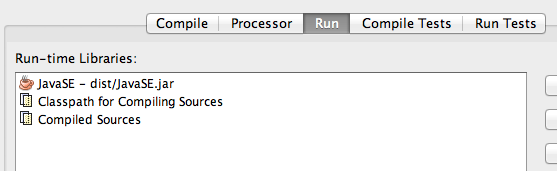
Now select the Run tab and remove the JavaSE.jar file from there by selecting it and pressing remove.
Add the JavaSEPort project using the Add Project
button and then use the Move Up button to make sure it is at the top most position since it needs to override everything else at runtime.
You are now good to go, now you can just place breakpoints within Codename One source code, edit it
and test it. You can step into it with the debugger which can save you a lot of time when tracking a problem.
Notice: This post was automatically converted using a script from an older blogging system. Some elements might not have come out as intended…. If that is the case please let us know via the comments section below.
Archived Comments
This post was automatically migrated from the legacy Codename One blog. The original comments are preserved below for historical context. New discussion happens in the Discussion section.
Maaike Z — May 22, 2015 at 6:45 pm (permalink)
Maaike Z says:
For people who also use this post regularly and wonder how to do it in the new situation, you should read this blog post: http://www.codenameone.com/…
Don’t forget to add the demos (not necessary), skins and binaries in the root of the project and to execute build_skins.sh from codenameone-skins (maybe add this also in the developer guide?).
Discussion
Join the conversation via GitHub Discussions.