Just last week I wrote that we are making an effort not to add new features and we got foiled by a couple of new features.
The main reason for this is paying customers who need to
have a feature now. This makes it hard for us to focus completely, but it does keep the lights on
here so we can’t really complain.
To be fair, during this time we were able to almost double the page count of the developer guide from the
3.2 era to 584 pages at this moment and we still have a lot of work ahead of us in that department.
ToastBar
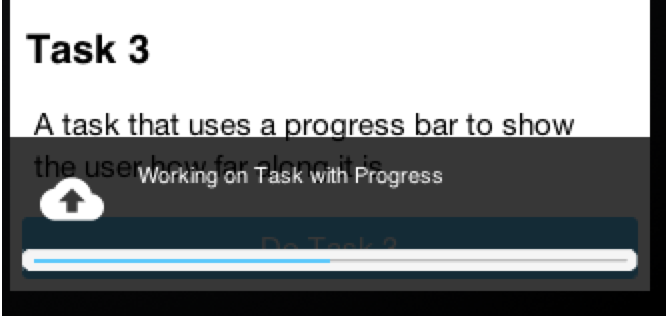
Steve was working with a customer who needed a none obtrusive notification system at the bottom similar
to the newer versions of Android’s toast UI. Fabricio already built a
native cn1lib for toast messages but because the library is native it
isn’t as flexible as we needed.
The new ToastBar API
started off as a StatusBar API but we changed that to avoid confusion with the iOS StatusBar. Here
is a quick video Steve made showing off the ToastBar.
Gaussian Blur & Dialog Blur
Some effects are very easy to accomplish in Codename One while others not so much. Gaussian blur is
one of those none trivial effects that become even harder to achieve when performance is of the essence.
It’s a really powerful effect that makes the UI standout over the background and should be built in now that
it’s a builtin part of iOS 8+.
We now have two new API’s in Display:
gaussianBlurImage &
isGaussianBlurSupported.
These API’s let us apply the blur to an arbitrary image which is useful for many things.
One of the chief uses for this is blurring a Dialog. We can apply Gaussian blur to the background of a dialog
to highlight the foreground further and produce a very attractive effect. We can use thesetDefaultBlurBackgroundRadius to apply this globally, we can use the theme constant dialogBlurRadiusInt
to do the same or we can do this on a per Dialog basis using setBlurBackgroundRadius.
Form hi = new Form("Blur Dialog", new BoxLayout(BoxLayout.Y_AXIS));
Dialog.setDefaultBlurBackgroundRadius(8);
Button showDialog = new Button("Blur");
showDialog.addActionListener((e) -> Dialog.show("Blur", "Is On....", "OK", null));
hi.add(showDialog);
hi.show();
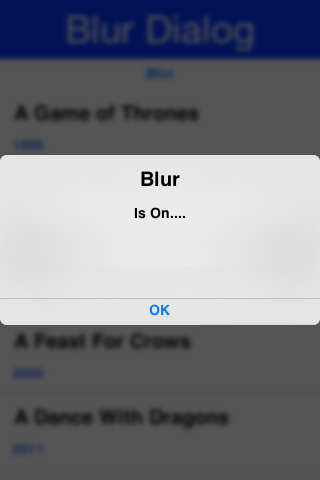
Figure 1. Gaussian Blur behind the Dialog
Archived Comments
This post was automatically migrated from the legacy Codename One blog. The original comments are preserved below for historical context. New discussion happens in the Discussion section.
Diamond — February 22, 2016 at 7:07 pm (permalink)
Hi Shai & Steve,
Can the Toast bar be shifted to the top of the screen?
Is it possible to change the level of image blur on container tensileDrag?
shannah78 — February 22, 2016 at 8:05 pm (permalink)
shannah78 says:
I have just added a ToastBar.setPosition() method that will allow you to move the toastbar to the top of the the form. I’ll leave to Chen to answer the tensileDrag question.
Chidiebere Okwudire — February 22, 2016 at 8:47 pm (permalink)
Chidiebere Okwudire says:
Hi Steve, nice job with the ToastBar. Just on time as I was considering implementing something like that. I have two questions about the ToastBar:
1. Can ToastBars be cascaded? Use case: For example when network is down, I want to show a permanent ‘offline mode’ message. However, in the mean time, there might be ‘real toasts’ in which case I’d like to show second toast temporarily above the permanent ‘offiline mode’ notice. Is that possible?
2. Can we add a button the toast bar? This is common e.g. in the gmail app where a right-aligned ‘UNDO’ button is added to the toast. Here’s an example: i.stack.imgur.com/LWClq.jpg
shannah78 — February 22, 2016 at 10:08 pm (permalink)
shannah78 says:
“Can ToastBars be cascaded?”
You can add multiple statuses. When a status is cleared or expires, it will show the next status in line. If you want to “bring a status to the front”, you can just call “show()” on that status again and it will be brought to the front.
“Can we add a button the toast bar?”
Not right now. If this is something that is useful, it wouldn’t be hard to add though.
Shai Almog — February 23, 2016 at 3:32 am (permalink)
Shai Almog says:
Do you mean something like the iOS swipe to search effect?
I think it’s more of a swipe than a tensile drag.
Diamond — February 23, 2016 at 4:01 am (permalink)
Diamond says:
This effect occurs on some apps, when you pull down the profile container, the blurred profile image at the top begins to get clearer.
Shai Almog — February 23, 2016 at 4:05 am (permalink)
Shai Almog says:
We don’t have an event for tensile drag but you might be able to use this with the title animation. However, I’d use the Gaussian blur method once rather than as needed during drag as it can be a pretty expensive method.
Diamond — February 23, 2016 at 4:10 am (permalink)
Diamond says:
I found another way that could be achieved, apply it to a placeholder image which is overlayed on the profile image and decrease the alpha (opacity) as the container is scrolled or pull down.
Chidiebere Okwudire — February 23, 2016 at 8:29 am (permalink)
Chidiebere Okwudire says:
1. Great! It would be nice to add this to the examples
2. I think it’s useful and quite common in apps these days
Jérémy MARQUER — February 23, 2016 at 8:33 am (permalink)
Jérémy MARQUER says:
Really nice features 🙂
Kyri Ioulianou — June 22, 2016 at 6:24 pm (permalink)
Kyri Ioulianou says:
Hi Shai. The dialog blur seems to be removing all text in the background. Is there any way to prevent this?
Shai Almog — June 23, 2016 at 3:12 am (permalink)
Shai Almog says:
The screenshot above blurrly shows the text so I don’t know what you are talking about?
Kyri Ioulianou — June 24, 2016 at 9:09 am (permalink)
Kyri Ioulianou says:
Before and after a gausian blur. See how the text dissappears?
Shai Almog — June 24, 2016 at 9:22 am (permalink)
Shai Almog says:
If it’s only on the simulator it could be related to this fixed bug
Elijah Mulili Mulwa — October 1, 2019 at 6:25 am (permalink)
Elijah Mulili Mulwa says:
I am displaying images on my codename projects and some of them appear blurred, what could be the reason?
Shai Almog — October 2, 2019 at 7:37 pm (permalink)
Shai Almog says:
How do you display the images and where do you get them from?
Discussion
Join the conversation via GitHub Discussions.