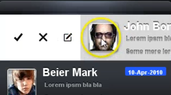
Chen’s been busy with some customers on a feature that is often requested:
mailbox
like swipes. This effectively allows you to swipe a component to the side in order to reveal capabilities underneath e.g. edit, delete etc.
Using this capability is really trivial just use something like a MultiButton and place it in a SwipeableContainer with the bottom Container which includes the various actions as such:
SwipeableContainer swip = new SwipeableContainer(bottom, top);
You then add the swipeable container probably into a BoxLayout Y container such as in this case, see the demo video below.
Notice: This post was automatically converted using a script from an older blogging system. Some elements might not have come out as intended…. If that is the case please let us know via the comments section below.
Archived Comments
This post was automatically migrated from the legacy Codename One blog. The original comments are preserved below for historical context. New discussion happens in the Discussion section.
Anonymous — November 5, 2014 at 10:47 am (permalink)
Anonymous says:
Nice feature, I was looking for this feature for awhile 🙂
However from the video it looks like you need to swipe from left, to right.. But IOS 7 is default swipe from right to left, is it possible to change direction 🙂 ?
Anonymous — November 5, 2014 at 12:36 pm (permalink)
Anonymous says:
You can swipe in both directions, it was added after Chen made the video.
Anonymous — November 5, 2014 at 6:53 pm (permalink)
Anonymous says:
Perfect timing. We have a need for something like this to support an app feature currently in our dev queue. This will allow us to get the feature done a little quicker – thanks!
Anonymous — November 20, 2014 at 8:20 pm (permalink)
Anonymous says:
Thanks for doing this as you have promised. I love that feature. Will this work in list
Anonymous — November 21, 2014 at 3:23 am (permalink)
Anonymous says:
This won’t work on a List because of the way the list is built.
Anonymous — December 1, 2014 at 4:36 pm (permalink)
Anonymous says:
Where would I find the JavaDocs for this new class?
Anonymous — December 2, 2014 at 5:04 am (permalink)
Anonymous says:
Its not yet in the javadoc but should appear in the IDE code completion with docs.
Anonymous — December 2, 2014 at 8:42 am (permalink)
Anonymous says:
I have Netbeans 8.0.2 and codename one plugin 1.0.80 but Netbeans does not recognize the SwipeableContainer. Even if I copy-paste the code and fix the imports. Do I need to manually update to get the feature?
Anonymous — December 2, 2014 at 3:10 pm (permalink)
Anonymous says:
Go to the project properties in the Codename One section and press the update client libraries button.
Anonymous — December 2, 2014 at 3:57 pm (permalink)
Anonymous says:
Thanks for the reply. I misunderstood the instructions at first. I only right-clicked the project and selected Refresh libs. I now understand that applies to downloaded CN1 libs.
Anonymous — December 3, 2014 at 5:43 am (permalink)
Anonymous says:
It works! This is a really great feature.
Anonymous — December 5, 2014 at 7:40 am (permalink)
Anonymous says:
Hi !
Where I can find the code ?
Thank
Anonymous — December 6, 2014 at 1:58 pm (permalink)
Anonymous says:
All our code is available in our google code project here: http://code.google.com/p/co…
Discussion
Join the conversation via GitHub Discussions.