We are happy to announce support for local notifications on iOS and Android. Local notifications are similar to push notifications, except that they are initiated locally by the app, rather than remotely. They are useful for communicating information to the user while the app is running in the background, since they manifest themselves as pop-up notifications on supported devices.
Sending Notifications
The process for sending a notification is:
Create a
LocalNotificationobject with the information you want to send in the notification.Pass the object to
Display.scheduleLocalNotification().
Notifications can either be set up as one-time only or as repeating.
Example Sending Notification
LocalNotification n = new LocalNotification();
n.setId("demo-notification");
n.setAlertBody("It's time to take a break and look at me");
n.setAlertTitle("Break Time!");
n.setAlertSound("/notification_sound_beep-01a.mp3");
    // alert sound file name must begin with notification_sound

Display.getInstance().scheduleLocalNotification(
        n,
        System.currentTimeMillis() + 10 * 1000, // fire date/time
        LocalNotification.REPEAT_MINUTE  // Whether to repeat and what frequency
);
The resulting notification will look like
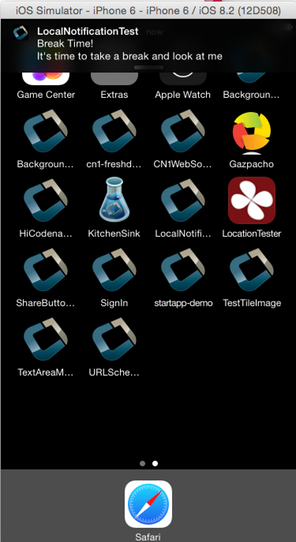
The above screenshot was taken on the iOS simulator.
Receiving Notifications
The API for receiving/handling local notifications is also similar to push. Your application’s main lifecycle class needs to implement the com.codename1.notifications.LocalNotificationCallback interface which includes a single method:
public void localNotificationReceived(String notificationId)
The notificationId parameter will match the id value of the notification as set using LocalNotification.setId().
Example Receiving Notification
public class BackgroundLocationDemo implements LocalNotificationCallback {
    //...

    public void init(Object context) {
        //...
    }

    public void start() {
        //...

    }

    public void stop() {
        //...
    }

    public void destroy() {
        //...
    }

    public void localNotificationReceived(String notificationId) {
        System.out.println("Received local notification "+notificationId);
    }
}
| __ | localNotificationReceived() is only called when the user responds to the notification by tapping on the alert. If the user doesn’t opt to click on the notification, then this event handler will never be fired. |
|---|
Cancelling Notifications
Repeating notifications will continue until they are canceled by the app. You can cancel a single notification by calling:
Display.getInstance().cancelLocalNotification(notificationId);
Where notificationId is the string id that was set for the notification using LocalNotification.setId().
Sample App
You can see a full sample that uses the new local notifications API here.
Archived Comments
This post was automatically migrated from the legacy Codename One blog. The original comments are preserved below for historical context. New discussion happens in the Discussion section.
Carlos — October 1, 2015 at 10:32 am (permalink)
Cool.
Is it possible to reset an scheduled notification? I’m thinking on something like “Hey, it’s been a while since you last visited us”. So if the user opens the app before the notification is triggered, the scheduled time gets back to zero. I haven’t checked the api so I don’t know if something like this is possible.
shannah78 — October 1, 2015 at 3:18 pm (permalink)
shannah78 says:
Yes. You can cancel the existing notification, then schedule a new one. One strategy might be to cancel the notification in your start() method, the schedule it in your stop() method. Might be a good idea to additionally schedule the notification before the stop method (e.g. in the start method) so that the user will be triggered to allow notifications when the app opens.
The key is that nothing bad happens if you cancel a notification id that doesn’t exist.
Nick Koirala — October 5, 2015 at 9:20 pm (permalink)
Nick Koirala says:
What sort of limit is there for how far in advance a notification can be set? can it be days or months away?
ahmed — November 1, 2015 at 9:17 pm (permalink)
ahmed says:
hi. I am using intelliJ and updated the codename libs and found that the new notification folder is now part of the jar. However when implementing using the sample code and the sample application I do not get any notifications. I tried this on the simulator and also sent the build to the physical phone but same result, no notifications.
Shai Almog — November 2, 2015 at 3:27 am (permalink)
Shai Almog says:
This will only work on devices. On which device type did you try?
ahmed — November 2, 2015 at 4:30 am (permalink)
ahmed says:
iPhone 6 running iOS 9.
shannah78 — November 5, 2015 at 3:54 pm (permalink)
shannah78 says:
I’m not aware of any limitation as to how far in advance the notification can be. On iOS you are limited to 64 notifications at a time. (recurring notifications are treated as a single notification).
shannah78 — November 5, 2015 at 3:56 pm (permalink)
shannah78 says:
Notifications will only be shown when the app is not running, or in the background. If the app is in the foreground, the notification will not appear.
ahmed — November 5, 2015 at 4:27 pm (permalink)
ahmed says:
Yes of course. The app was in the background at the time the scheduled notification would have fired.
shannah78 — November 5, 2015 at 5:26 pm (permalink)
shannah78 says:
Wow. Just looked at the source and it seems that the entire local notifications section had been commented out. This was caused by a sort of git race condition. I implemented it -> Shai commented it out because of a build error-> I fixed it and uncommented it -> tried to push but needed to first merge from origin master… so merged from master which re-added the comment outs .
I have now uncommented it so it should be working next time Shai updates the server.
ahmed — November 6, 2015 at 7:04 pm (permalink)
ahmed says:
Thank you for the info and update. I assume the IntelliJ lib will also get updated with the next build. Will keep an eye open.
Keshav Rai — April 11, 2016 at 4:22 pm (permalink)
Keshav Rai says:
Hey! Fellas 🙂 #iOs
Can we set CUSTOM SOUNDS on Local Notifications? !?!
Pls. Help …
Chen Fishbein — April 22, 2016 at 8:46 pm (permalink)
Chen Fishbein says:
From the code above :
n.setAlertSound(“beep-01a.mp3”);
Lukman Javalove Idealist Jaji — June 21, 2016 at 10:19 pm (permalink)
Lukman Javalove Idealist Jaji says:
One question…can we place a container with components in the notification…similar to what Uber and other apps have? I will like o have a few buttons in that area
Shai Almog — June 22, 2016 at 3:42 am (permalink)
Shai Almog says:
Those aren’t containers as you can’t add arbitrary data there. Currently that isn’t supported as the behavior here differs too much between platforms but if there is demand for it we might address it thru common use cases.
madhu thestudent — July 20, 2016 at 11:44 am (permalink)
madhu thestudent says:
can we see the local notifications in simulator and how?
madhu thestudent — July 20, 2016 at 11:44 am (permalink)
madhu thestudent says:
does the codename one support notification builders and how?
Daniel Le Cardinal — April 13, 2017 at 3:04 pm (permalink)
Daniel Le Cardinal says:
hi guys,
can someone tell me if local notification can allow to trigger some part of my app when it is in background ? For instance, i want to count the number of push notification received which are in a pending state (even if i restart my phone)?
Shai Almog — April 14, 2017 at 4:39 am (permalink)
Shai Almog says:
Hi,
you can schedule a local notification to the background but it’s not exactly a background task. It’s more of a visual use case.Apps don’t really run in the background in iOS, they perform background use cases which is a pretty limited scope. I’m assuming you want to do background processing similar to Androids services which is something iOS just doesn’t allow.
Shai Almog — April 14, 2017 at 4:40 am (permalink)
Shai Almog says:
Sorry I didn’t see that comment.
We support local notifications which provide similar functionality see the discussion on this in the developer guide.
Chibuike Mba — May 10, 2017 at 7:22 am (permalink)
Chibuike Mba says:
How can I reschedule my LocalNotification on device reboot?
Android has this user permission
which invokes a BroadcastReceiver but I can’t figure out how to use it with my LocalNotification.
Shai Almog — May 11, 2017 at 9:25 am (permalink)
Shai Almog says:
I replied here http://stackoverflow.com/qu…
Chibuike Mba — May 11, 2017 at 10:43 am (permalink)
Chibuike Mba says:
OK, will be expecting your reply.
Ch Hjelm — May 5, 2020 at 10:11 am (permalink)
Ch Hjelm says:
I use localNotificationReceived for setting reminders and it works as expected when the app is active in the background.
However, when the app is not running (eg killed manually), tapping the ios notification starts up the app and calls init() and start() as expected, but it doesn’t seem to get around to calling localNotificationReceived after that. How can I ensure the call to localNotificationReceived happens so the app takes the action the user expects?
Discussion
Join the conversation via GitHub Discussions.