Client API. The Codename One framework your app is built on: this runs on the device, not in a backend.
public class MasonryLayout
Arranges components in equal width columns, putting each one at the top of whichever column is shortest so far: a masonry, staggered or Pinterest-style grid, where tiles keep their own heights and the columns do not line up.
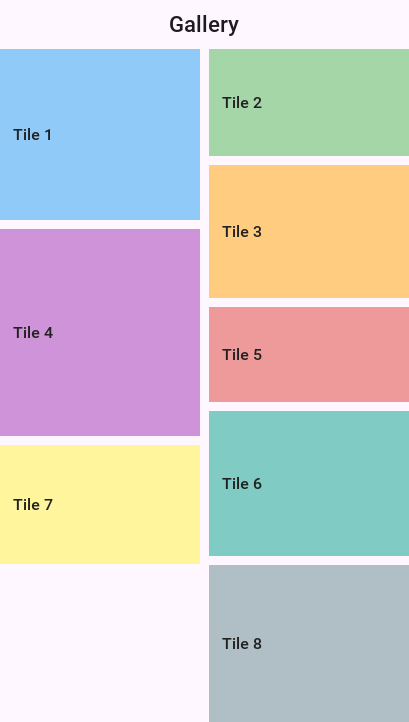
Form form = new Form("Gallery", new BorderLayout());
Container feed = new Container(new MasonryLayout(2));
int[] heights = {240, 160, 300, 200, 180, 260};
for (int h : heights) {
    // stands in for a downloaded photo
    feed.add(new ScaleImageLabel(Image.createImage(200, h, 0xff90caf9)));
}
feed.setScrollableY(true);
form.add(BorderLayout.CENTER, feed);
form.show();
Each component is as wide as its column and as tall as it prefers at that
width. Order is kept in the sense that every component is placed after the
ones before it, so the top of the grid reads in order. TableLayout and
GridLayout differ by aligning every row to its tallest cell.
#setMinimumColumnWidth(float) makes the column count follow the width
instead: as many columns as fit, never fewer than the count given.
Constructors
public MasonryLayout() | A layout with two columns. |
public MasonryLayout(int columns) | A layout with a fixed number of columns. |
Methods
public int getColumns() | The column count, or the minimum when columns follow the width. |
public void setColumns(int columns) | Sets the column count. |
public void setMinimumColumnWidth(float mm) | Makes the column count follow the width: as many columns at least this wide as fit, and never fewer than #getColumns(). |
public float getMinimumColumnWidth() | The narrowest column when columns follow the width. |
public float getGap() | The space between columns and between tiles of a column. |
public void setGap(float mm) | Sets the space between columns and between tiles of a column, added to the components’ own margins. |
public int columnsFor(int width) | The number of columns used at a given content width. |
public void layoutContainer(Container parent) | Layout the given parent container children |
public Dimension getPreferredSize(Container parent) | Returns the container preferred size |
public String toString() | Returns a string representation of the object. |
Inherited methods
Constructor details
MasonryLayout
public MasonryLayout()A layout with two columns.
MasonryLayout
public MasonryLayout(int columns)A layout with a fixed number of columns.
Parameters
columnsint- the column count, at least 1
Method details
getColumns
public int getColumns()The column count, or the minimum when columns follow the width.
Returns
the column count
setColumns
public void setColumns(int columns)Sets the column count.
Parameters
columnsint- at least 1
setMinimumColumnWidth
public void setMinimumColumnWidth(float mm)Makes the column count follow the width: as many columns at least this
wide as fit, and never fewer than
#getColumns().Parameters
mmfloat- the narrowest column in millimetres, or 0 for a fixed count
getMinimumColumnWidth
public float getMinimumColumnWidth()The narrowest column when columns follow the width.
Returns
millimetres, 0 for a fixed count
getGap
public float getGap()The space between columns and between tiles of a column.
Returns
millimetres, 1 by default
setGap
public void setGap(float mm)Sets the space between columns and between tiles of a column, added to
the components’ own margins.
Parameters
mmfloat- millimetres
columnsFor
public int columnsFor(int width)The number of columns used at a given content width.
Parameters
widthint- the width available, in pixels
Returns
the column count
layoutContainer
public void layoutContainer(Container parent)Layout the given parent container children
Parameters
parentContainer- the given parent container
getPreferredSize
public Dimension getPreferredSize(Container parent)Returns the container preferred size
Parameters
parentContainer- the parent container
Returns
the container preferred size
toString
public String toString()Returns a string representation of the object. In general, the toString method returns a string that “textually represents” this object. The result should be a concise but informative representation that is easy for a person to read. It is recommended that all subclasses override this method.
The toString method for class Object returns a string consisting of the name of the class of which the object is an instance, the at-sign character `@’, and the unsigned hexadecimal representation of the hash code of the object. In other words, this method returns a string equal to the value of:
getClass().getName() + ‘@’ + Integer.toHexString(hashCode())