Client API. The Codename One framework your app is built on: this runs on the device, not in a backend.
public class FlameGraphSeries
- Object
- Series
- HierarchySeries
- FlameGraphSeries
A flame graph: each node is a bar as wide as its share of its parent, and its children sit
on top of it, so the widest stacks are where the time (or memory, or any other total) goes.
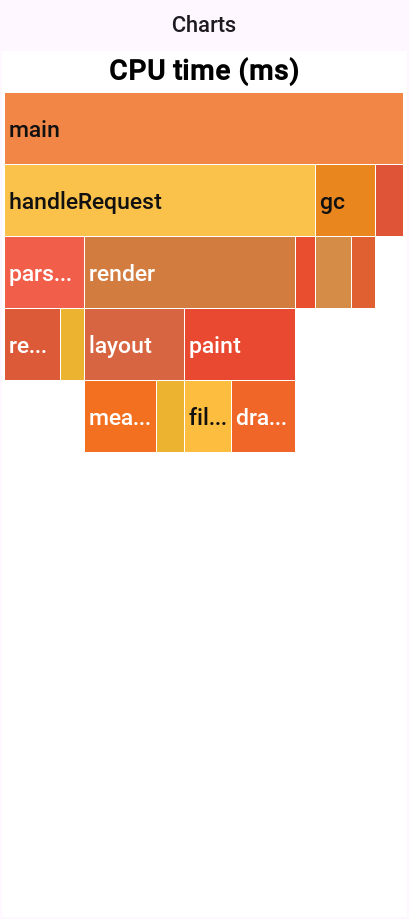
The root is the bottom row. With setInverted(true) the root is the top row and the
children hang below it, which is usually called an icicle chart.
Tapping a bar zooms into it: that node becomes the bottom row and spans the full width. Tapping the breadcrumb goes back up. A branch is as wide as the sum of its children, so time a function spends in its own code goes in a leaf child of its own, conventionally named “self”. Bars too narrow for their text show none, and the tooltip always shows the name and value.
Bars take the node’s own color when it has one. Otherwise they get warm colors, picked from
the node’s name so the same function keeps its color between captures; setWarmColors(false)
uses the theme’s palette by top level branch instead, as a treemap does.
TreeNode main = new TreeNode("main");
TreeNode load = main.add(new TreeNode("load"));
load.add(new TreeNode("parse", 30));
load.add(new TreeNode("decode", 20));
TreeNode render = main.add(new TreeNode("render"));
render.add(new TreeNode("layout", 25));
render.add(new TreeNode("paint", 15));
Chart chart = new Chart();
chart.addSeries(new FlameGraphSeries("CPU", main));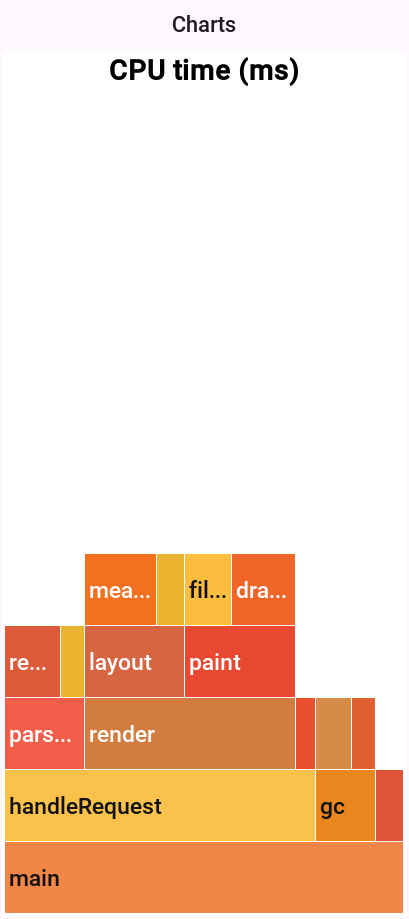
Constructors
public FlameGraphSeries(String name, TreeNode root) | Creates a flame graph. |
Methods
public FlameGraphSeries setInverted(boolean inverted) | Draws the root at the top and the children below it (an icicle chart) instead of the root at the bottom. |
public boolean isInverted() | True when the root is drawn at the top. |
public FlameGraphSeries setWarmColors(boolean warm) | Chooses between warm colors picked from each node’s name, the default, and the theme’s palette by top level branch. |
public boolean isWarmColors() | True when bars get warm colors picked from their names. |
public void paint(ChartContext ctx) | Paints the series. |
protected float[] collapsed(float[] r) | The geometry a node added by a data change grows from: by default the geometry itself, so the node appears in place. |
protected boolean contains(float[] r, float x, float y) | True if the absolute point lies in a recorded geometry. |
protected float[] anchor(float[] r) | The anchor point of a recorded geometry, {x, y} absolute. |
Inherited methods
From HierarchySeries
isCartesian, setRoot, attached, detached, getRoot, getCurrent, setCurrent, crumbContains, setDrillDown, setMaxDepth, getMaxDepth, captureEntryStart, captureTransitionStart, transitionEnded, tween, growth, colorOf, paintBreadcrumb, record, hitTest, isPointCountFromLayout, getPointCount, getPoint, getNode, handleTap, formatTooltip, collectTableRows
From Series
getName, setName, getColor, setColor, isVisible, setVisible, isSecondaryAxis, setSecondaryAxis, isShowValues, setShowValues, getValueFormatter, setValueFormatter, getChart, getXBounds, getXBoundsWithin, getYBounds, getSelectablePointCount, paintLegendSymbol, getLegendEntryCount, getLegendEntryName, paintLegendEntrySymbol, isLegendEntryVisible, toggleLegendEntry, formatValue, dataChanged, repaintChart, getVisibilityFraction, isGap, lerp
Constructor details
FlameGraphSeries
public FlameGraphSeries(String name, TreeNode root)Parameters
nameString- the series name
rootTreeNode- the tree’s root, drawn as the bottom row
Method details
setInverted
public FlameGraphSeries setInverted(boolean inverted)Parameters
invertedboolean- true for the root at the top
Returns
isInverted
public boolean isInverted()Returns
setWarmColors
public FlameGraphSeries setWarmColors(boolean warm)Parameters
warmboolean- false for the theme’s palette
Returns
isWarmColors
public boolean isWarmColors()Returns
paint
public void paint(ChartContext ctx)Parameters
ctxChartContext- the current frame: graphics, plot area, axes and animation progress
collapsed
protected float[] collapsed(float[] r)Parameters
rfloat[]- the node’s geometry after the change
Returns
contains
protected boolean contains(float[] r, float x, float y)Parameters
rfloat[]- a recorded geometry
xfloat- absolute x
yfloat- absolute y
Returns
anchor
protected float[] anchor(float[] r){x, y} absolute.Parameters
rfloat[]- a recorded geometry