What’s The EDT
Codename One allows developers to create as many threads as they want; however to interact with the Codename One user interface components a developer must use the EDT. The EDT stands for "Event Dispatch Thread" but it handles a lot more than "events."
The EDT is the main thread of Codename One, by using one thread Codename One can avoid complex synchronization code and focus on simple functionality that assumes one thread.
You can visualize the EDT as a loop such as this:
while(codenameOneRunning) {
     performEventCallbacks();
     performCallSeriallyCalls();
     drawGraphicsAndAnimations();
     sleepUntilNextEDTCycle();
}
Normally, every call you receive from Codename One will occur on the EDT. For example, every event, calls to paint(), and lifecycle calls (start etc.) should all occur on the EDT.
This is pretty powerful, however it means that as long as your code is processing nothing else can happen in Codename One!
Thread.sleep() will actually stop everything!The solution is pretty simple, if you need to perform something that requires intensive CPU you can spawn a thread.
Codename One’s networking code automatically spawns its own network thread (see the NetworkManager). However, this also poses a problem…
Codename One assumes all modifications to the UI are performed on the EDT. If you spawn a separate thread, how do you force its modifications back into the EDT?
Codename One includes helper methods in the Display class to help in these situations: isEDT(), callSerially(Runnable), callSeriallyOnIdle(Runnable), and callSeriallyAndWait(Runnable) (with an optional timeout overload).
isEDT() is useful for generic code that needs to test whether the current code is executing on the EDT.
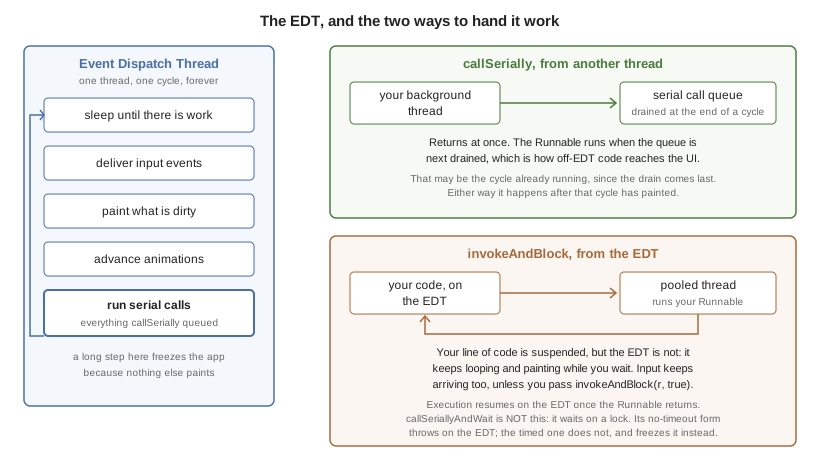
The two methods that coordinate work with the EDT pull in opposite directions,
and the difference is easiest to see against the cycle itself. callSerially
moves a Runnable onto the EDT. invokeAndBlock moves one the other way:
called on the EDT it hands the Runnable to a pooled thread, and called off
the EDT it simply runs it on the calling thread. Either way that Runnable
isn’t on the EDT, so don’t touch the UI from inside it:
Call Serially (And Wait)
callSerially(Runnable) should normally be called off the EDT (in a separate thread), the run method within the submitted runnable will be invoked on the EDT.
callSerially and callSeriallyAndWait methods isn’t a Thread. Use the Runnable interface as a convenient callback interface:// this code is executing in a separate thread
final String res = methodThatTakesALongTime();
Display.getInstance().callSerially(new Runnable() {
public void run() {
// this occurs on the EDT so I can make changes to UI components
resultLabel.setText(res);
}
});
// this code is executing in a separate thread
String res = methodThatTakesALongTime();
Display.getInstance().callSerially(() -> resultLabel.setText(res));
This allows code to leave the EDT and then later on return to it to perform things within the EDT.
The callSeriallyAndWait(Runnable) method blocks the current thread until the method completes, this is useful for cases such as user notification e.g.:
// this code is executing in a separate thread
methodThatTakesALongTime();
Display.getInstance().callSeriallyAndWait(() -> {
  // this occurs on the EDT so I can make changes to UI components
  globalFlag = Dialog.show("Are You Sure?", "Do you want to continue?", "Continue", "Stop");
});
// this code is executing the separate thread
// global flag was already set by the call above
if(!globalFlag) {
   return;
}
otherMethod();
callSerially. The use cases for callSeriallyAndWait are rare. When you do need to wait, the overload that accepts a timeout lets background threads marshal results back to the EDT without risking an indefinite stall if the EDT is busy.If the work you’re posting back to the EDT is expensive and can wait until the UI finishes its current pass, use callSeriallyOnIdle(). This queues the runnable for execution after the EDT completes painting, animations, and any other queued tasks. Deferring longer tasks to the idle queue helps avoid starving animations and transitions when bursts of background callbacks arrive together.
callSerially On The EDT
One of the misunderstood topics is why you’d ever want to invoke callSerially when you’re still on the EDT. This is best explained by example. Say you have a button that has quite a bit of functionality tied to its events e.g.:
A user added an action listener to show a Dialog.
A framework the user installed added some logging to the button.
The button repaints a release animation as its being released.
However, this might cause a problem if the first event being handled (the dialog) causes an issue with the
following events. For example, a dialog will block the EDT (using invokeAndBlock), events will keep happening but since
the event you’re in "already happened" the button repaint and the framework logging won’t occur. The same problem
also occurs if you show a form which might trigger logic that relies on the current form still being present.
One of the solutions to this problem is to wrap the action listeners body with a callSerially. In this case the callSerially
will postpone the event to the next cycle (loop) of the EDT and let the other events in the chain complete. Notice
that you shouldn’t use this normally since it includes an overhead and complicates application flow, however when
you run into issues in event processing this is worth trying to see if its the cause.
If you need to run logic on the EDT but must ensure nothing inside it blocks, the Display class also provides invokeWithoutBlocking() and invokeWithoutBlockingWithResultSync(). These helpers temporarily disable invokeAndBlock() during the runnable. Any nested call to invokeAndBlock() while blocking is disabled results in a BlockingDisallowedException. Framework code that wraps user callbacks can use these methods to guard against accidental nested blocking that would otherwise deadlock or stall the UI, yet still obtain a return value when needed via invokeWithoutBlockingWithResultSync().
Debugging EDT Violations
Two types of EDT violations exist:
Blocking the EDT thread so the UI performance is considerably slower.
Invoking UI code on a separate thread
Codename One provides a tool to help you detect some of these violations some caveats may apply though…
It’s an imperfect tool. It might fire "false positives" meaning it might detect a violation for legal code and it might miss some illegal calls. However, it’s a valuable tool in the process of detecting hard to track bugs that are sometimes reproducible on the devices (due to race condition behavior).
To activate this tool select the Debug EDT menu option in the simulator and pick the level of output you wish to receive:
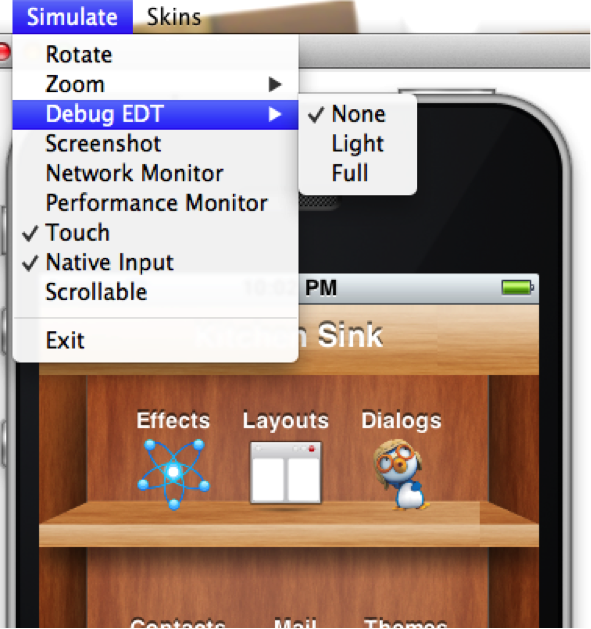
Full output will include stack traces to the area in the code that’s suspected in the violation.
Invoke And Block
Invoke and block is the exact opposite of callSeriallyAndWait(), it blocks the EDT and opens a separate thread for the runnable call. This functionality is inspired by the Foxtrot API, which is
a remarkably powerful tool most Swing developers don’t know about.
This is best explained by an example. Typical Java code reads as a single sequence as such:
doOperationA();
doOperationB();
doOperationC();
This works well normally but on the EDT it might be a problem, if one of the operations is slow it might slow the whole EDT (painting, event processing etc.). Normally you can move operations into a separate thread e.g.:
This means that operation C will happen in parallel to operation B which might be a problem…
For example, instead of using operation names lets use a more "real world" example:
updateUIToLoadingStatus();
readAndParseFile();
updateUIWithContentOfFile();
Notice that the first and last operations must be conducted on the EDT but the middle operation might be slow!
Since updateUIWithContentOfFile needs readAndParseFile to occur before it starts doing the new thread won’t be enough.
A simplistic approach is to do something like this:
updateUIToLoadingStatus();
new Thread() {
    public void run() {
          readAndParseFile();
          updateUIWithContentOfFile();
    }
}.start();
However, updateUIWithContentOfFile should be executed on the EDT and not on a random thread. The right way to do this would therefore be something like this:
updateUIToLoadingStatus();
new Thread() {
    public void run() {
          readAndParseFile();
          Display.getInstance().callSerially(new Runnable() {
               public void run() {
                     updateUIWithContentOfFile();
               }
          });
    }
}.start();
This is legal and would work reasonably well, however it gets complicated as you add more and more features that need to be chained serially after all these are 3 methods!
Invoke and block solves this in a unique way you can get almost the exact same behavior by using this:
updateUIToLoadingStatus();
Display.getInstance().invokeAndBlock(new Runnable() {
    public void run() {
          readAndParseFile();
    }
});
updateUIWithContentOfFile();
Or this with Java 8 syntax:
updateUIToLoadingStatus();
Display.getInstance().invokeAndBlock(() -> readAndParseFile());
updateUIWithContentOfFile();
Invoke and block effectively blocks the current EDT in a legal way. It spawns a separate thread that runs the run() method and when that run method completes it goes back to the EDT.
All events and EDT behavior still work while invokeAndBlock is running, this is because invokeAndBlock() keeps calling the main thread loop internally.
invokeAndBlock comes at a slight performance penalty. Also notice that nesting invokeAndBlock calls (or over using them) isn’t recommended.However, they’re convenient when working with multiple threads/UI.
Even if you never call invokeAndBlock directly you’re probably using it indirectly in APIs such as Dialog that show a dialog while blocking the current thread e.g.:
public void actionPerformed(ActionEvent ev) {
  // will return true if the user clicks "OK"
  if(!Dialog.show("Question", "How Are You", "OK", "Not OK")) {
  // ask what went wrongnull
  }
}
Notice that the dialog show method will block the calling thread until the user clicks OK or Not OK…
NetworkManager.addToQueueAndWait() also make use of this feature. Pretty much every "AndWait" method or blocking method uses this API internally!To explain how invokeAndBlock works you can return to the sample above of how the EDT works:
while(codenameOneRunning) {
     performEventCallbacks();
     performCallSeriallyCalls();
     drawGraphicsAndAnimations();
     sleepUntilNextEDTCycle();
}
invokeAndBlock() works in a similar way to this pseudo-code:
void invokeAndBlock(Runnable r) {
    openThreadForR(r);
    while(r is still running) {
         performEventCallbacks();
         performCallSeriallyCalls();
         drawGraphicsAndAnimations();
         sleepUntilNextEDTCycle();
    }
}
The EDT is effectively "blocked" but invokeAndBlock "redoes" it from within…
As you can see this is a simple approach for thread programming in UI, you don’t need to block your flow and track the UI thread. You can program in a way that seems sequential (top to bottom) but uses multi-threading correctly without blocking the EDT.