An app that’s put in the background isn’t paused. Android reclaims the process routinely, iOS terminates a suspended app whenever it needs the memory, and in both cases what comes back isn’t the app the user left — it’s a fresh launch that happens to be wearing the same icon. The user sees their work replaced by the home screen and has no idea why.
com.codename1.continuity saves what the user was doing and brings it back. On
Apple platforms it does one thing more: it offers that same work to the other
devices the person is signed in to, so a draft begun on the phone can be
finished on the iPad they pick up.
The two halves cost different things, so they’re two packages.
com.codename1.continuity holds the framework and everything that carries work
to a device the user is holding. com.codename1.continuity.sync holds a small
key/value store the platform keeps in step across their devices, and referencing
it earns an iOS build an entitlement. An app that wants the first shouldn’t have
to arrange the second.
| Capability | iOS and macOS | Android | Simulator and desktop | JavaScript |
|---|---|---|---|---|
Restore after the process is killed | yes | yes | yes | yes |
Restore the | yes | yes | yes | yes |
Carry on where they left off, on a device they’re holding | yes | — | simulated | — |
A key/value store synced across devices | yes ( | — | simulated | — |
Carry state to any other device | your | your | your | your |
Branch on the capability queries — Continuity.isSupported(),
Continuity.isContinuationSupported(), SyncedStore.isSupported() — rather
than on platform detection. The first row is the one that matters most and it’s
supported everywhere, because it’s pure storage with no platform behind it.
Every callback in this family arrives on the EDT.
Six Things Worth Knowing Before You Design Around This
Nothing happens until you ask for it. An app that never references this package
behaves exactly as it always did, and so does one that references it and never
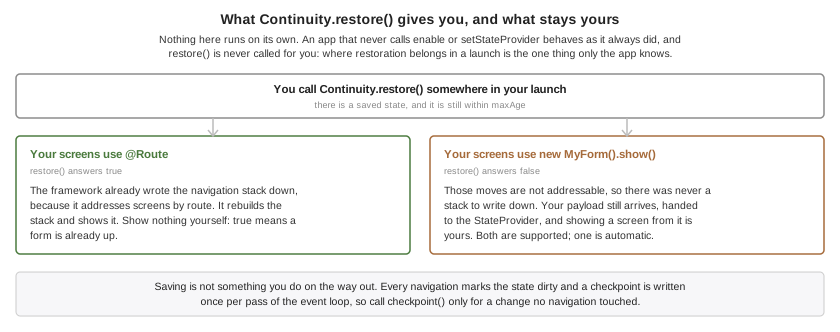
calls Continuity.setStateProvider or Continuity.enable. Continuity.restore()
is never called for you either. Where restoration belongs in a launch is a
decision only the app can make, and a framework that guessed would be wrong for
the apps that care most.
The route stack is free; everything else is yours. If your screens are declared
with @Route, the framework already knows the navigation stack and restores it
with no code from you. If your app navigates with new MyForm().show(), those
moves aren’t addressable and there’s nothing to write down — so restore()
hands your payload to the StateProvider and answers false, leaving you to
show a screen. Both are supported; only the first is automatic.
Saving happens continuously, not at shutdown. Every navigation marks the state
dirty and a checkpoint is written once per pass of the event loop, so by the time
the operating system suspends the app the work is already done. Don’t look for a
place to save on exit; there isn’t one worth using. Android blocks its own main
thread until your stop() returns, so an app that did its saving there would pay
for it on every suspend. Call Continuity.checkpoint() after changing something
your provider reports that no navigation touched.
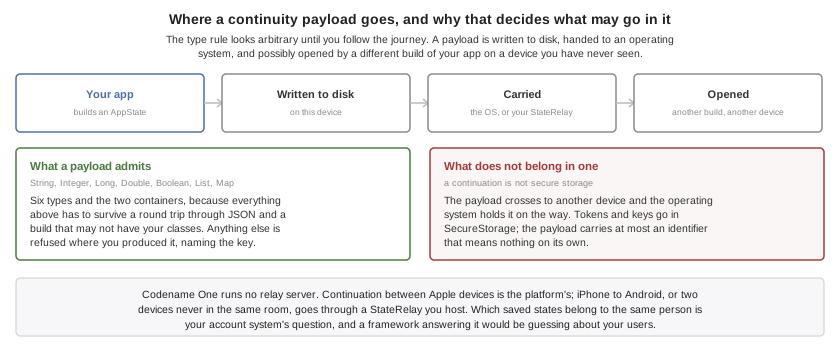
A payload has to survive leaving the device. It’s written to disk, handed to an
operating system, and possibly delivered to a different device running a
different build of your app — so it admits only String, Integer, Long,
Double, Boolean, and List and Map of those. Anything else is refused
where you produced it, with a message naming the key, rather than becoming a
value that stops arriving on the other end with nothing to say so.
Codename One runs no relay server. Continuation between Apple devices is the
platform’s; anything else — iPhone to Android, two devices that are never in the
same room — goes through a StateRelay, which is your endpoint. That isn’t a
gap to be filled later. Deciding which saved states belong to the same person
is your account system’s question, and a framework that answered it would be
guessing about your users.
A continuation isn’t secure storage. What you put in the payload crosses to
another device and is held by the operating system on the way. Tokens, keys and
anything you would not want restored on a device that merely shares an account
belong in com.codename1.security.SecureStorage, with the payload carrying at
most an identifier that means nothing on its own.
Saving and restoring
Two pieces. A StateProvider supplies the half the framework can’t work out — the scroll position, the half-typed message, the record being edited — and
installing one turns the framework on:
public void init(Object context) {
    Continuity.setStateProvider(new StateProvider() {
        public Map<String, Object> saveState() {
            Map<String, Object> state = new HashMap<String, Object>();
            state.put("draft", draftField.getText());
            return state;
        }

        public void restoreState(Map<String, Object> state) {
            draftField.setText((String) state.get("draft"));
        }
    });
}
Then start() reads as "restore, or else begin":
public void start() {
    if (!Continuity.restore()) {
        Navigation.navigate("/home");
    }
}
restore() returns true when it put a screen up, so the caller knows not to
show its own. It returns false when there was nothing to restore and when the
state carried no routes — the payload-only case above — which is why the
fallback branch belongs there rather than behind a null check.
restoreState runs before the restored screens are built, so a form the route
table is about to construct can read what the provider stashed while that form
is being built.
Take a checkpoint by hand after a change no navigation followed:
public void onDraftSaved() {
    Continuity.setTitle("Draft to Dana");
    Continuity.checkpoint();
}
The title is what a receiving device may show the user before they accept, so it
should name the work rather than the screen — Draft to Dana, not Compose.
By default a saved state never expires, because an app the user opens after a month should still come back where they left it. Where coming back is only meaningful for a while — a checkout, a booking hold, a queue position — say so:
public void expireACheckout() {
    Continuity.setMaxAge(15 * 60 * 1000);
}
Continuing on another device
Nothing extra is required for the Apple case. Every checkpoint advertises the current state, and a device the user is holding is offered it by the system. What you may want is to say so in the interface, which is what the capability query is for:
public void describeWhatThisDeviceCanDo() {
    if (Continuity.isContinuationSupported()) {
        showBanner("Open this app on your other device to carry on there.");
    }
}
An arriving state is restored automatically. When moving the user is a decision
your app should make — they’re midway through a payment, or the state belongs
to a different account than the one signed in here — take it yourself. A
listener that returns false has consumed the state: nothing is restored and no
other listener is asked, which is what makes holding it and asking work:
public void askBeforeMovingTheUser() {
    Continuity.setAutoRestore(false);
    Continuity.addContinuationListener(new ContinuityListener() {
        public boolean stateReceived(AppState state) {
            held = state;
            if (Dialog.show("Continue?", "Pick up \"" + state.getTitle()
                    + "\" from your other device?", "Continue", "Stay here")) {
                Continuity.restore(held);
            } else {
                // Declining is a decision, and it has to be recorded. Returning false alone
                // only suppresses the state for THIS run -- false also means "keep it, I will
                // prompt again later" -- so without this the relay's unchanged document asks
                // the same question after every relaunch.
                Continuity.acknowledge(state);
            }
            // Consumed either way: the decision has been made here, and recorded either way.
            return false;
        }
    });
}
A state this device published is never offered back to its own listener, and a state already acted on is never acted on twice — a continuation and a relay routinely carry the same one.
Reaching every other device
A StateRelay is your endpoint, and RestStateRelay covers the common case:
public void useMyOwnEndpoint() {
    Continuity.setRelay(new RestStateRelay("https://api.example.com/continuity") {
        @Override
        protected String getToken() {
            return session.getAccessToken();
        }
    });
}
Two requests against the one URL. A POST carries the state as a JSON body,
which you store against the signed-in user, replacing whatever you held for them.
A GET answers with the newest state you hold for that user, or an empty body
when you hold none. The JSON is a closed shape: your endpoint stores and returns
the document and never needs to look inside it.
The token comes from getToken() rather than from the constructor because it’s
read at every request, so a session that refreshes its token is followed with no
further code.
A relay is written to when the app checkpoints and read only when something asks, so ask when the app comes back to the foreground:
public void onAppResumed() {
    Continuity.pollRelay();
}
On Android that call is already made for you when the activity resumes. Making it yourself as well is harmless — a state already seen is ignored.
Put Continuity.clear() and Continuity.disable() on your logout path, and
Continuity.enable() on your login path. The advertised activity outlives your
app’s own screen, so an account’s work would otherwise stay on offer to the
devices around it after the user signed out — and anything still queued for the
relay would have gone out later under the next account’s credentials, because a
relay reads its token when the request runs:
public void onLogout() {
    // Both, and in this order. clear() forgets the account's data; disable() closes the
    // door behind it. clear() on its own leaves continuity ON, so a continuation that
    // arrives while your login screen is up is a valid arrival to a framework that is
    // still listening -- and the signed-out account's routes and payload get restored
    // over it.
    Continuity.clear();
    Continuity.disable();
}

public void onLogin() {
    // And open it again. Continuity stays off until you say otherwise, which is what
    // makes the gap above safe.
    Continuity.enable();
}
clear() alone isn’t a logout. It forgets the account’s data — the
stored checkpoint, the advertised activity, anything queued for the relay — and
it leaves continuity switched on by design, because forgetting state and turning
the feature off are two different things and an app is entitled to do the first
without the second. That means a continuation arriving while your login screen is
up reaches a framework that’s still listening, and the signed-out account’s routes
and payload are restored over it. disable() is what closes that gap, and
enable() at login is what reopens it.The synced store
com.codename1.continuity.sync.SyncedStore is the slow, patient half: a handful
of durable choices — which theme, which sort order, which tutorial they already
dismissed — kept in step across the devices one person is signed in to, without
those devices ever being near each other.
public String readSortOrder() {
    return SyncedStore.get("sortOrder", "byName");
}

public void writeSortOrder(String order) {
    if (!SyncedStore.put("sortOrder", order)) {
        // No synced store here, or it is full. The value still has to live somewhere, so
        // fall back to this device's own preferences rather than losing the choice.
        com.codename1.io.Preferences.set("sortOrder", order);
    }
}
Note the shape: a read always has a default, and a write reports whether the store actually took the value — checked by reading it back, not assumed. That isn’t defensive style, it’s the API being honest. The store is empty on a device that has never synced, the user can switch the whole mechanism off, and it exists on Apple platforms only — so a synced value with a local default behind it makes the design work on every platform.
Changes made elsewhere arrive without values, on every platform that has such a store at all, so re-read what your screen shows rather than assuming you know which key moved:
public void followTheStore() {
    SyncedStore.addChangeListener(new SyncedStoreListener() {
        public void storeChanged() {
            // No values are carried, on any platform. Re-read what this screen shows.
            applySortOrder(SyncedStore.get("sortOrder", "byName"));
        }
    });
}
This isn’t storage. It’s small, the platform decides when to sync it, and nothing in it should be anything your app can’t do without.
Developing Without Hardware
The simulator carries a simulated continuity platform, so all this works on
the desktop — and the Simulate → Continuity menu scripts the cases that are
otherwise reachable only with two devices in your hands. Every item is also
callable from a test with CN.execute("continuity:itemN").
Continue Here (As Another Device) hands whatever the app is currently advertising straight back to it. That’s the whole feature in one click. If it does nothing, the app hasn’t taken a checkpoint yet — which is itself the answer to the question of why nothing is being offered.
The rest reproduce traps rather than the happy path:
Continue A Route This Build Dropped. A screen goes away in a rebuild and the states already sitting on the user’s other devices still name it. The restore survives on the frames it can still build.
Continue With No Routes (Payload Only). What an app that doesn’t use
@Routeproduces. An app that assumedrestore()always shows something finds out here.Continue Something From Yesterday. Exercises
setMaxAge, and the listener that has to decide whether moving the user somewhere they were yesterday is a courtesy or an ambush.Change The Synced Store Elsewhere. The notification carries no values, so an app that re-reads only the key it assumed changed reads a stale one.
Make The Synced Store Unsupported and Make Continuation Unsupported. What every non-Apple platform reports. An app that put a required setting in the synced store and never checked
isSupported()loses it here, with no error, exactly as it would on Android.
Build Hints
| Hint | Default | What it does |
|---|---|---|
| unset | Whether this project wants the iCloud key-value store. Left unset the build decides from the bytecode. Set |
Everything is automatic by default. Referencing com.codename1.continuity compiles the
NSUserActivity handling into the iOS build and declares this app’s activity
type in NSUserActivityTypes, which is what lets another device be offered the
work — iOS continues an activity only when the app declared its type, so an app
that skipped this would publish states nobody is ever shown. Referencing
com.codename1.continuity.sync additionally asks for the
com.apple.developer.ubiquity-kvstore-identifier entitlement. Apps that touch
neither package get none of it, on any platform. Android needs nothing injected
at all: no permission, no manifest entry, no dependency.
The activity type is your package name followed by .continuity, derived the
same way in the build and at runtime, so there’s nothing to configure and
nothing to get out of step. Continuity.getActivityType() returns it, which is
the first thing to check when a continuation never arrives.
That entitlement is the one part of this that can stop a build. Apple grants it only through an App ID with the iCloud capability enabled, so a profile issued before that was switched on matches your bundle id and authorizes none of it — and the build fails at codesigning, talking about an entitlement rather than about the capability. Codename One checks the profile before sending the build and warns, naming both ways out: enable iCloud on the App ID and regenerate the profile, or drop the entitlement.
codename1.arg.ios.continuity.sync=false
With that set, SyncedStore.isSupported() reports false at runtime and the
rest of the app is unaffected. Handing work to a nearby device needs no
entitlement and keeps working either way.
Continuity.clear() on logout more than
housekeeping.