Codename One exposes a cross-platform API for rich local notifications, runtime notification permission, notification channels, constraint-aware background work, foreground services, deferrable background processing, receiving content shared from other apps, and push topic subscriptions. Each capability degrades on platforms that can’t support it — calls become documented no-ops rather than errors — and the JavaSE simulator implements them so you can exercise the flows without a device.
Because these features build on platform-specific behavior, every section below lists the support per platform. In the matrices: Yes = fully supported, Partial = supported with documented limitations, No-op = the call is accepted but does nothing, Sim = exercised in the simulator.
Notification permission
On iOS, and on Android 13+ (POST_NOTIFICATIONS), an app must obtain permission before
its notifications are shown. Request it through Display:
NotificationPermissionRequest req = new NotificationPermissionRequest()
        .provisional(true)      // iOS: deliver quietly without an explicit prompt
        .timeSensitive(true);   // iOS: allow the time-sensitive interruption level

Display.getInstance().requestNotificationPermission(req, result -> {
    if (result.isGranted()) {
        // schedule notifications
    }
    AuthorizationLevel level = result.getAuthorizationLevel();
});
NotificationPermissionResult.getAuthorizationLevel() returns an AuthorizationLevel
enum (NOT_DETERMINED, DENIED, AUTHORIZED, PROVISIONAL, EPHEMERAL). The values
are ordered from least to most permissive, so isGranted() is "more permissive than
DENIED." The callback is delivered on the EDT.
| Request option | iOS | Android | Simulator |
|---|---|---|---|
alert / sound / badge | Yes | Implied by POST_NOTIFICATIONS | Granted |
provisional | Yes (iOS 12+) | No-op | Granted |
timeSensitive | Yes (iOS 15+, needs entitlement) | No-op | Granted |
critical | Yes (needs Apple entitlement) | No-op | Granted |
carPlay / announcement | Yes | No-op | Granted |
The timeSensitive and critical options require an Apple capability on the App ID.
Enable injection of the matching entitlement with the ios.timeSensitiveNotifications=true
and ios.criticalAlerts=true build hints (they’re opt-in because an entitlement the
provisioning profile doesn’t carry breaks code signing).
Local notifications
LocalNotification is scheduled through Display.scheduleLocalNotification(…) as
before; the bean has been extended with fluent, backward-compatible setters:
LocalNotification n = new LocalNotification()
        .setChannelId("messages")                 // Android channel (see below)
        .setGroup("chat-42")                       // bundle related notifications
        .setProgress(100, 40)                      // determinate progress bar (Android)
        .setTimeSensitive(true);                   // break through Focus / elevated importance
n.setId("msg-42");
n.setAlertTitle("New message");
n.setAlertBody("Tap to reply");
n.addAction("open", "Open");
n.addInputAction("reply", "Reply", "Type a message", "Send");  // inline quick reply
Display.getInstance().scheduleLocalNotification(n, System.currentTimeMillis() + 1000,
        LocalNotification.REPEAT_NONE);
When the user taps an action, the selected action id (and any quick-reply text) are
delivered through com.codename1.push.PushContent — getActionId(), getActionTitle()
and getTextResponse() — before your LocalNotificationCallback.localNotificationReceived(id)
runs, so push and local notification actions are handled identically.
| Capability | iOS | Android | Simulator |
|---|---|---|---|
title / body / badge / sound | Yes | Yes | Sim (panel) |
image attachment | Yes (UNNotificationAttachment) | Yes (BigPicture) | Sim (thumbnail) |
action buttons | Yes (UNNotificationAction) | Yes | Sim (buttons) |
quick-reply input action | Yes (UNTextInputNotificationAction) | Yes (RemoteInput) | Sim (text field) |
grouping | Yes (thread identifier) | Yes (group + summary) | Partial |
progress (ongoing) | No-op | Yes | Sim (progress bar) |
full-screen intent | No-op | Yes (needs permission, see hints) | No-op |
time-sensitive | Yes (iOS 15+) | Approximated (category + priority) | Sim |
messaging / conversation style | Partial | Yes (MessagingStyle) | Sim |
custom view | Notification content extension | RemoteViews | Sim (render) |
Resource names for sound, image and action icons
These string parameters are platform resource names, not numeric ids (Codename One has
no R.drawable constants). They’re resolved at runtime per platform:
| Parameter | What to provide | Android resolution | iOS resolution |
|---|---|---|---|
| a file whose name starts with |
|
|
| image path placed in the app root | loaded from |
|
| a drawable name bundled in |
| not displayed |
The file extension is optional for the action icon and is ignored. iOS notification action buttons don’t render icons, so the icon value is ignored there.
Notification channels (Android O+)
Channels let the user control importance, sound, vibration, lights, lock screen
visibility and badge display for a group of notifications. Build and register one at startup,
then reference it from a notification with setChannelId(…):
new NotificationChannelBuilder("messages", "Messages")
        .description("Incoming chat messages")
        .importance(NotificationChannelBuilder.IMPORTANCE_HIGH)
        .sound("/notification_sound_ping.mp3")
        .enableVibration(true)
        .lightColor(0xff0000)
        .register();
Channels are an Android concept. On iOS and the simulator register() is a no-op (the
simulator stores the channel so its name can be shown in the notification panel); the
channel id you assign is still carried so the notification behaves consistently.
Constraint-aware background work
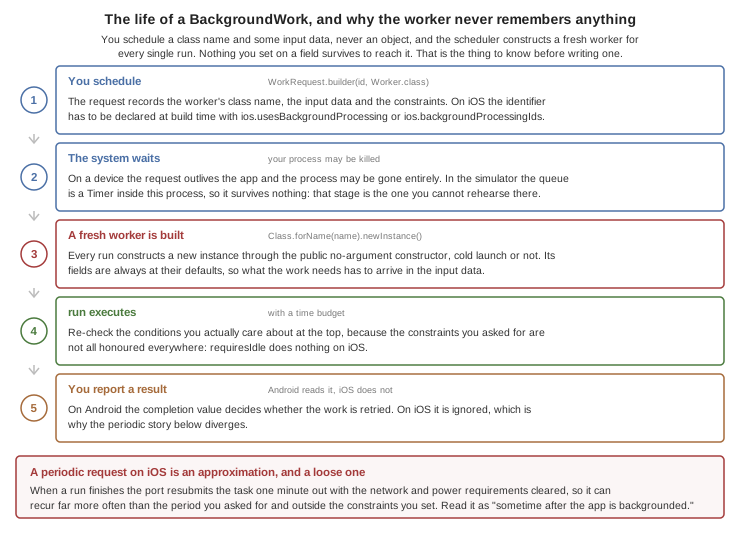
BackgroundWork schedules deferrable work that the OS runs when its constraints are met.
Implement BackgroundWorker in a class with a public no-argument constructor. You
schedule the class, never an instance: the request records its name, and the scheduler
constructs a fresh worker for every run, even when the process was never killed. Its
fields are always at their defaults, so pass state through the input data:
/// The platform may rebuild this after the app process was killed, so it
/// needs a public no-argument constructor and can rely on nothing from the
/// foreground app -- state arrives through the input data.
public static class SyncWorker implements BackgroundWorker {
    public void performWork(String id, java.util.Map<String, String> inputData,
            long deadline, com.codename1.util.Callback<Boolean> onComplete) {
        // the real work goes here; inputData carries whatever the request
        // was scheduled with, because no foreground state survives
        String account = inputData.get("account");
        boolean ok = account != null;
        // TRUE for done. FALSE asks for a retry on Android; the iOS port
        // ignores the value, so do not rely on it to recover from failure
        onComplete.onSucess(Boolean.valueOf(ok));
    }
}

void scheduleSync() {
    // on iOS the id must appear in BGTaskSchedulerPermittedIdentifiers, and
    // it gets there only if you ask: ios.usesBackgroundProcessing=true
    // declares <packageName>.processing, which is what this derives
    String taskId = Display.getInstance().getProperty("package_name", "") + ".processing";
    WorkRequest req = WorkRequest.builder(taskId, SyncWorker.class)
            .setRequiresNetwork(true)
            .setRequiresCharging(true)
            .setPeriodic(6 * 60 * 60 * 1000L)
            .putInputData("account", "primary")
            .build();
    BackgroundWork.schedule(req);
}
iOS needs the identifier declared at build time before BGTaskScheduler will
accept the request, and nothing detects BackgroundWork on the classpath for
you. Set ios.usesBackgroundProcessing=true, which declares
<packageName>.processing — the id the sample derives — or list your own ids
with ios.backgroundProcessingIds. Without one of those the scheduling call is
rejected on the device.
| iOS | Android | Simulator | |
|---|---|---|---|
backend | BGTaskScheduler (iOS 13+) | JobScheduler | Timer |
requiresNetwork / unmetered | Yes | Yes | Toggle in Simulate menu |
requiresCharging | Yes (requiresExternalPower) | Yes | Toggle |
requiresIdle / batteryNotLow | No-op | Yes | Toggle |
periodic | Approximated (resubmit) | Yes (>= 15 min) | Yes |
FALSE there doesn’t buy you a retry.BackgroundTask.scheduleProcessing(id, earliestBeginDate, requiresNetwork, requiresPower,
runnable) is a one-shot variant for occasional maintenance work. On iOS the identifiers
must be declared via the ios.backgroundProcessingIds build hint (comma separated,
default <packageName>.processing); the build also adds the processing UIBackgroundMode
and links BackgroundTasks.framework automatically.
Foreground service (Android)
ForegroundService runs a long task while a persistent notification is shown.
The first argument names a channel, but the Android service currently routes
its notification through the app-wide channel — android.NotificationChannel.id,
defaulting to cn1-channel — so the id here doesn’t place the notification
in a channel of its own today:
ForegroundService svc = ForegroundService.start("downloads", "Downloading", "Please wait",
        null, service -> {
            for (int i = 0; i <= 100; i++) {
                service.updateNotification("Downloading", i + "%");
                // ... do a chunk of work ...
            }
        });
// auto-stops when the task returns, or call svc.stop()
| Android | iOS | Simulator | |
|---|---|---|---|
persistent-notification service | Yes | No (best-effort background window + notification) | Sim (status indicator) |
When the app references ForegroundService the build registers the service and injects
FOREGROUND_SERVICE plus the per-type FOREGROUND_SERVICE_<TYPE> permission (Android 14).
Override the type with the android.foregroundServiceType build hint (default dataSync).
Receiving shared content
Override onReceivedSharedContent(SharedContent) on your Lifecycle subclass to receive
text, URLs, files or images shared into your app from other apps:
public class MyApp extends Lifecycle {
    public void onReceivedSharedContent(SharedContent content) {
        for (SharedContent.Item item : content.getItems()) {
            if (item.getType() == SharedContent.TYPE_IMAGE) {
                // your own import; the path is a FileSystemStorage path
                importImage(item.getFilePath());
            }
        }
    }
}
| Android | iOS | Simulator | |
|---|---|---|---|
receive shared content | Yes (SEND / SEND_MULTIPLE) | Yes (share extension + App Group) | Sim ("Send shared content") |
On Android, declare the accepted MIME types with the android.shareFilter build hint
(comma separated, for example text/plain,image/*); the build registers the share-receiver
activity. On iOS this reuses the share-extension authoring pipeline; set the
ios.shareAppGroup build hint to the App Group the extension writes to. File and image
items are copied into Codename One FileSystemStorage so your code is platform neutral.
Push topics
Push.subscribeToTopic("news") / unsubscribeFromTopic("news") subscribe the device to a
fan-out topic.
| Android | iOS | |
|---|---|---|
topic subscribe / unsubscribe | Yes (Firebase Cloud Messaging) | No-op (raw APNs has no topics; fan out server-side) |
Server-side topic delivery is handled by the Codename One push server.
Simulator
The JavaSE simulator implements all the above so you can develop without a device. Use the Simulate → Notifications and Background menu to toggle the background constraints (network / charging / idle / battery), run scheduled work immediately, inspect registered channels, and inject shared content. Posted notifications appear in a panel at the top right; tapping an action (or submitting a quick-reply) routes back through your callback exactly as on device.