Codename One ships a cross-platform health API under com.codename1.health that reads and writes the platform health store — HealthKit on iOS and watchOS, Health Connect on Android — summarizes data over time, watches it for changes, records workouts, and streams live measurements from standard Bluetooth health sensors.
Health.getInstance() is the single entry point and never returns null: ports without health support return a fallback whose operations fail fast with HealthError.NOT_SUPPORTED, so calling code needs no platform-specific if.
Every callback — AsyncResource results, sensor samples, workout events, change batches — is delivered on the EDT, on every platform. That includes the local-backed ports: the simulator, desktop and JavaScript stores hand results back on the EDT rather than on whichever thread called, so a read started from a worker thread can update the UI from its callback directly, with no callSerially of your own. A background change delivery may arrive with no visible UI, after the OS relaunched your app, but it’s still on the EDT.
| Capability | iOS 26+ | iOS < 26 | watchOS | Android | Simulator | Desktop / JavaScript |
|---|---|---|---|---|---|---|
Read samples and aggregates | yes | yes | yes | yes | yes (scripted) | local only |
Write samples | yes | yes | yes | yes | yes | local only |
Read-authorization introspection | no | no | no | yes | yes | n/a |
Background push delivery | no | no | no | no | no | no |
Change delivery while running | yes | yes | yes | yes | no | no |
Live workout session | recorded | recorded | recorded | recorded | recorded | recorded |
Automatic sensor collection in a workout | no | no | no | no | no | no |
Bluetooth health sensors | yes | yes | limited | yes | yes | yes |
Subscriptions are the one place the local-backed ports aren’t a
substitute for a device. subscribe() registers, persists its cursor and
restores across launches everywhere, but nothing on the local store records
a mutation as a change, so drainChanges() there resolves with zero and no
listener ever fires. Subscription code can be written and its registration
exercised on the desktop; whether it actually delivers has to be tested on
a phone.
Branch through the capability queries — Health.getAvailability(), HealthStore.isTypeSupported(…), WorkoutManager.isLiveSessionSupported(), HealthSubscription.isPushDelivery() — rather than through platform detection.
Quick start
Health health = Health.getInstance();
HealthAvailability availability = health.getAvailability();
if (availability == HealthAvailability.PROVIDER_NOT_INSTALLED
        || availability == HealthAvailability.PROVIDER_UPDATE_REQUIRED) {
    health.openProviderSetup();
    return;
}
if (availability == HealthAvailability.NOT_SUPPORTED) {
    return;
}
HealthStore store = health.getStore();
store.requestAuthorization(
        HealthAccess.read(HealthDataType.STEPS),
        HealthAccess.read(HealthDataType.HEART_RATE))
     .onResult((asked, err) -> {
         if (err != null) {
             Log.e(err);
             return;
         }
         // asked == true means the user has now been ASKED, not that
         // anything was granted. On iOS the sheet completes identically
         // whether they enabled every switch or none.
     });
Check getAvailability() before anything else. On Android it distinguishes a working provider from one that’s missing or out of date, and both of those are recoverable by the user through openProviderSetup(). On the desktop and JavaScript ports it returns LOCAL_ONLY, meaning reads and writes work and are durable but the data is only ever your own app’s.
Permissions, and the one thing that will surprise you
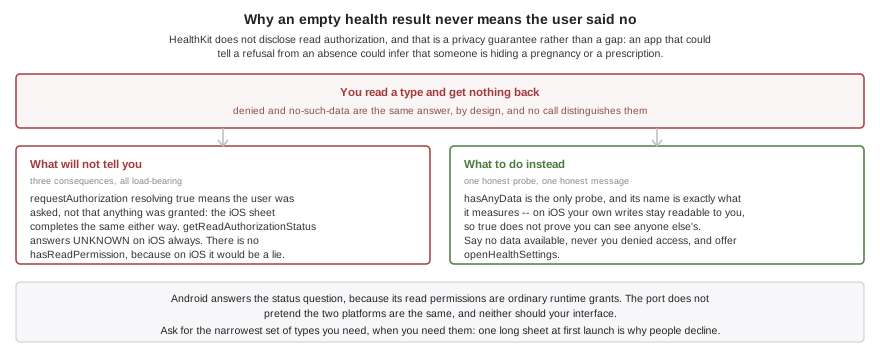
You can’t ask whether you are allowed to read.
HealthKit doesn’t disclose read authorization. A read the user denied returns an empty result, indistinguishable from having no data at all, because an app that could tell the two apart could infer that a user is hiding a pregnancy or a prescription. That’s a privacy guarantee, not a gap in this API.
Three consequences follow, and all three are load-bearing:
requestAuthorization(…)resolvingtruemeans the user has been asked, not that anything was granted. On iOS the sheet completes identically whether they enabled every switch or none of them.getReadAuthorizationStatus(…)returnsUNKNOWNon iOS in every case. Android answers, because its read permissions are ordinary runtime grants; the Android port doesn’t pretend otherwise, and neither should your UI.There is no
hasReadPermission()anywhere in this API, because on iOS it would be a lie.
HealthStore store = Health.getInstance().getStore();

// Write authorization is answerable on both platforms.
HealthAuthorizationStatus write =
        store.getWriteAuthorizationStatus(HealthDataType.BODY_MASS);

// Read authorization is NOT. On iOS this is always UNKNOWN, by design.
HealthAuthorizationStatus read =
        store.getReadAuthorizationStatus(HealthDataType.STEPS);
if (read == HealthAuthorizationStatus.UNKNOWN) {
    // The only honest probe: ask whether any data actually came back.
    store.hasAnyData(HealthDataType.STEPS, HealthTimeRange.lastDays(7))
         .onResult((hasData, err) -> {
             if (err == null && !hasData.booleanValue()) {
                 // Denied OR genuinely empty -- indistinguishable.
                 // Say "no data available", never "you denied access".
                 Health.getInstance().openHealthSettings();
             }
         });
}
hasAnyData(…) is the only honest probe, and its name says exactly what it measures. Note also that on iOS your own writes stay readable to you even when read access was denied, so a true here doesn’t prove you can see other apps' data.
Never tell a user "you denied access" on the strength of an empty result. Say "no data available," and offer openHealthSettings(). Getting this wrong produces an app that accuses users of something they didn’t do.
Request the narrowest set of types you actually need, at the moment you need them. Both stores present every requested type on one sheet, and a long list at first launch is the most common reason people decline.
Reading samples
SampleQuery query = new SampleQuery()
        .addType(HealthDataType.HEART_RATE)
        .setTimeRange(HealthTimeRange.lastHours(24))
        .setSortDescending(true)
        .setLimit(500);

Health.getInstance().getStore().readSamples(query)
        .onResult((samples, err) -> {
            if (err != null) {
                Log.e(err);
                return;
            }
            for (HealthSample s : samples) {
                QuantitySample hr = (QuantitySample) s;
                // Reading a value forces you to name the unit, which is
                // what removes the whole wrong-unit class of bug.
                double bpm = hr.getValue(HealthUnit.COUNT_PER_MINUTE);
                Log.p(hr.getStartMillis() + ": " + bpm + " bpm");
            }
        });
Values always come back in the type’s canonical unit unless the query asks for another, so the two ports return identical objects. Reading a number out of a HealthQuantity requires naming the unit at the call site — there is no zero-argument getValue() — which removes the entire class of bug where pounds are read as kilograms and every downstream chart is wrong by a factor of 2.2.
On Android a limit applies per data type when a query names several: Health Connect pages per record type, so a limit of ten over two types can return twenty. Query one type per call when the cap has to be exact, which is what iOS does anyway — HKSampleQuery reads one type per query.
Always set a limit for high-frequency types. A year of continuous heart rate is on the order of half a million samples; the default cap of 10,000 exists so a naive query can’t exhaust the heap, and readSamplePage(…) is there for walking more than that.
Health Connect stores a heart-rate series as one record containing many samples, while HealthKit returns many independent samples. SampleQuery.setFlattenSeries(boolean) defaults to true so both platforms hand back plain QuantitySample objects. Turn it off to keep a Health Connect record whole, which is what you want when you intend to delete it: you get one SeriesSample carrying the record identifier and every measurement in it. HealthKit has no series records at all, so iOS answers with plain samples whichever way the flag is set. Every flattened measurement still carries its record identifier, so record-level deletion works either way — and isDeletable(…) is a separate question from isWritable(…), so the series-shaped types Health Connect won’t let you write can still be deleted.
Writing a SeriesSample to a phone stores its measurements individually — neither platform accepts a series through this API — so the write result carries one identifier per measurement rather than one for the record. A series is unit-checked and converted exactly like a scalar write, and one longer than the platform’s batch limit is split across several calls. Sleep and workout samples can’t be written to HealthKit or Health Connect at all; writing one is refused with TYPE_NOT_SUPPORTED rather than reported as a success that stored nothing.
Sleep isn’t readable on either phone in this release. The iOS type map carries quantity types only, so HealthDataType.SLEEP is refused before a query runs, and SampleQuery.setSleepSessionGapMillis(long) — which configures the session reassembly that port will eventually need — changes nothing today. Android refuses it too: sleep is absent from the readable type set and the bridge has no record class for it, so a query fails with TYPE_NOT_SUPPORTED rather than returning nothing. Sleep works fully against the local and simulator stores, which is where to develop against it for now.
Heart-rate variability is two different statistics with one name. HealthKit stores SDNN, and stored only SDNN until iOS 27 added RMSSD; Health Connect has only ever stored RMSSD. HealthDataType.HEART_RATE_VARIABILITY_RMSSD is therefore the cross-platform one and the one to reach for, and it’s the first HRV type Android can answer at all — HEART_RATE_VARIABILITY_SDNN has no Health Connect record behind it and is refused there with TYPE_NOT_SUPPORTED. RMSSD on iOS needs both an iOS 27 device and an application built with the iOS 27 SDK, because the identifier doesn’t exist in older SDKs; anything else reports TYPE_NOT_SUPPORTED rather than substituting SDNN.
Aggregates and time buckets
AggregateQuery query = new AggregateQuery()
        .addType(HealthDataType.STEPS)
        .addMetric(AggregateMetric.TOTAL)
        .setTimeRange(HealthTimeRange.calendarDays(7, ZoneId.systemDefault()))
        // Calendar days, not a fixed 24 hours: a day is 23 or 25 hours
        // across a daylight-saving transition.
        .setBucket(HealthInterval.calendarDays(1, ZoneId.systemDefault()));

Health.getInstance().getStore().aggregate(query)
        .onResult((buckets, err) -> {
            if (err != null) {
                Log.e(err);
                return;
            }
            for (AggregateResult bucket : buckets) {
                HealthQuantity total = bucket.get(HealthDataType.STEPS,
                        AggregateMetric.TOTAL);
                if (total == null) {
                    // No data for that day. NOT the same as zero steps --
                    // render a gap rather than a bar at zero.
                    continue;
                }
                Log.p(bucket.getBucketStartMillis() + ": "
                        + (long) total.getValue(HealthUnit.COUNT));
            }
        });
Two rules here are easy to get wrong and hard to notice.
A bucket with no data returns null, never zero. A day on which no data was recorded and a day on which the user genuinely took no steps are different facts. Substituting zero turns an absence of data into a claim that nothing happened and draws a flat line through every day the phone stayed in a drawer.
Use calendar buckets when your UI labels them with dates. HealthInterval.calendarDays(1, tz) follows the calendar; a fixed 86_400_000 doesn’t, and drifts against the dates the user sees twice a year at each daylight-saving transition. Calendar intervals require an explicit TimeZone — nothing in this API reads the JVM default, because a server-side default of UTC would file a user’s evening walk under the wrong day.
addSource(…) to pin a query to the source you trust, and tell the user which device a figure came from.Writing samples
QuantitySample weight = QuantitySample.create(
        HealthDataType.BODY_MASS,
        new HealthQuantity(178.4, HealthUnit.POUND),
        System.currentTimeMillis());
weight.setRecordingMethod(RecordingMethod.MANUAL_ENTRY);

Health.getInstance().getStore().write(weight)
        .onResult((result, err) -> {
            if (err instanceof HealthException
                    && ((HealthException) err).getError()
                            == HealthError.UNAUTHORIZED) {
                Health.getInstance().openHealthSettings();
                return;
            }
            if (result != null && result.hasRejections()) {
                // A batch can partially succeed; surface what was dropped
                // rather than discarding it silently.
                for (String reason : result.getRejections()) {
                    Log.p("rejected: " + reason);
                }
            }
        });
Writes are validated before the platform is touched: a type this app can’t write, an instantaneous sample of a cumulative type such as STEPS, or a quantity whose unit measures the wrong dimension all fail immediately with a message naming the offending sample, rather than as an opaque platform error later. Large batches are chunked automatically to the platform’s limit.
Set RecordingMethod on what you write. Other apps use it to decide how much to trust a value, and a manually typed weight is a different kind of evidence from one a scale reported.
HealthSample.getId() is assigned by the platform, is scoped to this install, and won’t survive a reinstall, so don’t use it as a primary key on your server. Keep your own identifier in your own storage and correlate on that. getMetadata() looks like the natural home for it and isn’t: metadata round-trips through the local and simulator stores but isn’t written to HealthKit or Health Connect in this release, so on a phone the identifier is gone the moment you read the sample back.
Background delivery
SubscriptionRequest request = new SubscriptionRequest("steps-v1")
        .addType(HealthDataType.STEPS)
        .setIncludeDeletions(true);

HealthSubscription sub = Health.getInstance().getStore()
        .subscribe(request, StepWatcher.class);

if (!sub.isPushDelivery()) {
    // Android: Health Connect never wakes the app. Drain from your
    // background-fetch handler instead of assuming push.
    Display.getInstance().setPreferredBackgroundFetchInterval(900);
}
The subscription id keys the persisted cursor that records how far you have read. Reuse it across launches and app updates and you resume exactly where you left off; change it and the framework treats it as new and resynchronizes from scratch. Hard-code it, and version it explicitly ("steps-v1") if you ever want a clean start.
No platform wakes your app for health data today. isPushDelivery() answers false everywhere, and that’s the honest answer rather than a placeholder: nothing arrives while your app is closed, so your app has to ask.
On Android this is permanent. Health Connect has no push mechanism at all and Google’s own guidance is to poll. On iOS, HealthKit does offer HKObserverQuery with background relaunch, but this release doesn’t register one, so iOS behaves the same way as Android for now. isPushDelivery() is the query to branch on; it will start answering true on iOS when observers land, and code that already polls will simply poll less often.
Draining is what delivers changes, and your app has to ask for it. Nothing here hooks the application lifecycle: call drainChanges() when you come to the foreground, and from your background-fetch handler. Omit it and a subscription delivers nothing at all, however much data arrives. This is the one place where forgetting a call looks exactly like having no new data.
The two backends drain differently, and the difference is visible to you. Android uses Health Connect change tokens, so a drain reports deletions as well as additions and never re-reports a sample you have already seen. iOS re-reads each subscribed type over the window since the last drain: additions arrive, deletions don’t, and a sample edited in place looks like a new one. Both advance their cursor only after your listener returns, so a crash re-reads rather than skips.
On iOS a subscription can miss backdated data, and there is no way around it in this release. The cursor is a timestamp, so it finds samples by when they were measured, not by when they arrived in the store. A watch that syncs an hour late, or a reading the user types in for yesterday, lands entirely behind the cursor and no later drain will ever see it. HealthKit’s own HKAnchoredObjectQuery is what solves this — it’s ordered by insertion and would fix deletions and edit-detection at the same time — and this release doesn’t use it. If your app has to be complete rather than merely current on iOS, do a full readSamples over the range you care about on a schedule of your own, and treat the subscription as a prompt to refresh rather than as the source of truth. Android is unaffected: change tokens are insertion-ordered already.
A busy window on iOS can hold more samples than one HealthKit query returns, and HealthKit offers no continuation token. When that happens the cursor advances only as far as the samples actually delivered and the batch reports hasMore(), so the next drain picks up the remainder rather than skipping it. Draining more often keeps each window small; a subscription left undrained for weeks will take several drains to catch up.
Handle isResyncRequired(). A Health Connect change token expires after 30 days and an iOS anchor can be rejected after a restore from backup; when that happens the batch carries no data and you must do a full time-range read to catch up.
A HealthBackgroundListener must be a public top-level class with a public no-argument constructor. Unlike some older callback APIs in this framework there is no need to do anything to keep it from being stripped: the build server scans for implementations and generates a factory that constructs each one with a direct new, so shrinking and obfuscation both follow the reference correctly.
Workouts
WorkoutManager workouts = Health.getInstance().getWorkouts();
workouts.startSession(new WorkoutConfiguration()
        .setActivityType(WorkoutActivityType.RUNNING)
        .setLocationType(WorkoutLocationType.OUTDOOR))
    .onResult((session, err) -> {
        if (err != null) {
            Log.e(err);
            return;
        }
        if (!session.isLive()) {
            // Android phones and iOS before 26: the clock and the saved
            // record are real, but nothing is collected unless you feed
            // it -- from a sensor, from location, or by hand.
            Log.p("Recording; connect a strap for heart rate");
        }
        session.start();
    });
Two capabilities that are easy to conflate and that this API keeps separate:
isLiveSessionSupported()— the OS runs a real session and keeps the app alive. False everywhere in this release.HKWorkoutSessionexists on watchOS and on iOS 26 and later, andandroidx.health.servicesexists on Wear OS, but neither is wired up yet, so every platform currently uses the recorded session described below. Branch on this query rather than on the OS version and your code will pick up native sessions when they land.isSensorCollectionSupported()— the OS also gathers heart rate and energy into that session by itself. False everywhere in this release, for the same reason: the live session is what collects, and there isn’t one yet.
The second being false everywhere today, a workout records only what you feed it. On an Android phone that isn’t a degraded fallback: Health Connect has no live-session concept, and inserting a session, batching your own data and updating it at the end is precisely the flow Google documents. Feed it with addSamples(…), or by attaching a Bluetooth sensor.
getStatistic(…) returns null rather than a fabricated zero when nothing has been collected. Sessions aren’t restored after the process dies — a killed workout is over, end() was never called, and nothing is written.
Ending a workout tells you what the platform would not keep. WorkoutSample.WORKOUT_NOT_PERSISTED is set when the session record itself has no write form — neither mobile platform accepts one through this API — and WorkoutSample.SAMPLES_NOT_PERSISTED names the data types whose samples were refused, comma separated. Power, speed and both cadences are the ones that bite: they’re exactly what a bike or foot pod feeds in, and Health Connect has no single-value write form for any of them. Check both and upload what matters to you; the workout object itself is complete either way.
Bluetooth health sensors
HealthSensors sensors = Health.getInstance().getSensors();
if (!sensors.isSupported()) {
    return;
}
SensorScanSettings settings = new SensorScanSettings()
        .addProfile(HealthSensorProfile.HEART_RATE)
        .setTimeoutMillis(15000);

sensors.startScan(settings, new SensorDiscoveryListener() {
    public void sensorDiscovered(HealthSensor sensor) {
        sensors.connect(sensor, HealthSensorProfile.HEART_RATE,
                new SensorSessionOptions().setAutoReconnect(true))
            .onResult((session, err) -> {
                if (err != null) {
                    return;
                }
                session.addListener(new SensorSampleListener() {
                    public void sensorSample(SensorSession s,
                            HealthSample sample) {
                        Log.p("bpm: " + ((QuantitySample) sample)
                                .getValue(HealthUnit.COUNT_PER_MINUTE));
                    }
                    public void sensorStateChanged(SensorSession s,
                            SensorSessionState state) { }
                    public void sensorError(SensorSession s,
                            HealthException e) { }
                });
            });
    }
    public void scanFailed(HealthException e) {
        Log.e(e);
    }
});
com.codename1.health.sensors covers the adopted Bluetooth SIG profiles — Heart Rate, Cycling Power, Cycling and Running Speed & Cadence, Health Thermometer, Weight Scale, Blood Pressure and Glucose — so any conforming device works without per-vendor code.
This layer is built entirely on com.codename1.bluetooth.le and needs no platform health store, so it works identically everywhere Bluetooth LE does, including the desktop and JavaScript ports where no health store exists at all. It needs Bluetooth permissions, not health ones, and the build server makes the same distinction: an app that uses only this package isn’t treated as a health-data app and gets neither a HealthKit entitlement nor a Google Play health-permissions review.
Speed and cadence sensors transmit cumulative counters rather than rates, with counters and event timers that wrap every 32 or 64 seconds. The framework differences them for you; hand-rolling that arithmetic is the most commonly botched part of these profiles.
SensorSessionOptions.setWriteToStore(…) defaults to false on purpose. When the OS is recording heart rate into HealthKit during a workout, a strap that also writes its own samples double-counts in every downstream average. Attach the session to the workout with setWorkoutSession(…) instead; turn write-through on for standalone measurements the OS knows nothing about, such as a weight from a scale.
A heart-rate session reports the rate. RR intervals are decoded by HeartRateMeasurement but aren’t delivered as samples — they’re the input to an HRV calculation, not a measurement of it, and no platform has a data type that would store them. If you need HRV, subscribe to characteristic 0x2A37 through com.codename1.bluetooth.le and call HeartRateMeasurement.parse(…) on the raw value yourself; both are public API.
Blood pressure is the exception: it’s two values in one reading, which HealthKit models as a correlation and Health Connect as its own record type, and neither is implemented in this release. A cuff reading routed to the store fails with TYPE_NOT_SUPPORTED on both phones rather than being dropped without a word; the local and simulator stores keep it fine. Read it off the session and persist it yourself for now.
Nutrition
com.codename1.health.nutrition logs food and drink as a sparse set of nutrient amounts. A logged apple sets four fields and a scanned packaged food might set thirty; both platforms model this as a record with several dozen optional fields, and NutritionSample keeps that sparseness explicit rather than exposing forty nullable getters. A nutrient that was never measured reads back as null, not zero — the same distinction aggregate buckets make, and one that matters to someone managing their sodium.
HealthDataType.NUTRITION is local and simulator only in this release. Neither the wire format nor either port’s type map knows the multi-nutrient record shape, so a read or write of it on a phone is refused with TYPE_NOT_SUPPORTED before it reaches the platform rather than being dropped without a word. Individual dietary quantities do reach the phones as ordinary quantity samples — HYDRATION on both, DIETARY_ENERGY on iOS — so use those when the number has to land in the user’s real health store.
Build configuration
Health data is the most regulated data these APIs touch, and the build is strict about it.
| Hint | Effect |
|---|---|
| Why your app reads health data. Required if you touch the store; the build fails without it. |
| Why your app writes health data. Required if you write. |
| Adds the background-delivery entitlement. Inferred from observer usage. |
| Adds the estimate-recalibration entitlement. |
| Adds |
| Hint | Effect |
|---|---|
| Comma-separated data types to read. Required. |
| Comma-separated data types to write. |
| Adds |
| Adds |
| Your privacy policy. Required. |
| Overrides the Health Connect client version. |
Codename One doesn’t inject a placeholder privacy string for health, unlike camera or Bluetooth. Apple reviews health purpose strings against what the app actually does, so a generic placeholder is precisely what gets an app rejected — it would not even achieve the "keeps the build working" goal. The build fails with a message naming the hint instead.
The Android data types can’t be inferred. A data type is referenced as a constant, which compiles to a field read, and the build server’s class scanner records only type and method references — so the permission set genuinely can’t be derived from your bytecode. Declaring it explicitly also matches Google Play policy, which requires you to request exactly what you use. Health Connect additionally raises minSdkVersion to 26 and requires targetSdkVersion 30 or higher.
com.apple.developer.healthkit capability must be enabled for your App ID and present in the provisioning profile you build with, or the build fails at code-signing.An app that only uses Health.getSensors() needs none of this. The sensor
layer is built on com.codename1.bluetooth.le and touches no HealthKit, so
the build injects neither the framework nor the entitlement nor the usage
strings, and none of the hints above apply — it needs
ios.NSBluetoothAlwaysUsageDescription instead. Reaching for the store is
what pulls HealthKit in, and it’s getStore() rather than
Health.getInstance() that reports a missing usage string, so the
sensor-only path stays clear of the whole apparatus.
Privacy and store policy
Read this section before shipping. Both stores enforce policies that go well beyond the technical permissions.
Apple. HealthKit data may not be used for advertising or use-based data mining beyond health, fitness and medical research, and may not be shared with third parties without explicit consent for that specific sharing. A privacy policy URL in App Store Connect is mandatory — HealthKit apps are rejected without one. HealthKit data may not be stored in iCloud. Purpose strings must be specific: "Reads your step count to show weekly activity trends," not "Needs health access."
Google. Health Connect access is gated by the Play Console health apps declaration form, and each permission is approved individually. Your app must implement a privacy-policy activity that’s shown before the permission dialog — Codename One declares it for you, and this isn’t optional: Health Connect declines to show its consent dialog to an app that lacks one. Play’s Health Apps policy prohibits using the data for ads, for credit, insurance or employment decisions, or transferring it to a data broker.
What Codename One itself does. The framework never uploads health data anywhere. The simulator’s event log records data types and counts but never sample values. And the build fails rather than inventing a purpose string on your behalf.
Practical rules. Request the narrowest type set, at the moment of use rather than at launch. Never persist samples to unencrypted Storage. Treat the on-device store as the source of truth and avoid server round-trips. Delete health data on account deletion.
Finally, the read-authorization asymmetry is a privacy feature, not an obstacle. iOS hides read denial so that an app can’t infer what a user is concealing. Design your UI to respect that.
Simulating health
The simulator ships a scriptable health store under Simulate → Health, and every action is also callable from a test with CN.execute("health:itemN").
| Action | Effect |
|---|---|
Grant / Deny All Permissions | The permissive and fully denied cases |
Grant Write, Deny Read Without Error | Reproduces the iOS trap exactly |
Load Demo Dataset (7 days) | Synthetic steps, heart rate, sleep and weight |
Emulate HealthKit / Health Connect Permissions | Switches read-denial behaviour |
Make Health Unavailable | Emulates a missing provider |
| Arm a one-shot query or save failure |
Click "Grant Write, Deny Read Without Error" before you ship. It’s the default-adjacent case real users will produce and the one a permissive store never shows you: authorization appears to succeed, the status reads UNKNOWN, and every query comes back empty with no error. If your UI shows an error or accuses the user of denying access, it’s wrong.
The simulator’s data is synthetic and seeded, not recorded from anyone. That’s intentional: unlike Bluetooth traces, where the sensitive parts are identifiers that can be scrubbed, the sensitive part of a health sample is the value being asserted on, and a resting heart rate together with sleep timing and step cadence is quasi-identifying.
Troubleshooting
A query returns empty even though permission was granted. On iOS you can’t distinguish a denied read from an empty store — this is by design. Use hasAnyData(…), show "no data available," rather than an error, and offer openHealthSettings(). Reproduce it in the simulator with "Grant Write, Deny Read Without Error."
The chart shows zero for days the user was active. You are substituting zero for a null aggregate. An empty bucket means no data, not no steps.
Totals are double. A phone and a watch are both writing the same type, on iOS as much as on Android — aggregation runs on raw samples in shared code, so HealthKit’s de-duplicating statistics engine never sees the query. Pin it with addSource(…).
Background delivery never fires. No platform pushes health data to a closed app in this release — see the subscriptions section. Call drainChanges() from your background-fetch handler and branch on isPushDelivery() rather than assuming.
Replaying stored glucose records isn’t implemented. SensorSession.requestStoredRecords(…) always fails with NOT_SUPPORTED in this release. Replay runs over the Record Access Control Point — a stateful protocol on a second characteristic — and shipping it untested against real meters would be worse than saying so. Live glucose notifications work normally.
Sample metadata doesn’t reach the phone’s health store. HealthSample.getMetadata() round-trips locally — the simulator, desktop and JavaScript store — but isn’t persisted to HealthKit or Health Connect in this release, so a sample written and read back on a device returns without it. Health Connect has no arbitrary metadata at all, only a single client record id. Keep your correlation identifier in your own storage.
Recorded workouts aren’t kept alive on Android. The manifest declares no foreground service, so a recorded workout lives exactly as long as your process does. If you need one to survive backgrounding, keep the app alive yourself.
BODY_MASS_INDEX is rejected on Android. Health Connect has no BMI permission or record — BMI is derived, not stored — so the build fails rather than requesting an unrelated body-composition permission on your behalf. Read BODY_MASS and HEIGHT and compute it. HealthKit does store BMI, so iOS is unaffected.
Deleting a sample by id does nothing. Health Connect deletes by record class plus id, so HealthDeleteRequest.byId(…) takes the data type alongside the identifier. Naming the wrong type deletes nothing and still reports success.
The weekly chart is off by a day twice a year. You are bucketing by a fixed 24 hours across a daylight-saving transition. Use HealthInterval.calendarDays(1, tz).
The iOS build fails complaining about a usage description. That’s intentional — add ios.NSHealthShareUsageDescription with text describing what your app actually does with the data.
The Health Connect permission dialog never appears. Health Connect requires the permissions-rationale activity, which Codename One declares only when it detects health usage. Check that the build log mentions the health manifest fragments.