Codename One runs on embedded Linux boards — Raspberry Pi, NXP i.MX, Rockchip, NVIDIA Jetson, BeagleBoard, RISC-V boards — as the same single native binary the native Linux port builds, with the desktop layer swapped out. There is no X11, no Wayland compositor, no GTK and no JVM on the device: the application takes the screen directly through the kernel, reads touch, keys and rotary encoders straight from the input devices, and starts from boot as a service.
The same source is also the phone, tablet and desktop companion application. A form, a theme, an entity model or a REST client written for the device builds for iOS and Android unchanged, and the simulator runs it on the desktop with a virtual board attached.
Why use Codename One on a device
One native executable. ParparVM translates the application, Codename One and the Java runtime it uses to C, and the board’s compiler builds it. Nothing is interpreted and nothing is compiled at start-up, so the first frame arrives in tens of milliseconds and memory use stays flat.
Java or Kotlin for the whole product. The device UI, the companion application and, with the backend, the server or the headless gateway share one language, one build and one set of classes.
A renderer that owns every pixel. Codename One draws its own components, so the user interface looks the same on a 3.5 inch SPI panel, a 10 inch HMI and a phone, and it needs nothing from the board but a frame buffer.
Hardware access in the core API. GPIO, I2C, SPI, serial ports, PWM, CAN, the watchdog and the backlight are
com.codename1.hardware, implemented in the port, with virtual devices in the simulator.
Displays and the software fallback
At start-up the port picks the first display back end that works, in this order, and every board renders through at least the last two:
DRM/KMS (
/dev/dri/card*): a mode is set on the first connected output and frames are flipped between two buffers, so there is no tearing. This is the path on Raspberry Pi 4 and 5, i.MX 8, Rockchip and any board with a modern display driver.fbdev (
/dev/fb0): the legacy frame buffer, at 32 or 16 bits per pixel, for SPI panels and older kernels.Memory: renders without a display, for tests, screenshots and benchmarks.
Rendering is in software, by a renderer built into the port, which needs no GPU driver and is fast enough for a full-screen HMI at 60 frames per second on a Raspberry Pi class board. Text is drawn with FreeType and images are decoded with libpng and libjpeg; nothing of a desktop stack (X11, GLib, Cairo, Pango or FontConfig) is loaded, so the application starts in a few tens of milliseconds. Images are PNG or JPEG.
Fonts are found by file name, without FontConfig: in the directories listed in
CN1_FONT_PATH, then in a fonts directory beside the executable, then under
/usr/share/fonts and /usr/local/share/fonts. The default face is DejaVu Sans,
or Liberation, Noto, FreeFont, Roboto or Open Sans when DejaVu is absent. Fonts an
application bundles work the same as on every other platform.
The CN1_DISPLAY environment variable forces a back end (drm, fbdev, memory
or headless); the others are listed in the table below.
| Variable | Effect |
|---|---|
|
|
| The device node to use instead of the first found |
|
|
| The panel’s density, when the display doesn’t report its size |
|
|
|
|
| Correct a touch controller mounted differently from its panel |
|
|
| Directories, separated by colons, searched for fonts before the system’s |
Input comes from every /dev/input/event* device, including devices plugged in
later: multi-touch panels (with pinch), mice, keyboards and rotary encoders, which
move the focus like the arrow keys. Text fields open an on-screen keyboard, since
a device seldom has a physical one. SIGTERM closes the application cleanly and the
console is restored on exit.
GPU rendering
Boards with a dependable OpenGL ES 2 driver can draw through the GPU instead. The same renderer still decides what every operation covers — shapes, clips, glyphs and antialiasing are computed exactly as in software — and the GPU then composites the result: fills, gradients, images and text become textured quads, images are uploaded once and kept on the GPU, and the finished frame is flipped to the display with no copy. The pointer moves on the display’s cursor plane. Frames are identical to the software renderer’s; the CPU time a frame costs is what drops, which matters most for large images, full-screen animation and high-resolution panels.
The linux.embedded.renderer build hint chooses: gpu or software. Without
it, the board profile decides: gpu for the Raspberry Pi profiles, imx8,
imx6, rk3588, jetson and generic-x64, and software for the rest. A
software build links no GPU library at all.
A gpu build never fails to show a picture for want of a GPU. When the device
has no usable driver, or the driver can’t draw the window, the application logs
the reason and continues with the software renderer. The first log line names the
renderer in use (renderer gpu or renderer software). The device needs Mesa’s
GBM, EGL and GLES 2 libraries (libgbm1, libegl1, libgles2 on Debian and
Raspberry Pi OS), or the board vendor’s equivalents.
Building for a board
Add the linux.embedded build hint to a native Linux build and name the board, and
the builder picks the architecture, the display defaults and the libraries to link:
codename1.arg.linux.embedded=true
codename1.arg.linux.embedded.board=rpi5
linux.embedded.board | Architecture | Boards |
|---|---|---|
| arm64 | Raspberry Pi 5, 4, 3 and Zero 2 W on a 64-bit OS |
| armv7 | Raspberry Pi on a 32-bit OS |
| arm64 | Raspberry Pi with the official 7 inch touch display |
| arm64, armv7 | NXP i.MX 8 and i.MX 6 |
| arm64 | Rockchip RK3588 boards (Orange Pi 5, Rock 5) |
| arm64 | NVIDIA Jetson |
| arm64 | BeagleBoard BeaglePlay |
| riscv64 | StarFive VisionFive 2 |
| as named | Any other board |
linux.embedded.display, linux.embedded.rotation and linux.embedded.dpi set
the defaults the binary starts with; the environment variables override them on the
device. linux.sysroot points a cross build at a Yocto or Buildroot SDK sysroot, so
the binary links against exactly the libraries the image carries.
The device needs FreeType, libpng, libjpeg, zlib, a font and, for DRM/KMS, libdrm.
OpenSSL 3 and libcurl are loaded only when the application first uses cryptography
or the network. Raspberry Pi OS Lite has most of them; the
scripts/embedded/pios/setup-device.sh script installs the rest and prepares the
device to start the application at boot.
Deploying to a device
The deploy-device goal copies the binary to the device over SSH, installs it as a
systemd service that starts at boot and restarts if it exits, and restarts it:
mvn cn1:deploy-device -Dcn1.device.host=pi.local -Dcn1.device.user=pi
gradle cn1DeployDevice -Pcn1.device.host=pi.local -Pcn1.device.user=pi
It uses the system’s ssh, so keys, agents and ~/.ssh/config aliases
work as they do in a terminal. cn1.device.env passes environment variables to the
service (CN1_ROTATION=90,CN1_DISPLAY=fbdev), and cn1.device.logs=true follows its
log after the restart.
A project’s backend module can run in the cloud and on a board, and each side
usually needs some controllers the other doesn’t. The deployed service runs with
CN1_PROFILE=device, so @Profile("device") beans and
application-device.properties are active only on the board, and
@Profile("!device") keeps cloud-only beans off it. cn1.device.profile names a
different profile, and an empty value sets none.
For a production image, scripts/embedded/yocto/meta-codenameone is a Yocto layer
and scripts/embedded/buildroot/package/codenameone-app a Buildroot package. Both
build the translated application with the image’s own toolchain and start it at
boot.
Hardware access
com.codename1.hardware.Hardware is the entry point. On a device it drives the
kernel’s own interfaces — the GPIO character device, i2c-dev, spidev, termios, sysfs
PWM and backlight, SocketCAN and /dev/watchdog — with no extra library. On a phone
it reports no support, so the same code runs everywhere:
Hardware hw = Hardware.getInstance();
try {
    if (hw.isSupported(Hardware.FEATURE_GPIO)) {
        GpioPin led = hw.openGpioOutput("gpiochip0", 17, false);
        led.setHigh(true);
        GpioPin button = hw.openGpioInput("gpiochip0", 27, GpioPin.BIAS_PULL_UP, GpioPin.EDGE_FALLING);
        button.setListener((pin, rising, nanos) -> {
            try {
                led.setHigh(!led.isHigh());
            } catch (HardwareException e) {
                Log.e(e);
            }
        });
    }
    if (hw.isSupported(Hardware.FEATURE_I2C)) {
        I2cDevice sensor = hw.openI2c(1, 0x48);
        Log.p("Sensor reads " + sensor.readRegister(0));
    }
} catch (HardwareException e) {
    Log.e(e);
}
Listeners run on the event dispatch thread. Reads that wait for data — a serial port, a CAN frame — take a timeout and belong off the event dispatch thread.
The simulator attaches a virtual board: gpiochip0 with 32 lines, a TMP102
temperature sensor at 0x48 and an EEPROM at 0x50 on I2C bus 1, loopback SPI,
serial and CAN devices, two PWM channels, a watchdog and a backlight. Hardware code
therefore runs, and can be unit tested, before a board is on the desk.
NFC readers
Nfc.getInstance().readTag(options) works with a USB contactless reader through
PC/SC. The device needs the pcscd service and its libpcsclite library, which
Codename One loads the first time NFC is used; without them isSupported()
returns false. A card on the reader is reported as an ISO-DEP tag whose getId()
is the UID the reader returns, and getIsoDep().transceive(apdu) exchanges APDUs
with it. The connection stays open until the next readTag call. Reading NDEF,
writing tags and host card emulation aren’t available on Linux.
Headless devices with the backend
A gateway, a sensor hub or a controller with no screen runs the
backend instead: a native REST and WebSocket server, built the same way
and as small. Hardware.getInstance() works there too, through the same kernel code
as the UI port, and listener callbacks run on the pin’s own thread. The device then
serves its API, the phone application is the client, and both share the entity
classes.
Finding each other on the network
Devices, phones and servers on one network find each other over multicast DNS
(Bonjour), so nobody types an address. The Linux port implements
BonjourBrowser and BonjourPublisher itself, on a plain UDP socket, so a
Buildroot image needs no Avahi. The backend has the same protocol as
com.codename1.backend.Discovery:
Discovery.Advertisement ad = Discovery.advertise("Hall Thermostat", "_thermostat._tcp", 8080,
        Collections.singletonMap("api", "/v1"));
Discovery.browse("_gateway._tcp", new Discovery.Listener() {
    @Override
    public void found(Discovery.Service gateway) {
        System.out.println("Gateway at " + gateway.getHost() + ":" + gateway.getPort());
    }

    @Override
    public void lost(Discovery.Service gateway) {
        System.out.println(gateway.getName() + " went away");
    }
});
A phone, a Mac or a Linux desktop sees the device in its own Bonjour browser too.
When another device already uses the name, the second one gets a numeric suffix,
Hall Thermostat (2). Discovery listeners on the backend run on the discovery
thread, because a server has no event dispatch thread.
Working through a flaky link
A device in a field, a truck or a basement loses its network for minutes or
days and has to keep working. com.codename1.io.outbox.Outbox is a queue of
outgoing messages kept in the application’s own database. The device enqueues
what it has to report, and the outbox sends it in order once the link is back.
The same class works in a UI application and on the backend.
The table sits in the database of the ORM session the outbox was opened on. An
enqueue inside one of that session’s transactions belongs to the transaction,
so a reading and the message announcing it commit together or not at all:
Outbox outbox = Outbox.open(session, "readings@" + deviceId);

session.beginTransaction();
session.persist(reading);
outbox.enqueue("/v1/readings", body);
session.commitTransaction();

// From a timer, or when the network comes back:
outbox.flush(message -> {
    int status = postToServer(message.getTopic(), message.getKey(), message.getPayload());
    return status < 300 ? Outbox.DELIVERED
            : status < 500 ? Outbox.REJECTED : Outbox.RETRY;
});
postToServer stands for the application’s own request: Rest on a client,
Web on the backend, or anything else that can carry bytes. A message stays at
the head of the queue until the transport answers DELIVERED. While it’s
retried, with a backoff that doubles up to five minutes by default, nothing
overtakes it. REJECTED drops a message the server will never accept.
Delivery is at least once. If the acknowledgement is lost, the same message goes
out again with the same getKey(), so the server records the keys it has applied
and acknowledges a repeat without applying it twice. When many devices report to
one server, put the device identity in the outbox name, which is the first half of
every key. setCapacity(limit, true) bounds a telemetry queue by discarding the
oldest readings. setMaxAttempts gives up on a message after that many
failures.
Device identity and mutual TLS
A fleet server has to know which device is calling, and a shared password
compiled into every unit isn’t an answer. Instead, each device generates its own
key pair on first boot and asks a certificate authority for a client
certificate. The key never leaves the device. The request is a PKCS#10
certificate signing request, which com.codename1.security.CertificateRequest
builds:
KeyPair keys = KeyGenerator.ec(256);
byte[] csr = new CertificateRequest(keys.getPublicKey().getEncoded(), "EC")
        .commonName(deviceId)
        .dnsName(deviceId + ".local")
        .sign(data -> Signature.sign(Signature.SHA256_WITH_ECDSA, keys.getPrivateKey(), data));
String pem = CertificateRequest.toPem(csr);
// Send pem to the enrollment endpoint, store the certificate it returns.
From then on the device presents the certificate on every request, and the server identifies it from the TLS handshake:
ConnectionRequest request = new ConnectionRequest(fleetUrl + "/v1/readings", true);
request.setClientCertificate(certificatePem, keys.getPrivateKey());
ConnectionRequest.isClientCertificateSupported() is true on Linux devices, on
Android and in the simulator. A headless device on the backend signs the
request with Crypto.sign and presents the certificate through
WebClient.setClientCertificate. Keep the private key in SecureStorage, or in
a file only the application’s user can read on a board without one.
One project from the phone to the cloud
A connected product is seldom one program: it’s a device, the phone application that controls it and often a cloud service that sees every unit. In Codename One all three are targets of one project, laid out like any full-stack application:
sharedholds the entities, the DTOs and the API contract that every side compiles against, so a change that breaks the wire format breaks the build.commonis the user interface. It builds for phones and desktops, and for a board with a screen through the Linux target.backendis the server. It builds for the cloud and for a board, with thedeviceprofile choosing the controllers that run on the board.
These pieces combine into five common shapes:
A phone controls a device with a screen. A kiosk or a panel runs the UI and a small backend on the board. The phone finds it with Bonjour and uses its REST API, while the board’s own screen talks to the same API locally. A QR code shown on the panel (
com.codename1.qrcode.QrCode) carries the pairing token.A phone talks to a headless device. A gateway runs only the backend and the hardware API, and pushes live readings to the phone over a WebSocket. Where there is no network, Bluetooth LE carries the same messages, and an NFC tag on the case starts the pairing.
A device reports to the cloud. The device backend writes its readings through the ORM, and an outbox in the same transaction forwards them to the cloud backend when the link is up. Both sides share the entity classes.
A fleet. Many devices enroll with their own certificates and report to one cloud backend, which knows each one by its TLS handshake. The phone and web dashboards are clients of the cloud, not of the devices. MQTT (
com.codename1.io.mqtt) suits fleets that already run a broker.A chain. The phone talks to the device directly when both are on the same network and through the cloud when they aren’t. It tries the address Bonjour found first and falls back to the cloud relay, and the API is the same either way because both backends implement the shared contract.
Each standard is folded into the build only when the application uses it: an application that never browses Bonjour or opens a Bluetooth connection carries none of that code.
Compared with the alternatives
The same workload ran in each framework: an 800 by 480 pixel gauge (a filled arc that sweeps, a needle and a bold percentage) redrawn for every frame, capped at 60 frames per second, rendered in software into memory. Each ran three times for ten seconds, from a cold start and then a warm one, in the same Debian bookworm arm64 container on an Apple Silicon host. The table shows the median. A board is slower than that host and its storage is slower still, so read the columns against each other rather than as a board’s figures.
| Framework | First frame, cold (ms) | First frame, warm (ms) | Frames per second | CPU (%) | Memory, PSS (MB) | Memory, private (MB) | Files mapped (MB) |
|---|---|---|---|---|---|---|---|
Codename One | 46 | 53 | 57 | 6 | 18 | 17 | 15 (15 files) |
Slint 1.8, software renderer | 45 | 103 | 51 | 2 | 23 | 22 | 4.3 (6 files) |
Qt 6.4 Widgets, raster engine | 73 | 100 | 62 | 6 | 23 | 22 | 73 (51 files) |
JavaFX 26, software pipeline | 327 | 468 | 62 | 32 to 42 | 116 | 115 | 102 (44 files) |
Chromium kiosk, canvas | 717 | 419 | 60 | 50 or more | 398 | 224 | 378 (149 files) |
First frame is the wall-clock time from starting the process to the end of the first frame drawn. A cold start follows dropping the kernel’s page cache, so the executable and every library, plugin and font it uses are read from storage again, as on the first start after boot. A warm start follows straight after a cold one. Below about 100 ms the two differ by less than the run-to-run noise.
Memory, PSS (proportional set size) counts every page the process maps, shared library pages divided among the processes sharing them, so shared libraries are included. Private counts only the pages no other process shares: heap, stacks and written data. Both are read from
/proc/<pid>/smaps_rollupmid-run, and for Chromium summed over its whole tree of processes.Files mapped is every distinct file the process has mapped mid-run, counted once at its full size: the executable, every shared library including the C library, plugins loaded at run time, fonts and locale data. That’s what has to be on the device for the application to run, whether the board image already carries it. Codename One’s executable is 7.7 MB of it; the rest is the C library, FreeType, libpng, libjpeg, libdrm, libepoxy and the font. OpenSSL and libcurl are loaded only when an application first uses them, and this one doesn’t. Qt’s executable is 0.1 MB of 73; the rest is the Qt Core, GUI and Widgets modules, their dependencies and the platform plugins.
Codename One draws more: its form has a title bar, a button, a slider and a label around the gauge; the others draw only the gauge.
JavaFX runs on a JDK 25 runtime cut down with
jlinkto the modules it uses, with the Headless glass platform JavaFX 26 introduced and Prism’s software pipeline. That is the same rendering path as a board without a GPU, minus the display. Gluon does not publish its embedded (Monocle) builds, so this is the closest public build. Its CPU includes the JIT compiler warming up, which is why it varies between runs.Chromium’s CPU covers its start-up as well, an upper bound.
Slint missed frames under the harness’s 16 ms pacing loop, not for lack of CPU.
Codename One and Slint start fastest, Codename One uses the least memory, Slint needs the least on disk, and the three native toolkits land close together in frame rate and CPU. Codename One and Slint need far less on disk than Qt. JavaFX, the other way to put a Java UI on a board, needs about six times Codename One’s memory and seven times its disk, and a kiosk browser about twenty times both.
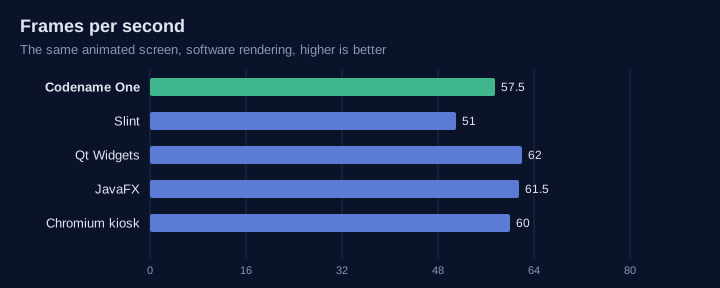
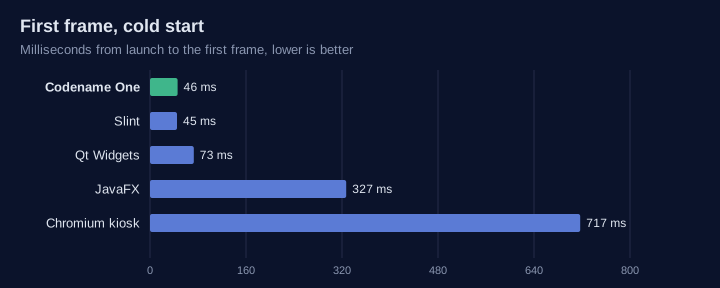
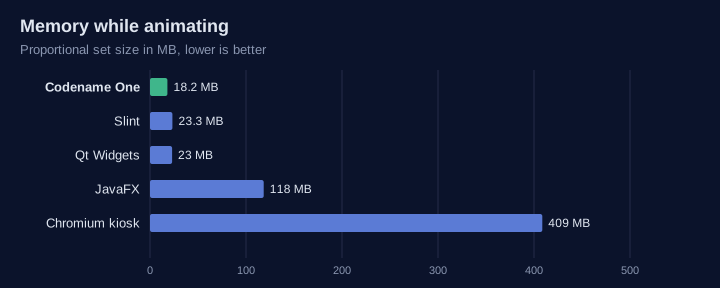
The table leaves out flutter-pi and Android (AOSP): flutter-pi needs an OpenGL ES GPU and AOSP needs a board support package, so neither runs in this harness.
| Codename One | Qt / Boot2Qt | Slint | flutter-pi | Chromium kiosk | AOSP | |
|---|---|---|---|---|---|---|
Language | Java, Kotlin | C++, QML | Rust, C++, JavaScript, Python, | Dart | HTML, JavaScript | Java, Kotlin |
Runtime on the device | None: one native executable | Qt libraries | Small native library | Flutter engine | Browser | Android runtime |
Needs a GPU | No | No (raster), yes for Qt Quick | No | Yes | No, but slow without one | Yes |
Display without X11 or Wayland | DRM/KMS, fbdev |
|
| DRM/KMS | Through Ozone | SurfaceFlinger |
Same code on iOS and Android | Yes | Yes | Not as a primary target | Yes | As a web application | Android only |
GPIO, I2C, SPI, serial, CAN in the API | Yes ( | Serial and CAN modules; GPIO through the OS | No | Through plugins | No | Through vendor HALs |
Simulator with virtual hardware | Yes | No | No | No | No | Emulator |
Headless server on the same codebase | Yes (the backend) | Qt Core, HTTP server module | No | No | No | No |
Yocto and Buildroot integration | Layer and package | Yes (meta-qt6, Boot2Qt) | Yes (meta-slint) | Community recipes | Yes | Not applicable |
Licence | GPL 2 with Classpath exception | LGPL 3, GPL or commercial | GPL 3, royalty-free or commercial | BSD 3-clause | BSD 3-clause | Apache 2.0 |
Without a display
A gateway or sensor hub has no screen, so the GUI comparison says little about it.
The same small JSON service ran in each runtime: GET /json answering a short object.
The server was pinned to two cores, a small board’s share, and the load generator
(oha) ran on the remaining cores. Each runtime ran four rounds, from a cold start
and then a warm one, in the same Debian bookworm arm64 container. The first round
pages the container image in and is left out, so the table shows the median of the
other six runs.
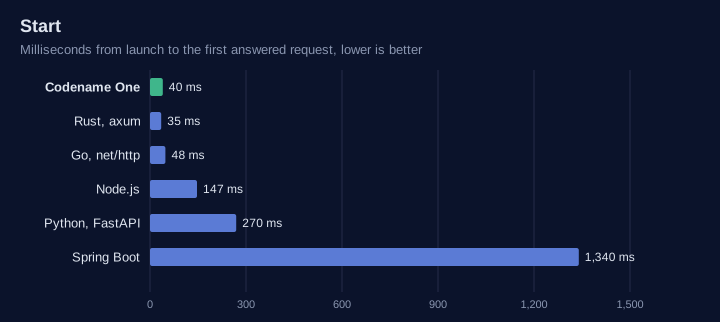
Start is the time from launch to the first answered request.
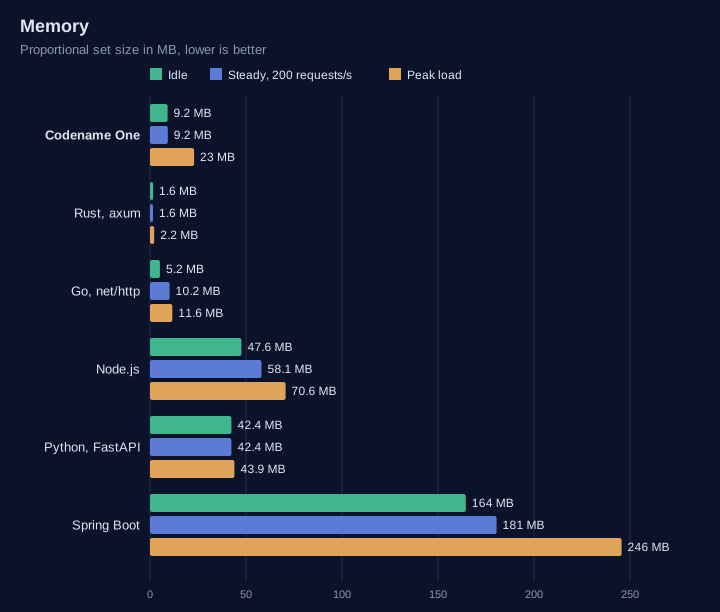
Idle is the proportional set size (PSS) two seconds later, with no requests.
Steady is a constant 200 requests per second for ten seconds. It gives the CPU used over that time and the memory at its end.
Peak is as many requests as 32 connections can drive in ten seconds.
| Runtime | Start (ms) | Idle PSS (MB) | Steady CPU (%) | Steady PSS (MB) | Peak (requests/s) | Peak p99 (ms) | Disk mapped (MB) |
|---|---|---|---|---|---|---|---|
Codename One backend | 40 | 9.2 | 3.1 | 9.2 | 379,900 | 0.22 | 21 (34 files) |
Rust, axum | 35 | 1.6 | 3.2 | 1.6 | 290,200 | 0.25 | 3.3 (5 files) |
Go, net/http | 48 | 5.2 | 8.3 | 10.2 | 178,900 | 0.59 | 5.2 (1 file) |
Node.js, http | 147 | 48 | 11 | 58 | 63,500 | 1.1 | 90 (19 files) |
Python, FastAPI and uvicorn | 270 | 42 | 22 | 42 | 6,700 | 11 | 21 (30 files) |
Spring Boot 3.5, JDK 21 | 1,340 | 164 | 16 | 181 | 33,300 | 3.3 | 183 (20 files) |
Codename One starts as fast as the compiled runtimes and serves the most requests of any of them: 1.3 times Rust’s peak and 2.1 times Go’s, at the lowest p99, with a steady-load CPU the same as Rust’s. Like Rust’s, the server makes two system calls per request, one read and one write, and a request allocates nothing but the object the handler returns. Rust and Go use less memory: a Codename One process grows to about 23 MB at peak load, against Go’s 12 MB and Rust’s 2 MB. Against the managed runtimes, it starts 33 times faster than Spring Boot, uses an eighteenth of its memory and serves over 11 times its peak.
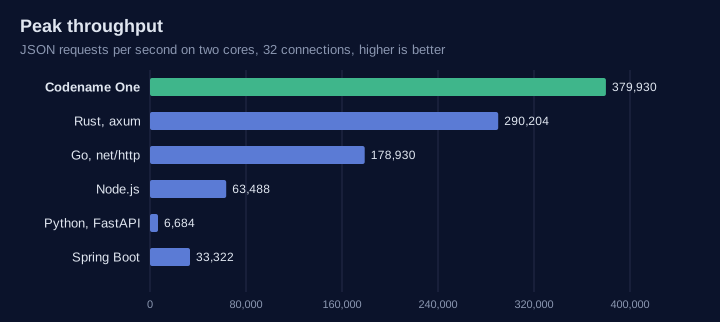
Every change to the backend runtime or the translator reruns this comparison in continuous integration, against Rust and Go on an arm64 machine. The build fails if Codename One’s peak throughput falls below Rust’s, if its latency, start or CPU falls too far behind, if its memory passes 12 MB idle or 32 MB at peak, or if a request allocates anything beyond the object its handler returns.