A phone application has one window, because the operating system owns the screen and the application fills it. A desktop application usually doesn’t: an inspector panel, a preferences window, a second document, a tool palette and a detached console are all ordinary desktop expectations.
com.codename1.ui.Window is how you open them. A Window is a separate native
operating-system window with its own Codename One component hierarchy inside it, its
own focus owner, its own animations and its own repaint region. The application’s main
surface is a Form and is unaffected by any of this.
if (Desktop.isSupported()) {
    Window inspector = new Window("Inspector", new BorderLayout());
    inspector.add(BorderLayout.CENTER, new Label("Hello from a second window"));
    inspector.setWindowSize(420, 320);
    inspector.centerOnDesktop();
    inspector.show();
}
Where windows exist
Windows are a desktop feature, and the API says so plainly:
| Platform | Windows | Notes |
|---|---|---|
Java SE desktop app | Yes | The packaged desktop build and the simulator in desktop-skin mode. |
Java SE simulator with a phone skin | No | A skin simulates one device screen; a real window inside that simulation is incoherent. |
Native Windows | Yes | |
Native Linux | Yes | |
macOS | Yes | Each window is a real |
macOS (Mac Catalyst) | Opt-in | Needs |
iOS, Android, JavaScript | No | These platforms have no windowing system. |
Always guard with Desktop.isSupported() (or the shorthand CN.isMultiWindowSupported()).
Constructing a Window where windows are unsupported throws
UnsupportedOperationException immediately:
Window w = new Window("Tools");   // throws on a phone
w.show();
There’s no fallback to showing a Form instead. A pretend window produces layout and
lifecycle bugs that are far harder to find than an exception
on the line that asked for it. The exception is thrown by the constructor rather than by
show(), so a wrong assumption surfaces at the point it was made.
Everything else degrades cleanly. Desktop.getWindows() returns an empty array rather
than null, Desktop.getFocusedWindow() returns null, and Desktop.getMonitors() still
reports the main display, so portable code that loops over windows or positions against
a monitor compiles and runs everywhere.
Window and Form
Form and Window are siblings. Both extend Container, and both implement the new
TopLevelContainer interface, which is the contract shared by anything that can sit at
the root of a component hierarchy:
TopLevelContainer top = component.getTopLevelContainer();
top.getContentPane().add(new Label("works in either"));
top.registerAnimated(component);
Component focused = top.getFocused();
TopLevelContainer carries only what genuinely applies to both. It has the
content pane, the layered panes, the title, commands, animation registration, focus,
editing state, the theme manager and the show/size listeners. It does not carry
Form’s mobile surface - form transitions, the back command, `previousForm, the
Toolbar or the tint that dims a form behind a dialog - because none of those mean
anything for a desktop window, whose title and menus belong to the platform chrome. Members that already exist on Component or
Container are reached through asContainer().
getComponentForm() returns null inside a Window
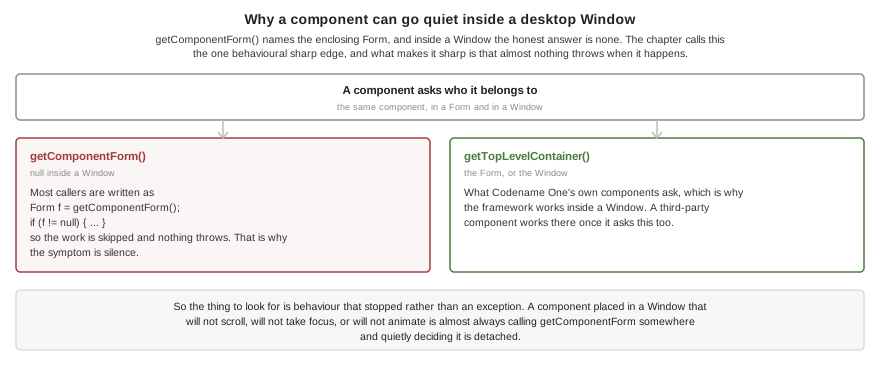
This is the one behavioral sharp edge, and it’s worth stating plainly:
Window window = new Window("Inspector", new BorderLayout());
Label l = new Label("hi");
window.add(BorderLayout.CENTER, l);

l.getTopLevelContainer();   // the Window
l.getComponentForm();       // null -- a Window is not a Form
getComponentForm() means what it says: it names the enclosing Form, and inside a
window the honest answer is none. Codename One’s own components ask
getTopLevelContainer() instead, so the framework works inside a window - apart from
the handful listed under Unsupported inside a window, which depend on something
that isn’t window-aware rather than on the call itself. A third-party component that
calls getComponentForm() works inside a window only once it asks
getTopLevelContainer() too.
The failure mode is usually silence rather than an exception, because most of that code
is written as Form f = getComponentForm(); if (f != null) { … }. If a component
behaves as though it’s detached when you put it in a window - it doesn’t scroll, doesn’t
take focus, or doesn’t animate - that’s almost always the cause.
Window lifecycle
boolean unsavedChanges = hasUnsavedWork();
Window w = new Window("Preferences", new BorderLayout());
w.add(BorderLayout.CENTER, new Label("Preferences"));
w.setWindowSize(500, 400);
w.setCloseOperation(Window.DISPOSE_ON_CLOSE);

w.addCloseListener(evt -> {
    if (unsavedChanges) {
        evt.consume();          // veto the close, then prompt the user to save
    }
});

w.show();
show() creates the native window the first time it’s called and maps it on screen.
hide() hides the window while keeping it alive, so it can be shown again. dispose() destroys
the native window and releases everything behind it; calling it twice is harmless.
setOwnerWindow() has to be called before the window is shown. Native ownership is
established when the window is created — the owner window handle on Windows, the
transient parent on GTK, the owner passed to the dialog on Java SE — and no platform
lets it be re-pointed once the window exists, so changing it later throws rather than
pretending.
setCloseOperation() decides what the platform’s own close control does:
| Destroy the window. The default. |
| Hide it, so it can be shown again later. |
| Do nothing; the application calls |
Consuming the event in a close listener vetoes the close regardless of the operation, which is how a window asks the user to save first.
That veto isn’t available on Mac Catalyst. UIKit hands a scene disconnection over
after the scene is already gone, so there is nothing left to refuse: the window is
disposed, the close listeners don’t run, and HIDE_ON_CLOSE and
DO_NOTHING_ON_CLOSE have no effect for the title-bar control. Don’t rely on a save
prompt there. An application that has to intervene should drive the close itself: ask
the user from its own menu item or button, and call dispose() once they’ve answered.
Note that dispose() isn’t a close request on any platform. It destroys the window
directly and doesn’t run the close listeners, so a listener can’t veto it - the
confirmation belongs in the code that decides to call dispose(), not in a listener
behind it. Close listeners fire for the platform’s own close control, which is exactly
the control Catalyst doesn’t let anyone refuse.
Every open window is disposed when the application shuts down, so a window can’t outlive the event dispatch thread that paints it.
Window chrome and geometry
w.setResizable(false);
w.setDecorated(false);      // no native title bar; draw your own with a Toolbar
w.setAlwaysOnTop(true);     // a floating palette
w.setUtilityWindow(true);   // keep it out of the task bar where the platform allows
w.setMinimumWindowSize(new Dimension(320, 240));
Geometry has two coordinate systems and two sets of names, which is deliberate:
getWindowBounds(),setWindowBounds(),setWindowSize()andsetWindowLocation()are native coordinates and include the platform’s own chrome.getWidth()andgetHeight(), inherited fromComponent, are the Codename One content size in Codename One pixels.
A size is a request. Every window system is free to adjust it — a minimum size, a
constraint from the window manager, or a screen too small for what you asked — so read
getWidth() and getHeight() back rather than assuming the request was granted, and
listen for Resized if it matters.
centerOnDesktop() centers the window on the work area of the monitor it’s on, so it
doesn’t land under the task bar or the dock. centerOn(other) centers it over another
top level. minimize(), restore() and toggleMaximize() do what they say, where the
platform allows a program to ask.
Styling
A window is a top level surface, so it starts out with the styles a theme already
defines for one: Form for the window itself, ContentPane for its content pane,
TitleArea and Title for its title. That means every existing theme styles a window
correctly without being updated, which is the point — a top level with no style entry
paints nothing at all and comes up as an unpainted rectangle.
To make windows look different from forms, give them a UIID of your own and style that:
w.setUIID("PaletteWindow");
w.getContentPane().setUIID("PaletteWindowContentPane");
Modal windows
Window dialog = new Window("Confirm", new BorderLayout());
dialog.add(BorderLayout.CENTER, new Label("Really delete everything?"));
dialog.setOwnerWindow(mainWindow);
dialog.setModalityType(Window.MODALITY_WINDOW);
dialog.showModal();          // blocks here until the window is disposed
showModal() parks the calling code until the window is no longer showing, much as a
modal Dialog does. It doesn’t freeze the application: the event dispatch thread keeps
running, so every other window carries on painting and animating while the modal is up.
Both dispose() and hide() end the wait — the window is closed as far as the user is
concerned either way, and parking the caller on a window nobody can reach would hang it.
That matters when the close operation is HIDE_ON_CLOSE, because showModal() then
returns with the window still live and reusable. Cleanup that only makes sense for a
destroyed window should ask isWindowDisposed() rather than assume it. Minimizing
doesn’t end the wait: a minimized window is still up.
Three modality types are available:
| Blocks nothing. The default. |
| Blocks input to the window that owns it, and nothing at all when the window has no owner. |
| Blocks input to every other window and to the main form. |
Codename One decides which windows a modal blocks, so modality behaves identically everywhere whether the underlying window system implements its own or not. That decision depends on the whole stack of open modal windows, not just the newest one, which is why it isn’t left to the ports: a window modal opened from inside an application modal narrows what it blocks without lifting anything the outer one still blocks.
The framework then tells each port which windows to disable natively. That matters beyond appearances, because a blocked window’s own title bar is outside the input filter - without it, the close button of a window you’ve blocked still reaches your application.
Monitors and per-monitor DPI
Desktop is the front door for the display side of a windowing system, alongside
Display rather than replacing any of it. Display answers how big the application’s main surface is, which is the only question a
phone has. Desktop answers which screens exist and which windows are open.
for (Monitor m : Desktop.getInstance().getMonitors()) {
    System.out.println(m.getName()
            + " bounds=" + m.getBounds()
            + " workArea=" + m.getWorkArea()
            + " scale=" + m.getScale()
            + " dpi=" + m.getDotsPerInch()
            + (m.isPrimary() ? " (primary)" : ""));
}

Monitor under = Desktop.getInstance().getMonitorAt(pointerX, pointerY);
Rectangle whole = Desktop.getInstance().getDesktopBounds();   // union of every monitor
Prefer getWorkArea() over getBounds() when placing or maximizing a window: the work
area excludes the task bar, the dock and any reserved panels, and the bounds don’t.
Note that desktop coordinates span every monitor, so a display placed to the left of or above the primary one legitimately has a negative origin.
A window reports its own monitor’s characteristics
On a desktop with mixed displays - a high-resolution laptop panel next to a conventional external monitor is the common case - two windows of the same application can correctly render at different scales:
w.getMonitor();     // the Monitor this window currently sits on
w.getScale();       // that monitor's backing scale, e.g. 1.0 or 2.0
w.getDensity();     // that monitor's density bucket
These answer for the window’s own monitor, not for the global display. When the user drags a window onto a display with a different scale, Codename One re-reads the scale, marks the hierarchy’s preferred sizes stale and lays it out again. Skipping that step is what leaves a window blurry or the wrong physical size after a move.
Display.convertToPixels() keeps its existing global meaning, the main window’s monitor,
so no existing application changes behavior.
To react to displays being attached, removed or reconfigured:
Desktop.getInstance().addMonitorListener(evt -> {
    // a monitor was added or removed, or one changed resolution
    refreshWindowPlacement();
});
Window events
w.addWindowListener(evt -> {
    WindowEvent we = (WindowEvent) evt;
    if (we.getType() == WindowEvent.Type.Resized) {
        rememberWindowGeometry(we.getSource());
    }
});

// Every window, from one place
Desktop.getInstance().addWindowListener(evt -> auditWindowEvent(evt));
Display.addWindowListener() is unchanged and still reports only the application’s main
window, so existing code that casts getSource() to Display keeps working.
Close listeners and window events answer different questions, and the distinction matters when a listener does real work:
A close listener is the user asking to close the window. It runs before anything is destroyed and consuming it vetoes the close, which is how a window prompts the user to save first. It fires once per close attempt.
WindowEvent.Type.Disposedreports that the window is already gone. Nothing can veto it, and it’s what to listen for when the work has to happen whether the close came from the user or from a call todispose().
Peer components and native text editing
Both work inside a window. A BrowserComponent, a video player, a map or a native text
field placed in a Window is attached to that window’s native view hierarchy, not to
the main window’s.
The native macOS port qualifies this for one case. A peer is attached when it’s
initialized, and a peer already in the window’s content when the window is first
shown initializes before that window has painted — at which point nothing yet says which
window it belongs to, so it lands on the main window’s view. Add the peer in response to
WindowEvent.Type.Shown and it attaches to its own window.
This is worth knowing about because it was the single most common way an early multi-window implementation looks correct and isn’t: the peer or the text caret appears on the main window while the content it belongs to is in another one.
Overlays inside a window
A window has the same layered panes a form does, and that’s what an overlay attaches to:
Container overlay = w.getFormLayeredPane(MyOverlay.class, true);
overlay.setLayout(new LayeredLayout());
overlay.add(buildOverlayContent());
w.revalidate();
InteractionDialog is window-aware. A dialog anchored to a component works with no
extra ceremony, because showPopupDialog(Component) takes its host from the component
you hand it - and it has to, since the rectangle it points at is in that component’s
coordinate space:
dialog.showPopupDialog(buttonInsideTheWindow);
A dialog with no anchor can’t infer anything, because it isn’t attached to the hierarchy
at the moment show() runs. Tell it which top level to appear on:
dialog.setTopLevelHost(window);
dialog.show(top, bottom, left, right);
Leave the host unset and the dialog uses the current form, which is the right answer for an application with one window and is what every existing single-window application already relies on.
Dialog, Sheet and ToastBar take the same host. A Dialog shown on a window goes
into that window’s layered pane rather than replacing the main form, and returns the
command that was pressed exactly as it always did:
Dialog confirm = new Dialog("Confirm");
confirm.setLayout(new BorderLayout());
confirm.add(BorderLayout.CENTER, new Label("Delete the selected document?"));
confirm.setTopLevelHost(window);
Command result = confirm.showDialog();
A Sheet takes setTopLevelHost too, and Sheet.getCurrentSheet(TopLevelContainer)
answers per surface - with more than one surface, "the current sheet" has no single
answer. ToastBar gives each window its own instance through
ToastBar.getForTopLevel(TopLevelContainer); the singleton keeps following the current
form, which is what an application with one surface relies on. The static helpers
(ToastBar.showMessage and friends) target the window the user is actually in.
A ComboBox popup, a FloatingActionButton submenu and InfiniteProgress are all
Dialog underneath, so they follow the surface they were opened from with no code
change. Tooltips and HTMLComponent do too.
Anything you write yourself should resolve its surface with
Component.getTopLevelContainer() rather than getComponentForm(), and measure against
that top level rather than against Display. For code with no component to start
from - a static helper, say - CN.getCurrentTopLevel() is the window the user is in,
where CN.getCurrentForm() only ever names the main surface.
Dialogs in a window of their own
A dialog can be a real operating system window instead of something drawn inside the application’s surface:
Dialog confirm = new Dialog("Confirm");
confirm.setLayout(new BorderLayout());
confirm.add(BorderLayout.CENTER, new Label("Delete the selected document?"));

// opens as a real operating system window on the desktop, and as an ordinary
// dialog everywhere else
confirm.setNativeWindowMode(true);
Command result = confirm.showDialog();
Dialog.setDefaultNativeWindowMode(boolean) sets it for the application, and the theme
constant defaultNativeWindowModeBool sets it for the theme. The instance setting wins,
then the static default, then the theme constant - and all three are subordinate to
there being a windowing system at all.
The three desktop native themes declare that constant, so an application using one gets
window dialogs by default and doesn’t have to ask. An application that wants the old
in-surface dialogs back on those themes says so with
Dialog.setDefaultNativeWindowMode(false), or per dialog with
setNativeWindowMode(false).
On iOS, Android, JavaScript, headless and in the
phone-skinned simulator the request is ignored and the dialog shows the ordinary way, so
shared code doesn’t have to guard it. InteractionDialog takes the same setting.
The window is decorated, so the user can move it, close it and find it in the window
list. Override initNativeWindow(Window) to change that or anything else about it
before it appears. Closing it with the platform’s own close control dispatches the back
command, or disposes the dialog when there isn’t one, so it means the same thing as
Cancel. getNativeWindow() returns the window while the dialog is showing.
Commands split by what they already are: buttons stay buttons inside the dialog, and
commands added with addCommand are published to the window so the platform can put
them wherever it shows a window’s commands.
These are ignored in this mode, because they describe a dialog drawn inside another
surface: the margin arguments to show(top, bottom, left, right), the position argument
to showPacked and showStretched, the tint and setBlurBackgroundRadius, transitions,
setDisposeWhenPointerOutOfBounds and disposeOnRotation. Display.getCurrent() also
keeps naming the main form rather than the dialog.
An anchored popup - showPopupDialog(Component), showPopupDialog(Rectangle), and so
the ComboBox, Picker and ContextMenu popups with them - never opens a window even
with the option on for the whole application. The rectangle it points at is in its
host’s coordinate space, nothing exposes where a window’s drawable begins on the
desktop, a separate window would never receive the click meant to dismiss it, and it
would steal focus from its opener every time it appeared.
Transitions in a window
A Form transition into or out of a window isn’t supported, and won’t be. A transition
paints both screens into one Graphics covering one surface; two operating system
windows are composited by the window server, on monitors that need not even share a
scale factor, so there is no shared context to draw an in-between frame into. That’s the
same reason Window.capture() exists rather than Display.screenshot(). A window’s own
appear and disappear animation belongs to the platform.
Moving between screens inside a window is an ordinary transition:
window.setContent(nextScreen,
        CommonTransitions.createSlide(CommonTransitions.SLIDE_HORIZONTAL, true, 300));
replace, replaceAndWait, animateLayout, animateHierarchy and their fade variants
all work on a window as they do on a form.
Unsupported inside a window
A
Pickerin a window always uses its lightweight popup, even on a platform with a native one, because every native picker attaches to the main surface and would open over the wrong window.Formtransitions into or out of a window - see Transitions in a window for why, and for what to use instead.A
Toolbaron a window.Toolbaris installed throughForm.setToolbarand is bound to a form throughout, so there is no supported way to put one on a window yet. Window commands go to the platform throughaddCommand.
Display.getDisplayWidth() and getDisplayHeight() continue to report the main
window. Components inside a window should size against their own top level, and
CN.getCurrentTopLevel() is the surface the user is in where CN.getCurrentForm()
only ever names the main one.
Capturing a window
Display.screenshot() can only see the application’s main surface, so a second
operating-system window is simply not in it. Window.capture() exists for that and
returns an image of the window itself.
Most desktop ports read the window’s own pixels back, so what you get is what the
window is showing — native peers and editors included. The JavaSE simulator, Mac
Catalyst and native Linux read their rasters directly. Native Windows takes a different
route to the same place: a secondary window renders into a Direct2D HWND target,
which Direct2D gives no readback for, so the port asks the window to render itself into
a device context with PrintWindow. That’s a real readback of the client area rather
than a re-render of the hierarchy.
The native macOS port is the exception to the peers-included half of that. It reads back
the window’s own Metal texture, so the image holds everything Codename One drew, but the
native peer views AppKit composites above that texture aren’t in it: a BrowserComponent,
a video player or a map inside the window is missing from the result. Everything else the
window shows is captured normally.
Window.capture() falls back to re-rendering the component tree if a port returns
nothing. That fallback draws what the window should be showing: it never contains a
peer or a native editor, and it can’t reveal a disagreement between a window’s raster
and its component hierarchy. Because a plausible image of the right size is exactly
what a silent fallback looks like, the Windows port logs when it happens rather than
letting a re-render pass for a readback.
macOS
Windows work on the native macOS build with no configuration and no build hint.
Each one is a real NSWindow: it has the standard title bar and its close,
minimize and zoom buttons, it takes part in Mission Control and the Window menu,
and it owns its own GPU surface rather than displaying a raster rendered
elsewhere.
Desktop.getMonitors() reports the real display list from NSScreen, including
each screen’s backing scale, so a window restored onto a Retina display and one
restored onto a non-Retina display each get the right density. Dragging a window
between them updates it.
Every operation on the windowing API is implemented. That’s worth saying explicitly because the Mac Catalyst target below can’t implement several of them — which is why windows are off by default there and on by default here.
Mac Catalyst (legacy)
Windows are opt-in on the macOS (Mac Catalyst) target. Set the macNative.multiWindow
build hint to true alongside macNative.enabled:
macNative.enabled=true
macNative.multiWindow=true
A second Codename One window is a second UIWindowScene, which needs the
UIApplicationSupportsMultipleScenes key in Info.plist. The builder emits that key
only for a Catalyst build that asked for windows, and for no other target, so iPhone
and iPad apps are unaffected either way.
The opt-in exists because that key has a cost the rest of the app pays. It puts the process on the UIScene lifecycle, under which a Catalyst window opens four points shorter: the conformance suite measures 685 points of content height without the key and 681 with it. Every layout in the app shifts slightly. That’s a fair trade when you want windows and an unpleasant surprise when you don’t, so an app that doesn’t ask for them keeps the bundle it has always had.
Desktop.isSupported() reads the key back out of the running bundle rather than
trusting a build flag, so the API and the Info.plist can never disagree — including
in a project that was generated once and then hand-edited.
System sheets follow the focused window. Sharing (ShareButton and Display.share()),
camera capture, the photo gallery, the file chooser and the full-screen video player are
presented from the scene the user is actually in, and the share popover anchors against
that window’s own coordinates and screen scale rather than the main scene’s. Invoking
one from a secondary window opens it over that window, where it belongs.
Catalyst differs in one implementation detail worth knowing: a window’s Codename One content is rendered into an off-screen raster and presented to the scene’s view, rather than the window owning a second GPU surface. The native macOS build doesn’t do this. Native peers and text editing still use the scene’s real view hierarchy, so they behave normally.
Some window controls have no Mac Catalyst equivalent, because AppKit owns the
behaviour and Catalyst doesn’t expose it to a UIWindowScene. setAlwaysOnTop,
setUtilityWindow, minimize, restore and toggleMaximize do nothing there; the
getters keep reporting whatever the application set, so treat them as requests the
platform may decline. setDecorated(false) is partial: it hides the title bar’s
title and toolbar — which is what an application supplying its own chrome needs — but the window frame itself stays. Modality, the minimum window size and
resizability all work.
Scenes also arrive asynchronously. show() asks the system to activate one and is
handed it back later, so a window exists for a moment before its scene does, and a closed
window’s scene is kept for the next one rather than destroyed — asking for a scene
while a destruction is still in flight is refused by the system.
Threading
Everything runs on the event dispatch thread, as usual. Showing, moving and disposing
a window are all EDT operations; calling them from a background thread is marshalled
for you the same way Form.show() is.
Constructing one is the exception, because a constructor has to return its object and
so can’t be deferred. new Window(…) runs on the thread that calls it, and that’s
safe from any thread — but the window doesn’t exist for the framework until it’s
shown.
There is one event dispatch thread for the whole application no matter how many windows are open. A window that animates keeps the thread awake; a minimized or hidden window does no work at all.