Crash Protection is an opt-in service that captures uncaught exceptions in your shipping app and files them as deduplicated issues on your GitHub repository. Symbolicated stack traces, scrubbed messages, and a per-bug counter are all recorded server-side; you triage from GitHub Issues like any other bug.
The service is available on the Pro and Enterprise subscription tiers. See the pricing page for current limits.
What gets stored where
Three things move when you opt in:
Symbol bundles (ProGuard
mapping.txton Android, dSYM on iOS, debug-info-bearing binaries on Mac/Linux/Win32). Uploaded by the Codename One build server after each successful release build. Stored compressed; subject to per-tier storage quota.Crash reports (one per device occurrence). Sent by the app at runtime via
CrashProtection.capture(t)or the automatic EDT error handler. Scrubbed on the device before transmission (see Privacy below).GitHub issues — the actual triage surface. One issue per unique crash fingerprint. Subsequent occurrences of the same fingerprint bump a counter on the issue body rather than filing duplicates.
Codename One never reads or persists the unscrubbed message body. The crash data store is the issue tracker on your repository, not a separate database. The service keeps only the minimum lookup state needed to find the right issue on the next occurrence.
Opting in
Add this line to your app’s codenameone_settings.properties:
codename1.arg.crashProtection.enabled=true
The codename1.arg. prefix marks it as a build hint — when the property reaches the Codename One build server, it tells the build to upload the symbol bundle (PDB / dSYM / .debug / mapping.txt) to the crash-protection service alongside the normal release artifact.
Runtime hook
In your Lifecycle.init, with the opt-in kept where the user gives it:
public void init(Object context) {
    // Lifecycle.init sets the theme, the global Toolbar, the network thread
    // count and the network error listener, so an override that skips it
    // loses all of that
    super.init(context);
    // install() only registers the handler; nothing is sent while the
    // service is disabled, and disabled is the default
    CrashProtection.install();
}

/// Call this from the flow where the user agrees to send crash reports.
/// Doing it in init() would opt every user in on each launch, drain the
/// buffered reports, and undo an opt-out they had already made.
void onUserAcceptedCrashReporting() {
    CrashProtection.setEnabled(true);
}
install() registers the EDT error handler and (on Android) wires Thread.UncaughtExceptionHandler. It’s idempotent and a no-op on the simulator. setEnabled(boolean) controls whether captured crashes actually get sent to the server — the captured payload is always persisted locally first, so setEnabled(true) after the fact drains the buffer.
You can also report a caught-but-noteworthy exception with CrashProtection.capture(e).
Per-platform opt-out
Sometimes one platform’s symbols are noisy or you don’t ship that target. Disable a platform with:
codename1.arg.crashProtection.and.enabled=false
codename1.arg.crashProtection.ios.enabled=false
codename1.arg.crashProtection.mac.enabled=false
codename1.arg.crashProtection.linux.enabled=false
codename1.arg.crashProtection.win.enabled=false
Setting one of these to false makes CrashProtection.install() a no-op at runtime on that platform AND skips the build-time symbol upload for it. Setting to true (or leaving unset) keeps the platform enabled.
The runtime check uses Display.getInstance().getPlatformName(). Supported values: and, ios, mac, linux, win, javascript, javase.
Tier limits
| Tier | Storage quota | Symbol retention |
|---|---|---|
Pro | 100 MB compressed | 3 weeks |
Enterprise | 500 MB compressed | 6 weeks |
Symbol bundles are gzipped before storage. mapping.txt files typically compress ~10x; dSYMs ~2x. The quota admits several recent builds per app for a typical developer.
When a new symbol upload would push you over the quota, the build’s symbol step is rejected with HTTP 413 (the build itself succeeds). You can free space from the Tracked apps tab in the console — delete an old build’s symbols or remove a whole app’s enrollment.
Privacy
What’s PII
PII is short for personally identifiable information: any field in a crash payload that could be traced back to a specific user. The pieces of a Java exception message that are typically PII are email addresses, account numbers, phone numbers, IP addresses, full URLs to authenticated endpoints (with session tokens in the query string), and the contents of user input fields that ended up in the message via string concatenation. Stack trace frames are class / method / file / line — they describe code paths, not users, so they’re not PII.
The Codename One crash-protection client runs incoming messages through a scrubber before transmission. The scrubber can be replaced with a stricter rule set if your application’s exception messages routinely carry data you don’t want to leave the device.
What gets sent
CrashReportPayload carries these fields. The marked one goes through PiiScrubber before transmission.
eventId(UUID, used for idempotent dedup)buildKey(anti-spoofing token; matched against the uploaded symbol bundle)packageName,appVersion,platform,osVersion,localeexceptionClassmessageScrubbed— scrubbedframes[]— class / method / file / line /nativeflag per framerawStack— the pre-rendered Java stack captured viaprintStackTrace, including the cause chain and any verbatim platform formatting. It complements the structuredframes(whichgetStackTrace()now populates on every port) and is the readable trace on the JavaScript port, where the JavaScript engine’s stack has no structured framestraceFormat— how the server should readrawStack:structured,parparvm-text,js-error, ornone. Derived, never guessedmappingId— the id of the obfuscation mapping a hardened build shipped with, so a report ties to the exact mapping even if a rebuild reused the build key; empty for unhardened buildshardenLevel— the hardening level of the build, so the server can give a specific reason for an unretraceable reportclientTs
Crash reports from a hardened build
When a build is hardened (see App Hardening), the build server retains the cross-platform obfuscation mapping and symbolicates incoming reports against it, so a hardened build’s crashes still land as readable, correctly lined issues. Two things follow from how the mapping is retained: a report whose mapping has aged out of retention can no longer be retraced, and a locally hardened build — whose mapping never reached the server — can’t be symbolicated at all. The ParparVM ports (iOS, tvOS, watchOS, macOS, Windows, Linux) report structured frames, and also carry the pre-rendered trace in rawStack; the JavaScript port has no structured frames, so its report relies on the rawStack JavaScript engine stack (js-error), symbolicated best-effort through the source map.
Default scrubber rules
PiiScrubber applies these by default:
Email addresses: redacted to the first 3 characters of the local part.
[email protected]becomesjoe***@example.com(the full domain is preserved so the issue still tells you which provider was involved).Long digit runs: any run of 6 or more consecutive digits collapses to
[num]. Catches phone numbers, order IDs, account numbers, ZIP+suffix, etc.URLs aren’t scrubbed by default. Override the scrubber if your app’s URLs carry session tokens.
Override scrubMessage(String) or scrubFrame(String, String) on a PiiScrubber subclass and register via CrashProtection.setScrubber(myScrubber) if you need stricter rules.
Mapping packages to repositories
In the console at https://cloud.codenameone.com/console/index.html, open Repo mappings:
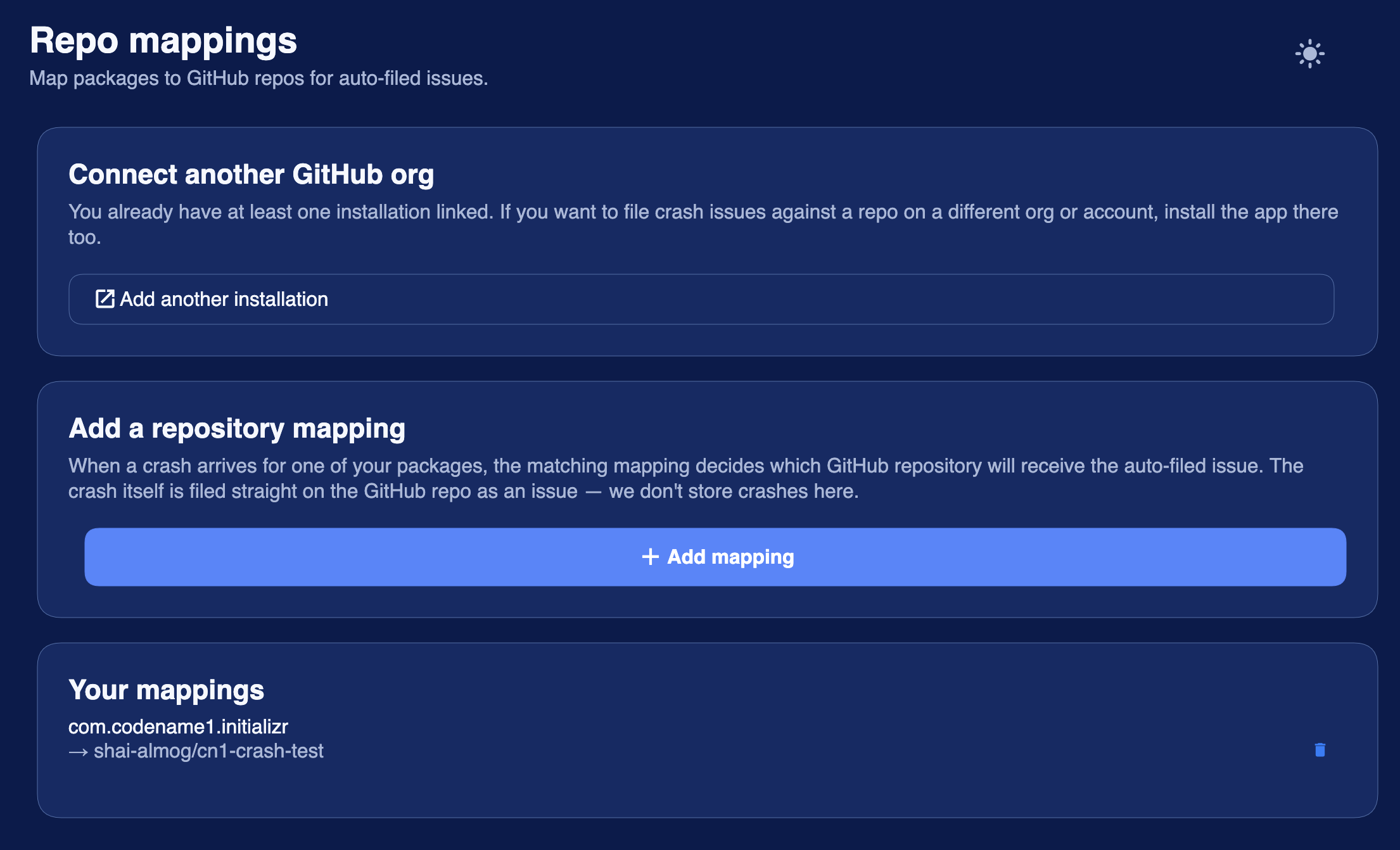
Click Add mapping and supply:
Package name — the exact value from
codenameone_settings.properties.Installation — which authorized GitHub App installation should file the issue. Only shown if you have more than one installation linked.
Repository — pick from the dropdown of the installation’s repos.
You must have authorized the Codename One Crash Protection GitHub App for at least one of your repositories first. The mapping page renders a button labeled Connect on GitHub that opens the App install flow on github.com. The post-install redirect brings you back to the same page with the installation already loaded; if you already have one installation and want to add another (for example a second GitHub org), the Connect another GitHub org card lets you link an additional one without disturbing the existing mapping.
Setup checklist
Pro or Enterprise subscription.
Add
codename1.arg.crashProtection.enabled=truetocodenameone_settings.properties.Call
CrashProtection.install()inLifecycle.init. CallCrashProtection.setEnabled(true)once you have the user’s consent.Build your app for release. The Codename One build server uploads the symbol bundle automatically.
Open the console, go to Repo mappings, click Connect on GitHub, and install the App on the repo you want crashes to land in.
Add a mapping for your package → repo.
Crashes from your release builds will now appear as GitHub issues on the mapped repo.