Codename One can make a call your app carries look, to the operating system and to the user, like a call the phone itself placed. That means the lock-screen call UI, the ringtone that plays while your app isn’t running, the entry in the system call log, the audio session the OS hands over and takes back, and the caller’s name shown for an incoming number the address book has never seen.
The APIs live under com.codename1.call, in three sub-packages, and they’re
separate packages rather than one because referencing a package is the whole
opt-in. The build server decides what native machinery an app gets by scanning
bytecode for these prefixes, so an app that only labels spam numbers pays for
none of the calling machinery — no telephony permissions, no VoIP background
mode. Referencing com.codename1.call itself costs nothing; it holds only the
shared value types.
| Capability | iOS | Android | Simulator and desktop | JavaScript |
|---|---|---|---|---|
System call UI | yes (CallKit) | yes (Android 8 and later, see below) | simulated | — |
Ring while the app isn’t running | yes ( | yes, from your own push handler | simulated | — |
Answer, hold, mute, keypad from the system | yes | yes | simulated | — |
Set the system mute state from your app | yes | — | simulated | — |
Audio session handoff | yes | synthesized | simulated | — |
Conference grouping | — | — | — | — |
Caller identification | yes (Call Directory) | — | simulated | — |
Call blocking | yes | yes (Android 10 and later) | simulated | — |
Branch on the capability queries — Calls.isSupported(),
Calls.getCapabilities(), VoipPush.isSupported(),
CallDirectory.isSupported() — rather than on platform detection. There is
no way to make a desktop show a lock-screen call, so an app that offers calling
needs an in-app fallback screen whatever else it does.
Every callback in this family arrives on the EDT.
Five Things Worth Knowing Before You Design Around This
These APIs don’t carry the voice. There is no codec and no signalling
here: carrying audio and video is com.codename1.webrtc
(Real-Time Audio and Video), and the signalling is your
app’s. What was missing was everything around the
media, and without it an app couldn’t ring at all while backgrounded — which
is why a Codename One app couldn’t previously be a calling app no matter how
good its audio was.
Start media when the audio session activates, not when the user answers.
This is the single most common way to get a calling app wrong. On iOS the
system owns the audio session: your app configures a category but must not
activate it, and CallKit activates it and tells you. Code that starts its audio
engine in answerRequested works in every simulator and produces a silent call
on a device, with no error anywhere. Use audioSessionActivated. The Android
port synthesizes the same callback when the connection goes active, so the one
piece of advice is correct everywhere.
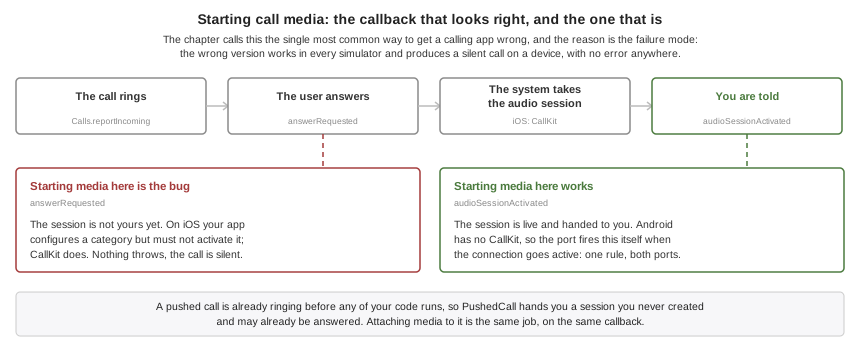
A pushed call is already ringing. When a call arrives as a VoIP push, iOS
requires it to be reported to the system before any of your code runs and
kills the app when it isn’t — so native code does the reporting from a fixed
payload, and your listener is told afterward. PushedCall therefore hands you
a CallSession you never created, possibly one the user has already answered.
Your job is to attach media to a call that exists, not to decide whether to
ring.
The two platforms draw the ringing screen differently. On iOS CallKit
presents the call and there is nothing to build. On Android a self-managed
calling app gets no system call screen at all: Telecom arbitrates with other
calls, routes the audio and writes the call log, but presenting the call is
the application’s job. The port does that for you — a call-category
notification carrying a full-screen intent, and the ringing screen that intent
launches. On an unlocked device you get the notification as a heads-up banner;
on a locked one the platform shows the ringing screen over the keyguard.
Answer and Decline appear on both and are wired to the same listeners as
everywhere else. The screen is a plain one, because it ships inside the
port and has no resources of its own: if you want your own, present it from
your incomingCall listener and it draws on top.
Two consequences are yours: the labels come from the
android.call.incomingTitle, android.call.answerLabel and
android.call.declineLabel build hints and are English until you set them,
and the user can turn the Incoming calls notification channel down in
Settings. Anything below high importance files the notification in the shade
instead of ringing, so the port treats it as it treats a revoked
POST_NOTIFICATIONS: Calls.getAvailability() answers NOT_PERMITTED and
Calls.reportIncoming is refused, rather than reporting a call that rings
nowhere.
Implement providerReset. It means every call your app had is gone,
because the user switched calling off or the platform recovered from an error.
Drop your media and forget your sessions, but don’t call end() on them — they no longer exist as far as the system is concerned. An app that leaves this
method empty leaks its media engine and shows calls that aren’t there.
Owning A Call
Configure once, then listen. Calls.configure must run before anything is
reported: on Android an unregistered account makes TelecomManager ignore
every reported call — no exception, no log line, no call.
if (!Calls.isSupported()) {
    return;                        // fall back to an in-app call screen
}
Calls.configure(new CallConfiguration().displayName("Acme Talk"));

Calls.addActionListener(new CallActionAdapter() {
    public void answerRequested(String callId, CallAction action) {
        signalling.accept(callId);
    }

    public void endRequested(String callId, CallAction action) {
        signalling.hangUp(callId);
        media.stop();
    }

    public void audioSessionActivated(CallAudioSession session) {
        media.start(session.getCallId());   // here, NOT in answerRequested
    }

    public void audioSessionDeactivated(String callId) {
        media.stop();
    }

    public void providerReset() {
        media.stopEverything();             // every call is gone
    }
});
An incoming call your app learned about over its own connection is reported with an identifier you allocate. Both ends must use the same one for the life of the call.
String callId = CallId.random();          // the id both ends will use
Calls.reportIncoming(callId, CallHandle.phone(theirNumber), "Ada Lovelace", false)
        .onResult((session, err) -> {
            if (err != null) {
                // The system refused to ring: an emergency call, another
                // app's call, or Do Not Disturb. Tell the caller.
                return;
            }
            signalling.invite(callId, theirNumber);
        });
Note the failure path isn’t decoration. The system genuinely refuses to ring a
call during an emergency call, when another app holds one, or when the user has
switched your app’s calling off, and Calls.getAvailability() will tell you
before you try. An app that assumes reporting always succeeds shows a caller
"ringing" over a phone that’s silent.
One difference between the platforms is worth designing around rather than
discovering. On iOS the provider is configured for a single call, so while your
app holds one, CallKit refuses the next report and getAvailability() answers
THIS_APP_IN_CALL. Android Telecom accepts a second self-managed call from the
same account, so it keeps answering AVAILABLE. If your app offers call
waiting, branch on the availability rather than assuming a second call can
always ring.
Outgoing calls are the same shape, with two extra reports that drive what the
user sees: reportStartedConnecting while the far end is being rung, and
reportConnected when media is actually flowing, which is what starts the call
duration.
String callId = CallId.random();
Calls.reportOutgoing(callId, CallHandle.phone("+14155551212"), "Ada", false)
        .onResult((session, err) -> {
            if (err != null) {
                return;
            }
            session.reportStartedConnecting();     // we are ringing them
            signalling.place(callId, "+14155551212");
            // ... and once the far end picks up:
            session.reportConnected();             // starts the duration
        });
CallSession carries the rest: end, setHeld, setMuted, sendDigits,
update and groupWith. Three are worth reading twice. setMuted tells the
operating system what the mute button should look like and does not stop your
app sending audio — nothing in this package touches media. It’s the one
CallSession method the two platforms don’t agree on: check
CallBridge.CAPABILITY_MUTE, which Android doesn’t offer, because a
self-managed call there can’t tell Telecom its mute state and the call answers
NOT_SUPPORTED. Hearing what the user does with the system’s mute button is a
different thing and arrives on both through muteRequested.
reportEndedRemotely rather than end is what you call when the hang-up came
down your own signalling, so the system call log says the far end hung up
instead of blaming the user.
And groupWith answers NOT_SUPPORTED everywhere, which is why the matrix
above shows conference grouping as absent on both platforms. Neither lets an
app conference two of its own calls: CallKit’s group action travels from the
system to your app with no counterpart in the other direction, and Telecom
conferences self-managed calls only through a ConnectionService conference
Codename One doesn’t build. Nothing stops you mixing several streams into one
call yourself and reporting that as a single call — that needs no permission
from either platform, and it’s what apps that offer conferencing actually
do.
The Values These APIs Hand You
Everything above takes or returns a handful of small types from
com.codename1.call. Six are enumerations — CallState, CallDirection,
CallEndReason, CallAvailability, CallHandleType and CallError — so a
value that isn’t one of their constants won’t compile, though a switch over
one isn’t required to cover every constant and an unhandled state falls through
rather than failing the build. CallHandle and CallException are ordinary
classes and CallId is a holder for static helpers whose identifiers are
plain strings, so none of those three offer values() or anything else
enum-shaped.
CallStateRINGING,DIALING,ACTIVE,HELD,ENDED. Incoming calls start atRINGINGand outgoing ones atDIALING, butACTIVEandHELDcycle in both directions —CallSession.setHeld(false)and a fulfilled resume both put a held call back toACTIVE, so code that treatsHELDas one-way rejects a legitimate resume or leaves media paused.ENDEDis the only terminal state, and it’s where you release whatever the call was holding. The session’s asynchronous operations —end,setHeld,setMuted,sendDigits,groupWith— fail withCallError.INVALID_IDonce a call has ended, which is how a bookkeeping bug in the app surfaces; the reporting methods that returnvoid, such asreportConnectedandupdate, return without a word instead, so don’t wait on them for that signal.CallDirectionINCOMINGorOUTGOING, fixed when the session is created and never changing after that. Read it when you hold a session you didn’t report yourself — a session passed to a listener, or fetched fromCalls.getSessions()— rather than keeping your own note of the direction beside the call id.CallEndReasonREMOTE_ENDED,LOCAL_ENDED,UNANSWERED,BUSY,FAILED,FILTERED.FILTEREDcovers more ground than its name suggests. It’s documented as the system declining the call rather than the user — Do Not Disturb, or a blocked number — and it differs fromUNANSWEREDin that the call never rang. The Android port also reports it for a fulfilled reject, though, so a Decline from the lock screen arrives asFILTEREDthere while a hang-up after answering arrives asLOCAL_ENDED. Read it as "this call ended without being taken, and not because the far end gave up," and don’t try to tell an explicit decline from a silent block out of this value alone.CallAvailabilitywhat
Calls.getAvailability()answers before you report a call, andAVAILABLEis the only value that lets one ring. Check it before an incoming report; an outgoing call is a different question. On Android the notification gate that makes this answerNOT_PERMITTEDapplies to incoming calls alone — an outgoing call never rings, soreportOutgoinggoes through and refusing it would take away a call the user started. The values need three different responses, not two.EMERGENCY_CALL_IN_PROGRESSandOTHER_APP_IN_CALLpass on their own, so a retry is the right move —THIS_APP_IN_CALLis in the same family, though Android’s bridge never reports it by design, because Telecom accepts a second call from the same account.NOT_CONFIGUREDmeansCalls.configurehasn’t completed successfully, which is yours to fix in code and not something a user can clear; prompting for it strands them in front of a dialog that changes nothing. Read it as "not configured," not as "never called," because on Android aconfigurethat threw answeredUNAUTHORIZEDand left the port without a registered account, so calling it again without fixing what it reported changes nothing.NOT_PERMITTEDis Android only — iOS never answers it — and it covers three conditions with three different fixes, none of which is the calling switch.MANAGE_OWN_CALLSmissing: that one is a normal permission granted at install, so there’s no prompt behind it andCalls.requestPermissionsdoesn’t ask. The builder declares it for you whenever the app uses the call packages, so its absence means something rewrote the manifest, and the fix is in the build rather than on the device.POST_NOTIFICATIONSnot yet granted on Android 13 and later: that one is a runtime permission, asking forPERMISSION_NOTIFICATIONSis exactly right, and it’s the usual answer the first time an app rings. Notifications switched off for the app, or the incoming-call channel dropped below high importance: no permission is missing, so only the system’s own notification settings can clear it. OnlyUNSUPPORTEDis permanent.CallHandleandCallHandleTypewho the call is with, and one of
GENERIC,PHONE_NUMBERorEMAIL_ADDRESS. Build a handle withCallHandle.phone(…),CallHandle.email(…)orCallHandle.generic(…)rather than by hand; the type travels with the value and decides how the system displays and dials it.CallIdstatic helpers for the identifier both ends of a call have to agree on, which is a
Stringrather than a type of its own.CallId.random()mints one,CallId.isValid(…)checks one that arrived over your own connection, andCallId.normalize(…)puts it in the form the platform expects.CallErrorandCallExceptionwhy an action failed, as an enum and the exception that carries it. Don’t sort these into "this call" and "this app" — the codes cut across that line, and what to do about one depends on the condition behind it rather than on the code alone.
CALL_REFUSED is the system declining to place or ring the call right now, and
it spans both kinds of cause: an emergency call or another app’s self-managed
call passes on its own, while the user having switched your app’s calling off,
or Calls.configure not having run, refuses every report until something
changes. Nothing in the code tells you which you got: Android’s refusal
carries one message naming all three causes. Calls.getAvailability() is worth
asking first, and won’t always separate them either — it never checks whether
the registered PhoneAccount was disabled, and its foreign-call test needs
READ_PHONE_STATE, which the port doesn’t declare by design and treats as "no"
when absent. It can answer AVAILABLE and the report still come back
CALL_REFUSED. Retry on a timer that slows down rather than reading anything
into a repeat: the emergency or foreign call that caused the first refusal is often
still up for the second, and a persistent refusal looks identical.
CALL_FILTERED means the system suppressed the call before it rang — Do Not
Disturb on iOS, or a blocked number — so no action will arrive for it.
DUPLICATE_CALL means that identifier is already live. Calls.report checks
its own session map first, so a second report of an id your app already has
fails here and never reaches a port — retrying it fails identically every
time. Fetch the existing session and update that instead. The reconciliation
the ports do, folding a repeat into an update, is for reports arriving from the
native side, not for this call.
NOT_SUPPORTED is either the whole integration or the one operation you asked
for. Calls.isSupported() covers the first — Android self-managed calls need
API 26, CallKit is absent from tvOS and watchOS — so branch on it rather than
waiting for the error. It doesn’t cover the second: setMuted answers
NOT_SUPPORTED on Android because Telecom won’t let a self-managed call set its
own mute state, and groupWith answers it on every port today. Disable the
capability that came back unsupported, not calling as a whole.
UNAUTHORIZED comes from two places on Android and nowhere else: a
SecurityException out of configure or a report, which means MANAGE_OWN_CALLS
is missing, and an incoming report refused because notifications are off or the
incoming-call channel sits below high importance. That second one is two
conditions wearing one code, and they part exactly as they do under
NOT_PERMITTED above: a POST_NOTIFICATIONS the user hasn’t granted is cleared by asking,
while notifications switched off or a lowered channel is a setting no prompt
reaches. Ask once, and if the code comes back with the permission already
granted, stop asking — the recovery is in settings. A denied microphone grant or a declined
call-screening role doesn’t arrive here — Calls.requestPermissions resolves
with the bitmask it got and CallDirectory.requestScreeningRole resolves
false, so read those results rather than waiting for an error.
BUSY is about neither a call nor the app: a conflicting operation is already
running, which can be another call but can equally be an unrelated request
holding a shared channel — CallDirectory.requestScreeningRole() answers it
when another dialog owns the activity result — so retry the operation rather
than blaming a session. And PROVIDER_RESET says the call provider was reset
while that one operation was in flight, so it could never be answered; the
provider works again afterward and the next report may well succeed.
Actions, And Why They Have To Be Answered
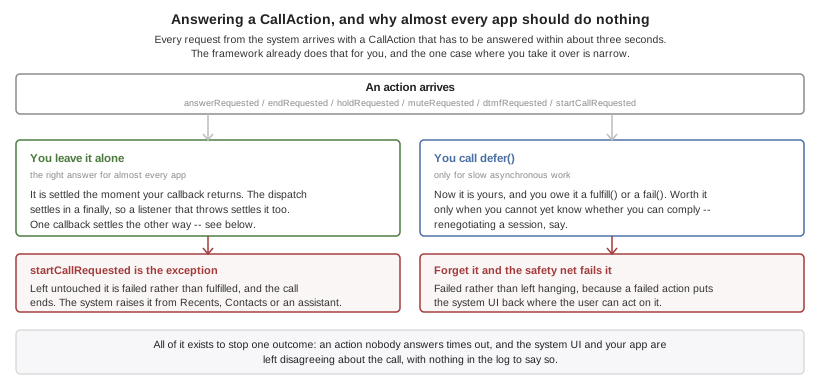
When the user answers on the lock screen, hangs up from the car, or taps the
keypad, the request arrives with a CallAction. Both platforms require an
answer within a few seconds, and an unanswered one times out and leaves the
system UI and your app disagreeing about the call, with nothing in the
log to say so.
Almost every app should ignore this entirely: an action the listener doesn’t
touch is fulfilled automatically, which is the correct behaviour. Only an app
that must do slow asynchronous work before it knows whether it can comply — renegotiating a session, say — calls action.defer() and then fulfill() or
fail() itself. A deferred action that’s forgotten is failed by a safety
timer, because a failed action puts the UI back in a state the user can act on
and a timed-out one doesn’t.
Ringing When The App isn’t Running
A VoIP push is delivered straight to the calling machinery, launching the app if it has to. It’s the only way an app that isn’t running can make the phone ring.
VoipPush.setListener(new VoipPushListener() {
    public void callReceived(PushedCall call) {
        if (call.isStale()) {
            history.addMissed(call.getHandle());   // it is already over
            return;
        }
        // The phone is ALREADY ringing. Attach media and wait for the
        // ordinary answerRequested; do not report the call again.
        signalling.attach(call.getSession().getCallId(), call.getData());
    }

    public void tokenChanged(String token) {
        signalling.registerVoip(token);
    }
});
VoipPush.register();
com.codename1.call.voip is iOS-only, and that isn’t a gap. It exists
because iOS reports a pushed call to the system before any of your code runs
and kills the app when it doesn’t — a constraint Android doesn’t have. On
Android a high-priority FCM message reaches your ordinary push callback like
any other, and you call Calls.reportIncoming from there.
VoipPush.isSupported() answers false on Android so you can branch on it.
Because the call is reported to the system before any Java runs, the native code parses the push itself and your server has to honour a fixed shape:
{ "cn1call": { "uuid": "6B29FC40-CA47-1067-B31D-00DD010662DA",
               "handle": "+14155551212", "handleType": "phoneNumber",
               "displayName": "Jane Doe", "video": false,
               "ttl": 30, "data": "opaque, handed back untouched" } }
uuid and handle are required; everything else falls back to the build
hints. data is never parsed by the framework and is how you carry a room id
or a session token through to code that runs later. To retract a call that was
cancelled before it was answered, send the same uuid with "cancel": true.
Sending a payload without cn1call wakes the app and rings nothing, which on
iOS is the case that gets the app killed.
Set the listener before or after registering, as you like — calls that arrived first are held and drained when a listener appears. An app that never sets one will find its calls timed out and ended by the platform.
UIBackgroundModes: voip is added only for apps that reference
com.codename1.call.voip, and Apple rejects an app that carries it without a
working call implementation. That’s the entire reason this is a separate
package from com.codename1.call.session.Naming And Blocking Other People’s Callers
This is caller ID and spam blocking: an ordinary cellular call arrives, and the system asks the installed directories whether any of them recognizes the number. It has nothing to do with calls your app carries, which is why it’s a package of its own and carries no telephony permissions.
DirectoryEntry[] entries = {
    new DirectoryEntry(14155551212L, "Acme Support"),
    new DirectoryEntry(14155559999L, null, true)      // blocked outright
};
CallDirectory.setEntries(entries).onResult((ok, err) -> {
    if (err == null) {
        CallDirectory.reload();
    }
});
Numbers are long rather than String on purpose. Both platforms require the
list in ascending numerical order and reject the whole list — not the offending
row — when it isn’t, and a string list sorts lexicographically, which puts
+1999… before +12…. CallDirectory sorts and de-duplicates what you
give it, so you need not.
Three platform facts to design around. On iOS the numbers are read by a
separate app extension the system starts on its own schedule, so installing the
data and asking the system to read it are two steps. Caller identification is
off until the user enables your app in Settings, which nothing you write can
do for them — check DirectoryStatus.isEnabled() before concluding that a
load failed.
And Android blocks but doesn’t label. A CallScreeningService may allow,
reject or silence a call; Android gives a third-party app no way to put a name
on one. blocked entries work there and labels are ignored, which is why
Calls.getCapabilities() reports CAPABILITY_SCREENING and not
CAPABILITY_DIRECTORY on Android.
Developing Without Hardware
The simulator and the desktop builds run a real simulated call stack rather than reporting the feature unsupported, so a ringing screen, an in-call screen and a media lifecycle can all be built and tested without a phone.
It’s a simulation and not a stub, and the difference is deliberate: nothing completes inside the calling stack frame, and the audio session arrives well after the answer rather than with it, because that gap is where media bugs live.
The Simulate → Calls menu scripts the awkward cases rather than the happy one, which is what makes it worth opening:
Ring A Second Call While Busy — where a single-call state machine breaks.
Refuse The Next Call — the emergency-call refusal an app that assumes reporting always succeeds never handles.
Never Activate The Audio Session — makes the silent-call mistake above reproduce on your desk instead of on a device.
Queue A Call That Already Ended — the cold-start call that must be logged as missed, never answered.
Every item is also callable from a test with CN.execute("call:itemN").
Build Hints
| Hint | Default | What it does |
|---|---|---|
| the app’s display name | The name shown above a call in the system UI. |
| the system ringtone | A sound file in the bundle to ring with. |
| none | A template image shown beside the call. |
| none | The name shown when a push carries no |
|
| Seconds a pushed call waits for your code before the system ends it as unanswered. |
|
| Whether the provider offers video calls. |
|
| Whether calls appear in the system call log. |
|
| The text on the Android ringing notification. |
|
| The Android answer button. |
|
| The Android decline button. |
|
| The notification channel the user sees in Settings. |
|
| Whether video calls are offered, on both platforms. Overridden per platform by |
|
| Whether the Android manifest declares |
videoSupported(true) on CallConfiguration isn’t enough on its own for a
video call. The camera permission has to be in the manifest, and a manifest is
written at build time, so the build has to be told: set call.video (or
android.call.video) as well. Without it Android refuses to grant CAMERA — a permission the manifest never asked for can’t be granted, and the request
resolves denied every time. Calls.getCapabilities() won’t report
CAPABILITY_VIDEO on such a build, so branch on that rather than assuming the
configuration was enough.
The ios.call. hints are baked into Info.plist rather than set from code
because native code needs them during launch, before any of your code has run.
The android.call. labels are read when the call rings, and exist because a
ringing screen is the last place to show an untranslated English string. Setting only
CallConfiguration and expecting a pushed call to ring with the right name is
the mistake to avoid; CallConfiguration refines them once the app is up.
Everything else is automatic. Referencing com.codename1.call.session links
CallKit, registers the Android service, and declares the two Android
permissions the ringing notification needs — POST_NOTIFICATIONS and
USE_FULL_SCREEN_INTENT, the second of which Google restricts to calling and
alarm apps and which is injected here on the strength of the package you
referenced; referencing
com.codename1.call.voip adds PushKit and the voip background mode;
referencing com.codename1.call.directory generates the iOS Call Directory
extension and the Android screening service.