The security chapter covers a lot of ground that ends at the same place: every check runs on the device, and a device the attacker fully controls is a device where every check can be patched out. Root detection returns false. The pinning code is skipped. The jailbreak probe is stubbed. None of it reaches your server, which is where the money is.
App Shield closes that loop. The app obtains a short-lived, Codename One-signed attestation token backed by a server-side verification of Apple’s App Attest and Google’s Play Integrity statements, and your own API refuses to serve a request that doesn’t carry a valid one. The statement that matters is made by a party the attacker doesn’t control, and your backend can check it in about twenty lines of middleware.
This is an Enterprise feature. The public API in com.codename1.security.shield ships in the open-source core and is safe to call in any build — in a build without the attestation engine it degrades to a documented no-op rather than failing — but tokens are only ever minted for entitled accounts.
How it fits together
Three parties are involved: the app, the Codename One attestation service, and your own API. A protected request goes through five steps.
The app asks the attestation service for a challenge, and the service answers with a nonce it generated. The nonce is what stops a token captured once from being replayed later.
The app asks the platform to attest itself against that nonce. Apple’s App Attest or Google’s Play Integrity produces a statement signed by hardware the app can’t forge.
The app sends that statement to the attestation service, together with any runtime signals it has collected.
The service verifies the statement with Apple or Google, applies the policy you configured, and answers with a short-lived ES256 JWT and the current certificate pin set.
The app sends that token to your API in the
X-CN1-Attestheader, and your middleware verifies its signature against the public keys the service publishes.
Steps 1 to 4 are the framework’s job and happen on the network thread. Step 5 is automatic for every ConnectionRequest to a host you registered. The decision — what to do about a device the service declined — is yours, and it belongs in step 5, on your server.
Turning it on
Two things have to be true: the account has to be entitled, and the build has to ask for it.
| Build hint | Default | Description |
|---|---|---|
|
| Master switch. The build server injects the hardening engine and wires it into the app’s startup. A build that asks for it without an Enterprise subscription, or on a server where the engine is unavailable, fails with an explanation rather than producing an unprotected app and saying nothing. |
| (service default) | The policy generation this build was compiled against. |
| (none) | The initial pin set, so the first launch on a new install is pinned before it has ever reached the service. Comma-separated base64 SHA-256 SPKI digests. |
| (none) | Pins the key that signs the tokens, so a compromised DNS answer can’t introduce a signing key the app will trust. |
| (Codename One cloud) | Override for a private deployment of the verification service. |
|
| The hardening engine’s own failure policy: |
|
| The App Attest environment written into the entitlement. |
Protecting hosts
Registration is the whole configuration. A host you don’t register is never touched — no header, no certificate check, no behaviour change of any kind.
AppShield.init(new ShieldConfig()
        // Money moves here, so refuse the request when no token can be obtained.
        .protect("api.mybank.example", HostPolicy.ENFORCED)
        // Everything else under the domain gets a token when one is available.
        .protect("*.mybank.example", HostPolicy.PROTECTED));

// From here on nothing changes at the call sites. A request to a protected
// host is given its token and its certificate check on the network thread.
ConnectionRequest r = new ConnectionRequest("https://api.mybank.example/transfer", true);
NetworkManager.getInstance().addToQueueAndWait(r);
HostPolicy is two independent decisions plus what to do when the shield can’t deliver:
| Policy | Token | Pins | When no token can be obtained |
|---|---|---|---|
| no | no | Not applicable. This is what an unregistered host gets. |
| yes | yes | Fail open. The request goes out without a token and your backend decides. Right for most hosts. |
| yes | yes | Fail closed. |
Fail-closed is a promise that a request without a valid token never leaves the device, so it applies to the awkward cases too: a protected host reached over plain http is refused rather than handed the bearer token in clear text, and a shield that was interrupted before it finished starting refuses rather than guessing.
If most of your hosts want the same failure mode, set it once and register them the short way:
AppShield.init(new ShieldConfig()
        .defaultFailureMode(FailureMode.CLOSED)
        // Registered the short way, so it picks up the default above.
        .protect("api.mybank.example")
        // And this one opts back out, because an outage here should degrade
        // rather than block the app.
        .protect("images.mybank.example", HostPolicy.PROTECTED));
.protect(h).defaultFailureMode(CLOSED) and the same two calls in the other order mean the same thing.Wildcards and hosts discovered at runtime
A pattern may be an exact host or a leading . wildcard covering its subdomains — .example.com matches api.example.com and a.b.example.com, but not the apex example.com and not example.com.somewhere-else.test. The most specific rule wins, so an exact registration is never relaxed by a wildcard.
Backends the app only learns about after it starts — a regional endpoint chosen at login, a tenant-specific host — are registered the same way, with the same matching:
// Exact host or a "*." wildcard, resolved the way the configured ones are:
// the most specific rule wins, and a runtime registration beats a configured
// one for the same pattern.
AppShield.addProtectedHost(region + ".api.mybank.example", HostPolicy.ENFORCED);
AppShield.addProtectedHost("*.cdn.mybank.example", HostPolicy.PROTECTED);
What happens to a request
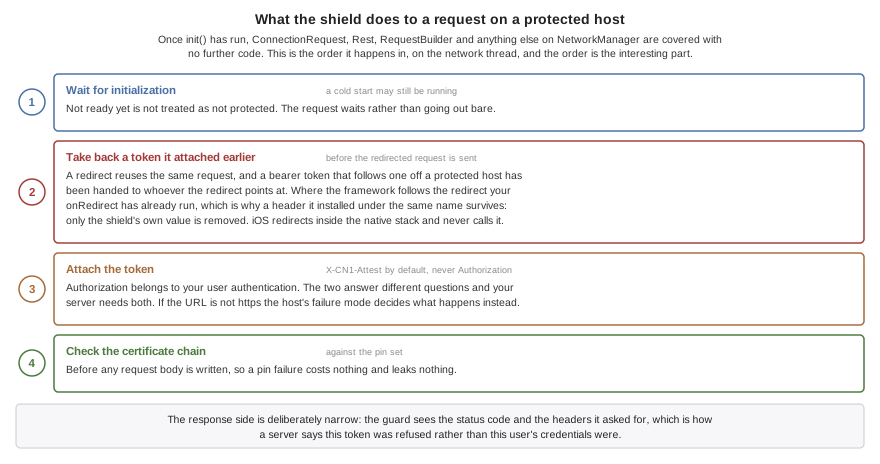
Once init() has run, ConnectionRequest, Rest, RequestBuilder and anything else built on NetworkManager are covered without further code. For a request to a protected host, on the network thread:
It waits for initialization to finish if a cold start is still in progress, rather than treating "not ready yet" as "not protected."
Any token the shield attached earlier is taken back off before the redirected request is sent — a redirect reuses the same request object, and a bearer token that follows a redirect off a protected host has been handed to whoever the redirect points at. A header your own
onRedirect()installed under the same name is left alone: the shield removes its token only while the value is still the token it attached. NoteonRedirect()runs only where the framework follows the redirect — iOS redirects inside the native stack and never calls it, so there is no opportunity to substitute a header there.The token is added under the token header, unless the URL isn’t
https, in which case the host’s failure mode decides.The certificate chain is collected and checked against the pin set, before any request body is written.
The response side is just as narrow: the guard sees the status code and the headers it asked for, which is how a backend tells the app its token was refused as opposed to the user’s credentials.
The token header
The default is X-CN1-Attest. It isn’t Authorization, by design: that slot belongs to your own user authentication, and the two answer different questions — who the user is, versus whether this is a genuine unmodified app on an uncompromised device. Your backend needs both, so they have to compose.
ShieldConfig.tokenHeader(String) changes it, and refuses names that can’t carry a token rather than accepting them and failing out of sight later:
Anything that isn’t a legal HTTP field name. A name with a space or a separator in it isn’t the header you asked for by the time it reaches the server — and it also slips past every check below, because
Cookie ` isn’t `Cookie.Content-Type, whichConnectionRequestroutes to the request’s media type rather than the header map, so the token would replace the content type and survive the redirect cleanup.Your app’s cookie header, whatever it has been renamed to, because the cookie string is written after the request’s own headers and would overwrite the token after
attach()reported success.Headers the transport owns — framing, routing, and the hop-by-hop names a correctly behaving proxy consumes and doesn’t forward.
Status, and what to do about it
The most important distinction in the API is between "the shield couldn’t be reached" and "the shield looked at this device and said no." Reacting to the first the way you react to the second is how an app locks a paying customer out on a train.
| Status | Transient | Meaning |
|---|---|---|
| - | A valid token is in hand. |
| no | This build has no attestation engine. Nothing is enforced. |
| no |
|
| yes | The service couldn’t be reached. |
| yes | The service answered with an error. |
| yes | This device is being throttled. Retry after a backoff. |
| no | The service evaluated this device and declined to mint a token. |
| no | A pinned host presented a chain matching none of its pins. Nothing was sent. |
ShieldStatus is a constant object rather than an enum on purpose: the vocabulary is visible on the wire and the service must be able to add a status without breaking apps built against an older release. Compare with equals, branch on isSuccess() and isTransient(), and treat an id you don’t recognize as a non-success.
Listeners are delivered on the EDT, so they may touch the UI directly. The framework never shows a dialog and never terminates the app over a shield event — what the user sees is entirely your decision:
AppShield.addListener(new ShieldListener() {
    public void statusChanged(ShieldStatus status) {
        if (status.isSuccess()) {
            return;
        }
        if (status.isTransient()) {
            // The service could not be reached. This is a bad connection, not a
            // bad device -- treating it like a rejection is how an app locks out
            // users on a train.
            Log.p("AppShield: attestation unavailable (" + status.getId() + ")");
            return;
        }
        // REJECTED or PIN_MISMATCH: the service evaluated this device and
        // declined, so degrade rather than retry.
        disableTransfers();
    }

    public void signalRaised(ShieldSignal signal) {
        // Informational. The server decides what a signal means -- an emulator
        // signal is normal on a developer's machine.
        Log.p("AppShield signal " + signal.getId() + " severity "
                + signal.getSeverity());
    }

    public void tokenRefreshed(ShieldToken token) {
    }
});
Getting a token yourself
For anything the guard doesn’t cover — a third-party HTTP client, a payload you sign yourself, a handshake — ask for the token directly. fetchToken() is asynchronous and returns immediately, including during a cold start:
AsyncResource<ShieldToken> pending = AppShield.fetchToken();
pending.ready(new SuccessCallback<ShieldToken>() {
    public void onSucess(ShieldToken token) {
        sendToMyBackend(token.getValue());
    }
});
pending.except(new SuccessCallback<Throwable>() {
    public void onSucess(Throwable error) {
        ShieldStatus status = ((ShieldException) error).getStatus();
        Log.p("AppShield: no token (" + status.getId() + ")");
    }
});
Pass a binding value to tie the token to one specific request, so a token lifted from it can’t be replayed onto another:
// The digest travels in the token, so a token lifted off this request and
// replayed on another one does not verify against the other one's body.
AppShield.fetchToken(sha256(payload)).ready(new SuccessCallback<ShieldToken>() {
    public void onSucess(ShieldToken token) {
        sendToMyBackend(token.getValue());
    }
});
AppShield.attach(ConnectionRequest) does the same work synchronously for a request you are about to send. It blocks on a network round trip, so it must not be called on the EDT:
ConnectionRequest r = new ConnectionRequest("https://api.mybank.example/transfer", true);
try {
    // Blocks on the attestation round trip, so never on the EDT. In normal use
    // the guard does this for you on the network thread.
    AppShield.attach(r);
} catch (ShieldException err) {
    if (ShieldStatus.PIN_MISMATCH.equals(err.getStatus())) {
        // The chain presented for a pinned host matched no pin. Nothing was
        // sent, and this is the one status worth surfacing to the user: it
        // usually means the connection is being intercepted.
        warnAboutInterception();
        return;
    }
    // A fail-closed host with no token. Retry later if the status is transient.
    Log.e(err);
    return;
}
NetworkManager.getInstance().addToQueueAndWait(r);
Token lifetime is measured from a monotonic clock, never from exp against the device clock, because on a rooted device the wall clock is whatever the attacker wants it to be. getCachedToken() returns the current token without any network access, and invalidateToken() discards it so the next request re-attests — which is what to call when your backend tells you the token itself was refused:
ConnectionRequest r = new ConnectionRequest("https://api.mybank.example/transfer", true) {
    @Override
    protected void readHeaders(Object connection) throws IOException {
        // Your middleware sets this header when the ATTESTATION was the problem,
        // as opposed to the user's own credentials. Without it a 401 or 403 is
        // ambiguous, and an app re-attests its way through a wrong password.
        if (getHeader(connection, AppShield.REJECT_HEADER) != null) {
            AppShield.invalidateToken();
        }
    }
};
NetworkManager.getInstance().addToQueueAndWait(r);
AppShield.REJECT_HEADER is X-CN1-Attest-Reject. Have your middleware set it only when the token was the problem: a protected API normally carries your own user authentication too, and an app that reads every 401 as an attestation failure re-attests its way through a wrong password.Certificate pinning
Pins are published by the service and refreshed with the token, so rotating a certificate is a console action rather than an app store release. They’re pinned over the subject public key info, so renewing a certificate on the same key pair doesn’t invalidate the pin, and a chain matches if any certificate in it matches any pin for the host — which is what makes it safe to pin an issuing CA as the backup.
Pinning is the one part of the shield that can take an app offline for a reason the developer can’t fix remotely, so the failure behaviour is asymmetric by design:
| Condition | Behaviour |
|---|---|
Host has no pins | Never enforced. Covers first run, a cold start with no network, and any host the service hasn’t published pins for. |
Pin fetch failed | Never fails a request. The last known set is kept. |
Set past its soft expiry | Still enforced; a refresh is attempted. |
Set past its hard expiry | Dropped, and enforcement stops. A device offline for weeks loses pinning, not the app. |
Chain matches a pin | Request proceeds. |
Host has pins, chain matches none | Fail closed. |
PinSet pins = AppShield.getPinSet();
if (!pins.isEnforcedFor("api.mybank.example")) {
    // No published pins for this host yet, or the set has hard-expired on a
    // long-offline device. Pinning is not enforced, and the app still works.
    Log.p("AppShield: no pins in force (version " + pins.getVersion() + ")");
}
IOException at your call sites you won’t see it, and an intercepted connection is the one failure worth telling the user about.Runtime signals
The framework’s own detections — root, jailbreak, hooking frameworks, emulators, debuggers, repackaging, untrusted accessibility services — are reported to ShieldSignals rather than acted on locally, and ride along with the next token fetch. There is no separate beacon to block and no extra battery cost.
This is a deliberate inversion of the older exit(0) style checks. Terminating the app is trivially patched out, destroys the telemetry that makes the feature useful, and turns a detection into a crash report. The client reports; the service decides. An emulator signal is normal on a developer’s machine; ten high-severity signals from one device in an hour is a device the service can keep flagging on its next clean-looking attestation.
Your own code can report what only it can notice — a server-side consistency check that failed, a sequence of actions no human performs:
// Severity is 0-100. The service applies the policy; the client only reports.
ShieldSignals.add("serverStateMismatch", 60,
        "balance disagreed with the ledger after a retry");

// The framework's own detections arrive the same way.
for (ShieldSignal s : AppShield.getSignals()) {
    if (ShieldSignal.HOOK.equals(s.getId())) {
        requireStepUpAuth();
    }
}
The bus is bounded and repeat reports of an id collapse onto the existing entry, so a detector that trips on every frame can’t exhaust memory. An identical repeat refreshes the entry without notifying listeners again; a changed severity or detail is a new observation and is announced.
Transports the guard doesn’t cover
Coverage matters more here than anywhere else in this chapter, because a gap is invisible at the call site: the code compiles, the request succeeds, and no token was ever attached.
| Transport | Coverage |
|---|---|
| Token and pinning, automatically. |
| Token via |
| The initial navigation only, through |
A native or third-party HTTP client | Nothing automatic. Use |
// BrowserComponent: the INITIAL navigation only. Requests the loaded page makes
// itself are invisible to the framework and cannot be given a token or pinned.
Hashtable headers = AppShield.headersFor("https://api.mybank.example/statement");
browser.setURL("https://api.mybank.example/statement", headers);

// WebSocket: the handshake carries the token. Emitted on Android, desktop,
// Windows and Linux; silently dropped on iOS and in the browser, whose platform
// sockets expose no way to add a header.
WebSocket.build("wss://api.mybank.example/stream")
        .header("X-CN1-Attest", token)
        .connect();
Composing with your own network guard
NetworkManager holds exactly one guard and seals the slot after the first one is installed, so an app that needs its own interception has to delegate to the shield’s rather than displace it:
// NetworkManager holds exactly one guard and seals the slot, so an app with its
// own has to delegate rather than replace -- calling attach() by hand instead
// would restore the token and silently drop the certificate callbacks that
// enforce pinning.
final NetworkGuard shield = AppShield.getNetworkGuard();
NetworkManager.setNetworkGuard(new NetworkGuard() {
    public void beforeRequest(ConnectionRequest r) throws IOException {
        r.addRequestHeader("X-My-Trace", newTraceId());
        shield.beforeRequest(r);
    }

    public boolean isCertificateCheckRequired(String url) {
        return shield.isCertificateCheckRequired(url);
    }

    public void checkCertificates(ConnectionRequest r, SSLCertificate[] chain)
            throws IOException {
        shield.checkCertificates(r, chain);
    }

    public String[] interestingResponseHeaders() {
        return shield.interestingResponseHeaders();
    }

    public void afterResponse(ConnectionRequest r, int code, String[] headers) {
        shield.afterResponse(r, code, headers);
    }
});
attach() by hand. That restores the token and drops the certificate callbacks with no error, so pinning stops being enforced while everything still looks like it’s working — the half of the shield whose absence looks exactly like success.Verifying the token in your backend
The token is a compact ES256 JWT with typ of cn1-attest+jwt, signed by a key published at /.well-known/cn1-attest-jwks.json and named by the header’s kid. Verification is ordinary JWT verification against a JWKS URL — NimbusJwtDecoder.withJwkSetUri in Spring, jose in Node, PyJWT[crypto] in Python — and the console renders a copy-paste quickstart for each, including a Cloudflare Worker for the zero-code-change case.
Beyond the standard iss, aud, sub, iat, exp and jti, the claims your middleware acts on are:
pkgandplat— the package name and platform the token was minted for. Check them against the app you expect.vrd— the verdict:attested,monitoredorunverified.dec— the decision under the current policy:allow, orwould_denywhile the app is still in monitor mode.sig— the signals the device reported.pol— the policy version the decision was made under.ph— the payload binding, when the request asked for one.
Roll it out in two stages, and keep the two sides independent. While the service is in monitor mode it mints a token for everyone and marks the ones it would have refused, so you can watch the would-deny rate against real traffic before anything breaks. Your middleware has its own switch: log and pass through, or reject. Move one at a time.
403, not a 401. A 401 invites the client to retry with fresh credentials, which is exactly the loop you don’t want, and a detailed reason is an oracle for whoever is probing you.iOS App Attest specifics
Apple’s model is one attestation, then many assertions: the first token carries a hardware-backed public key and its attestation, and every later token is a small assertion naming the key. The framework manages the key, the state and the retry policy in the keychain, including recovery when iOS invalidates the key — a restore to a new device, or a reinstall — and Apple’s rate limits, which are strict enough that attesting per request gets an app throttled.
The one thing your code has to do is close the loop when the backend has stored the key, because a registration call that was lost leaves the device asserting against a key the server has never seen:
// iOS App Attest is attest-once, assert-many: the FIRST token carries the public
// key, every later one is an assertion naming it. Call this once your backend
// has stored that key, or a device whose registration call was lost keeps
// sending assertions for a key the server never saw.
DeviceIntegrity.confirmAttestation(keyId);
DeviceIntegrity.resetAttestation() throws the key away and starts again, which is the recovery path for a backend that no longer knows the key.
Testing it in the simulator
None of this is testable against a real service on a developer’s desktop, so the simulator ships a simulation engine behind Simulate > App Shield. Switching on any item installs it; leaving the menu alone leaves the shield inert.
| Menu item | What it makes reachable |
|---|---|
Attestation Supported | Unchecking it simulates a platform with no attestation at all. |
Attestation Result |
|
Device signal toggles | Rooted / jailbroken, hooking framework, emulator, debugger, repackaged, untrusted accessibility service — each raising the signal your code reacts to. |
Screen Overlay (Tapjacking) | Fakes another app drawing over yours. It drives the real reporting path rather than setting a flag, so your tapjacking listener fires and the |
Serve Expired Token | The refresh path, without waiting out a real token’s lifetime. |
Force Pin Mismatch On Next Request | The most valuable item here: a fail-closed pinning branch is otherwise only reachable by mis-pinning a live host on purpose. It’s a one-shot that disarms itself once spent. |
Fail Pin Fetch | Confirms that a failed pin refresh doesn’t fail requests. |
Show Shield Status… | What the simulation is currently set to, and whether the simulated engine is registered. |
The simulated token is stamped so it can’t be mistaken for a real one, and the simulator’s engine never contacts the service. A backend that accepts a simulated token is a backend that isn’t verifying signatures.
When there is no engine
Every method in this chapter is safe to call in a build without the engine — an open-source build, an unentitled account, the simulator with the menu untouched. The degradation contract is explicit, and it’s the reason you don’t need to guard your call sites:
init()succeeds and logs one line.isProtected()returnsfalse.fetchToken()always completes, withUNPROTECTED, and never hangs.attach()does nothing. No header, no exception.No request is ever blocked, including one to a host registered as
ENFORCED. Fail-closed enforcement requires an engine to fail; with no engine there is nothing to enforce and the app must keep working.getSignals()still returns realDeviceIntegritydata, so the free-tier detections described in the security chapter keep working.