A classic Android application — activities, XML layouts, res/values,
drawables and the framework widgets — can build and run as a Codename One
application without changes to its Java code or its resources. The Android
sources go into the Codename One project, the build compiles them against a
Codename One implementation of the android.* API, and the result runs on
every Codename One target: iOS, Android, the JavaScript port, the desktop
ports and the simulator.
There is no Android runtime involved. Views are Codename One components, layouts follow Android’s measure and layout rules, text fields are the platform’s native text fields, and resources are compiled into a compact table at build time.
Quick start
Create a Codename One application project (for example from the initializr), then import the Android Studio project into it:
mvn cn1:import-android-project -Dcn1.android.import=/path/to/MyAndroidApp
The goal copies the module’s src/main (the app module unless
-Dcn1.android.module names another) into common/src/main/android, makes
the Codename One main class start the Android application, and lists the
module’s Gradle dependencies the compatibility runtime covers and the ones it doesn’t
cover. After that, run and build as usual:
mvn cn1:run
mvn cn1:build -Dcodename1.platform=ios
You can also copy the files by hand. The directory mirrors an Android Studio
module’s src/main:
common/src/main/android/
    AndroidManifest.xml
    res/          layouts, values, drawables, menus, fonts...
    assets/
    java/         the Android application's Java (and Kotlin) sources
    kotlin/       Kotlin sources, if the module keeps them apart
Kotlin sources compile with the application’s Kotlin support, which the import goal switches on when the module has any.
When the manifest declares no package (an Android Gradle plugin namespace
replaces it), add package="…" to the manifest or set the
cn1.android.namespace Maven property; the import goal does this for you.
How the build works
Three steps run as part of the normal build of the common module:
compile-android-res(ingenerate-sources) compiles the manifest andres/tree. It writes theRclass for the application package, a generated class withnewfor every activity in the manifest and every view class the layouts use, and a binary resource table with every value, style and compiled XML file. Images, fonts and assets are copied next to it.The Java compiler builds the application against the
codenameone-android-compatartifact, which provides theandroid.*API. This is why the sources need no changes.remap-android(inprocess-classes) moves the compiledandroid.*references and the runtime classes undercom.codename1.androidcompat, so nothing in the application uses a name the real Android framework owns. The application therefore also builds for Android without conflicts. This step also generates the dispatcher forandroid:onClickattributes from the methods that exist in the compiled classes.
Nothing is created by reflection: layouts are inflated from the compiled table by calling constructors the build generated, which is what lets the same code run on iOS.
The codenameone-android-compat dependency is added to the common module
by the project’s android-compat profile, which activates when
src/main/android exists. Gradle projects get the same tasks
(compileAndroidRes) and the dependency automatically.
The entry point
If the project has no main class of its own, the build generates one that starts the activity the manifest marks as the launcher. To customize startup, write the class yourself; it needs one line:
public class MyApp extends com.codename1.androidcompat.runtime.AndroidLifecycle {
    public MyApp() {
        super(new com.codename1.generated.android.AndroidAppImpl());
    }
}
Resources
Resources resolve the way they do on Android:
Every value type: strings (with formatting arguments and Android’s quoting and escaping rules), plurals, string and integer arrays, colors, color state lists, dimensions in every unit, integers, booleans, fractions and ids.
Styles and themes, including parent inheritance through
parent=and dotted names, theme attributes (?attr/colorPrimary),style=on views, default widget styles from the theme and text appearances.Configuration qualifiers: locale and region, layout direction, smallest width, width and height, orientation, night mode, density buckets and API level. The best match for the device is chosen with Android’s precedence rules and is re-evaluated when the device rotates or switches to dark mode.
Drawables: PNG and JPEG images scaled from their density bucket, nine-patches, vector drawables (
<vector>with groups, clip paths and theme tints),<shape>,<selector>,<layer-list>,<inset>,<ripple>,<bitmap>and<color>.Fonts in
res/fontand files inres/rawandassets/.
The framework’s own resources — the Material themes, android.R.id,
android.R.color and the widget styles — are part of the runtime.
Problems are reported against the resource file and line with a stable code,
for example src/main/android/res/layout/main.xml:12: <CalendarView> is not a
view class the Codename One Android runtime implements (android2cn1:E0201).
What’s supported
Activities with the complete lifecycle, explicit intents with extras,
startActivityForResult, the back stack andfinish(), implicit intents for web pages, phone numbers, mail, text messages and sharing, and configuration changes: an activity that doesn’t declareandroid:configChangesis recreated with its saved state, as on Android.The action bar with the options menu and its overflow,
PopupMenu,PopupWindowandListPopupWindow.Fragments:
Fragment,FragmentManagerand transactions with the back stack,ListFragment,DialogFragment,<fragment>in layouts, child fragment managers and fragments' option menus.ListActivityis supported too.Layout inflation with
<include>,<merge>,<ViewStub>, custom views (constructed with theirAttributeSet),android:themeon views andandroid:onClick.Views drawn and measured as on Android:
View,ViewGroup,TextView,Button,EditText,AutoCompleteTextView,ImageView,ImageButton,LinearLayout,RelativeLayout,FrameLayout,TableLayout,GridLayout,ScrollView,HorizontalScrollView,Space,CheckBox,RadioButtonandRadioGroup,Switch,ToggleButton,ProgressBar,SeekBar,RatingBar,NumberPicker,DatePicker,TimePicker,WebView, and custom views that overrideonMeasure,onLayoutandonDrawwithCanvas,Paint,PathandMatrix.Lists and adapters:
ListView,GridViewandSpinnerwith view recycling,ArrayAdapter,BaseAdapter,SimpleAdapter,CursorAdapterandSimpleCursorAdapter.Touch input dispatched down the view tree, so
onInterceptTouchEvent,onTouchEventand touch listeners behave as written, and the back key.Dialogs:
AlertDialog,DatePickerDialog,TimePickerDialog,ProgressDialogandToast.Data and files:
SQLiteOpenHelper,SQLiteDatabase, cursors andContentValuesover the platform’s SQLite,SharedPreferences, the application’s private directories (getFilesDir(),getCacheDir(),openFileOutput()), andjava.io.Filewith the file streams, readers and writers.HandlerandLooper,Bundle,Uri,AssetManagerandBitmapFactory.Animation: view animations from
res/anim(alpha,translate,scale,rotateandset) withstartAnimation, layout animations, the framework and XML interpolators,ViewFlipperand the switchers, and property animation withview.animate(),ValueAnimator,ObjectAnimator,AnimatorSetandres/animatorresources.XML:
getResources().getXml()returns a pull parser over the compiled resource, andXml.newPullParser()andXml.newSerializer()read and write XML text.Room: entities, DAOs, type converters,
@Embedded,@Upsert,@RawQuery,LiveDataqueries and migrations. The build generates the_Implclasses that the Room annotation processor would, so nothing is found by reflection.WorkManager: one-time and periodic work, chains whose outputs merge into the next worker’s input, unique work, retries with a growing delay and
LiveDatastatus queries. Pending work is saved and resumes on the next run.Location and sensors:
LocationManagerwith its listeners, last known and current location, andSensorManagerwith the accelerometer, gyroscope, magnetometer, gravity, rotation vector and orientation, includinggetRotationMatrix()andgetOrientation().Services declared in the manifest: started and bound services,
IntentService, andstartForeground(), which runs as a Codename OneForegroundService. Notifications and channels posted throughNotificationManagerandNotificationCompatare shown as local notifications.The
AndroidKeyStorewith AES keys fromKeyGeneratorandKeyGenParameterSpec, used throughCipherin GCM or CBC mode.
AndroidX
The runtime includes the AndroidX libraries a classic application most often depends on, so code written against them builds without changes:
AppCompat:
AppCompatActivitywithgetSupportActionBar()andsetSupportActionBar(), theToolbarwidget with its navigation button, title, subtitle, logo, action buttons and overflow menu,AlertDialog,SwitchCompat, and the AppCompat versions of the framework widgets, which an AppCompat activity inflates in place of the framework tags so thatapp:srcCompat,app:tint,app:backgroundTintandapp:buttonTintapply. TheTheme.AppCompatthemes, including theDayNight,NoActionBarandDarkActionBarvariants and theThemeOverlay.AppCompatoverlays, andAppCompatDelegate.setDefaultNightMode().androidx.activity:ComponentActivity,OnBackPressedDispatcherandOnBackPressedCallback, and the Activity Result API with theStartActivityForResult,RequestPermission,RequestMultiplePermissionsandGetContentcontracts.androidx.core:ContextCompat,ResourcesCompat,ViewCompat,WindowCompat,WindowInsetsCompat,ActivityCompat,DrawableCompat,TextViewCompat,ImageViewCompatandHandlerCompat.Fragments:
androidx.fragment.app.Fragmentwith its own lifecycle and a separate one for its view (getViewLifecycleOwner()),FragmentActivityandgetSupportFragmentManager(), transactions and the back stack, which the back key pops before the activity handles it,FragmentContainerViewwithandroid:name,<fragment>tags,DialogFragment,ListFragment, fragment results (setFragmentResult()andsetFragmentResultListener()), the Activity Result API from a fragment, andFragmentFactory.AppCompatActivityis aFragmentActivity.androidx.lifecycle:Lifecycle,LifecycleOwner,LifecycleRegistry,DefaultLifecycleObserver,LifecycleEventObserverandProcessLifecycleOwner;ViewModel,AndroidViewModelandViewModelProvider, with view models of an activity or a fragment surviving a configuration change;LiveData,MutableLiveData,MediatorLiveDataandTransformations; andSavedStateHandle.androidx.annotation.ConstraintLayout:
ConstraintLayoutwith everylayout_constraintattribute — edges, baselines, circular positioning, bias, chains (spread, spread inside, packed and weighted), match-constraint sizes with their minimum, maximum and fraction of the parent, dimension ratios and gone margins —Guideline,Barrier,Group,Placeholder,Flow,LayerandConstraintSet. Layouts are solved by ConstraintLayout’s own solver, so views land where they do on Android.RecyclerView: view recycling with the shared
RecycledViewPool, the view cache and stable ids;LinearLayoutManager(vertical and horizontal,reverseLayout,stackFromEnd,scrollToPositionWithOffset()),GridLayoutManagerwithSpanSizeLookup, andStaggeredGridLayoutManager, also set throughapp:layoutManager; touch scrolling and flings,smoothScrollToPosition()andLinearSmoothScroller; every adapter notification, payloads included;ItemDecorationandDividerItemDecoration;DefaultItemAnimator;DiffUtil,ListAdapterandAsyncListDiffer;ItemTouchHelperfor swipe-to-dismiss and drag-to-reorder; andLinearSnapHelperandPagerSnapHelper.ViewPager2with aRecyclerView.Adapter, horizontal or vertical,OnPageChangeCallback,setCurrentItem(), page transformers andMarginPageTransformer.Material Components: the
Theme.MaterialComponentsandTheme.Material3themes (light, dark andDayNight, with or without an action bar) with the library’s default color roles, type scale and corner shapes, and theThemeOverlayvariants. Under either theme a<Button>inflates as aMaterialButtonand a<CheckBox>,<RadioButton>,<TextView>or<AutoCompleteTextView>as its Material version, as they do on Android. The widgets areMaterialButton(icon, corner radius, stroke, toggling throughMaterialButtonToggleGroup),MaterialCardViewand AndroidXCardView,FloatingActionButtonandExtendedFloatingActionButton,TextInputLayoutwithTextInputEditText(floating label, helper text, error, counter, filled and outlined boxes, the password toggle and clear-text icons, and the exposed drop-down menu),ChipandChipGroup,BottomNavigationView,TabLayoutwithTabLayoutMediator,MaterialToolbarandAppBarLayout,Snackbar,MaterialAlertDialogBuilder,MaterialSwitchandSwitchMaterial,MaterialCheckBoxandMaterialRadioButton,Slider,LinearProgressIndicatorandCircularProgressIndicator,BottomSheetDialogwithBottomSheetBehavior, andMaterialDivider.
The libraries' resources — Theme.AppCompat, ?attr/colorPrimary, app:
attributes, the androidx.appcompat.R class — belong to the application’s own
namespace, as they do in an Android Gradle build: the application refers to them
without a package, its R class lists them, and a resource it defines under a
library resource’s name overrides the library’s value.
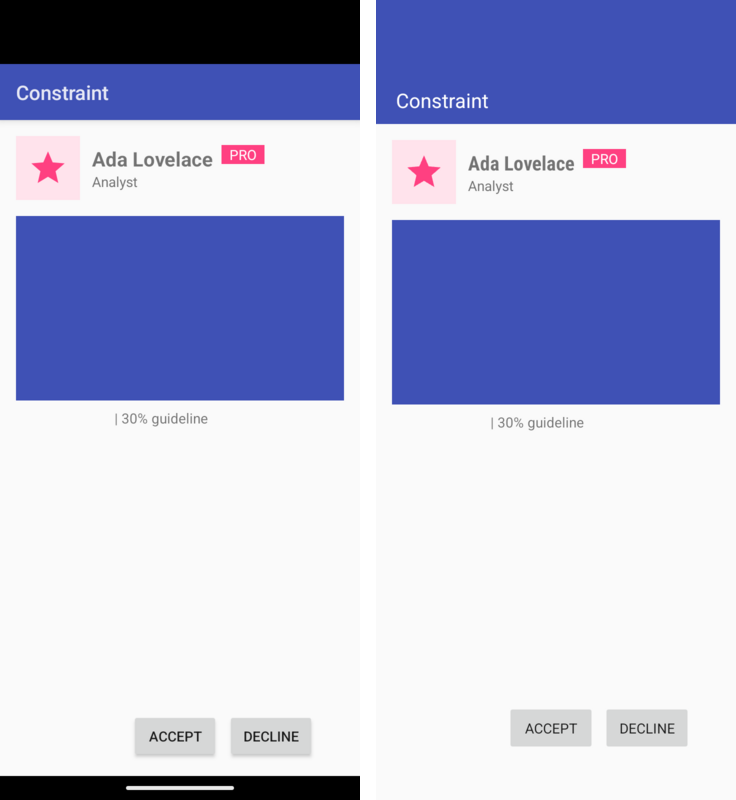
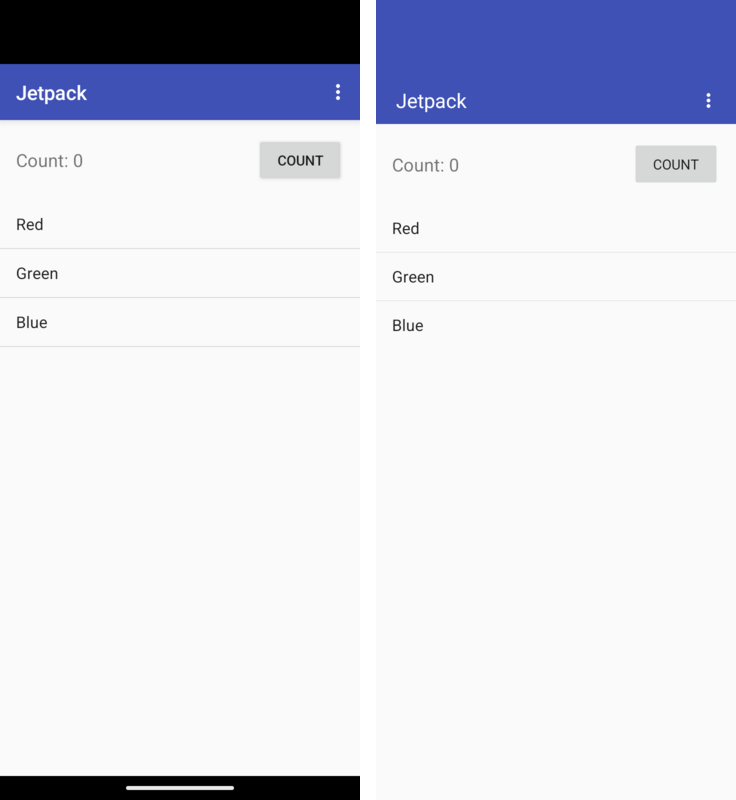
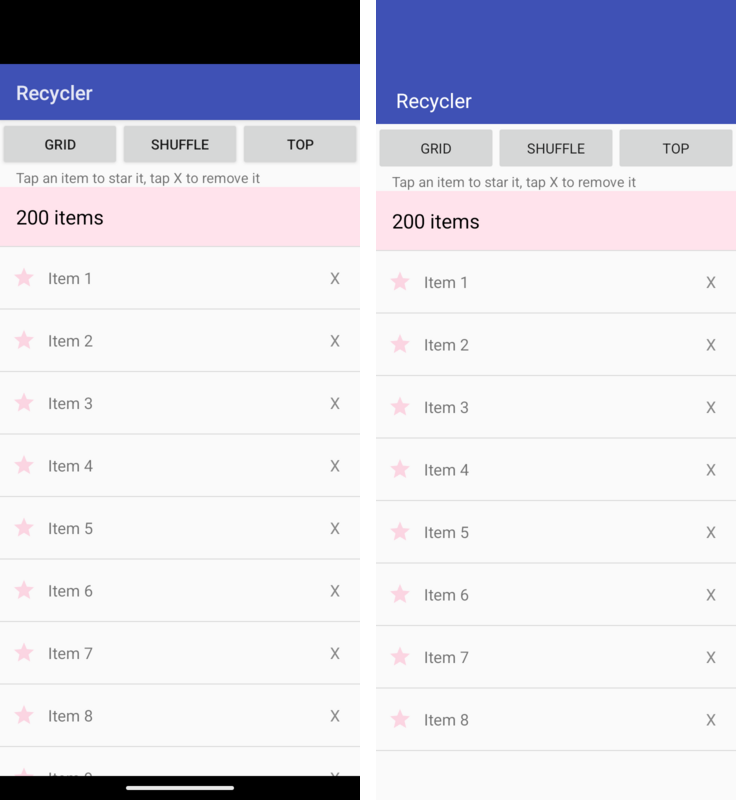
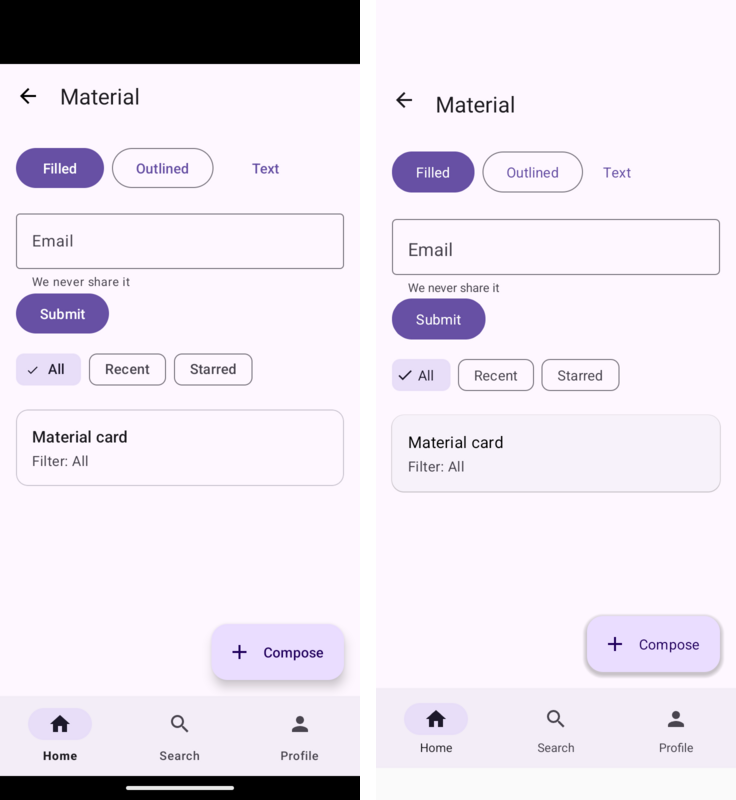
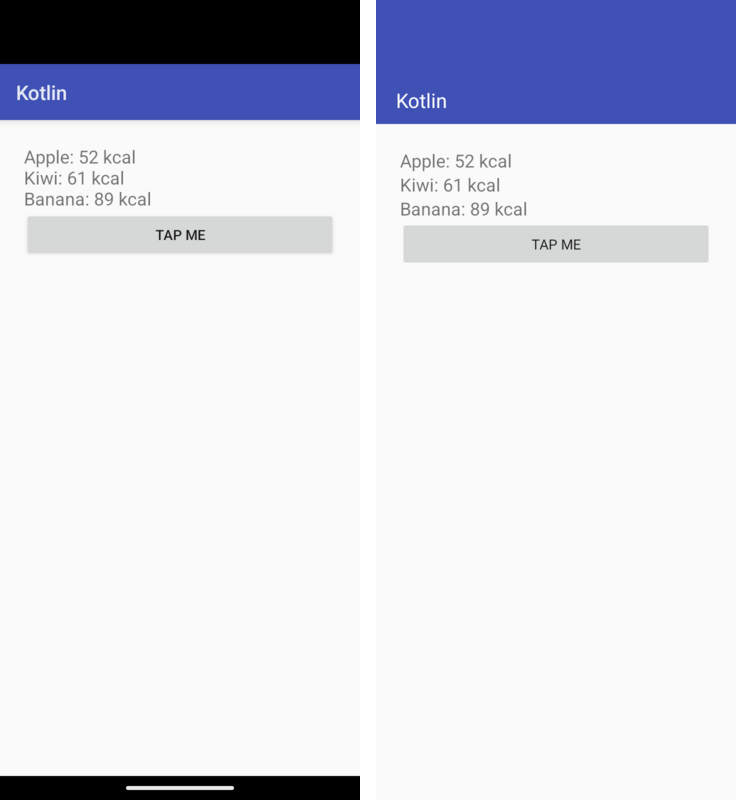
Side by side with Android
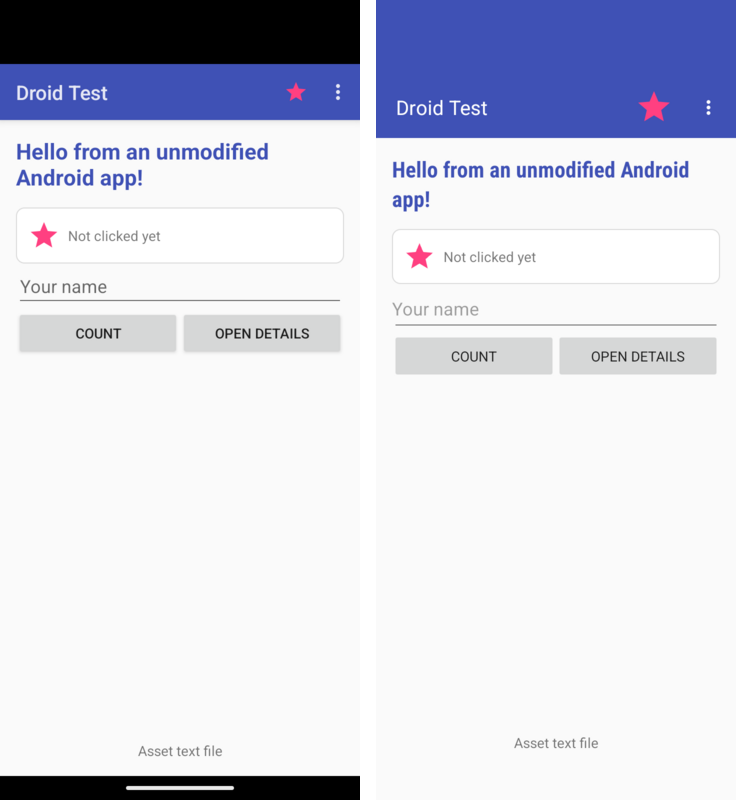
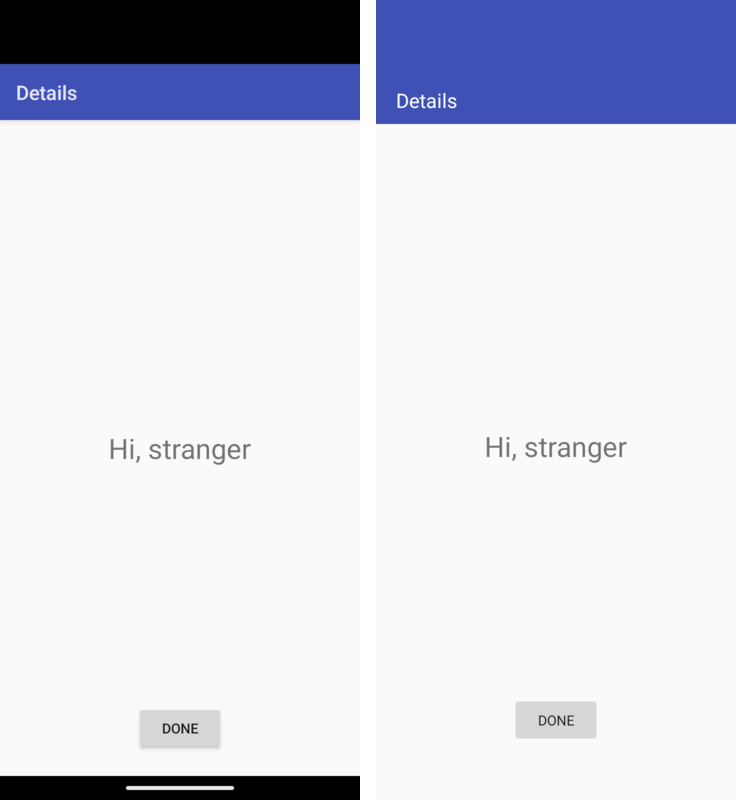
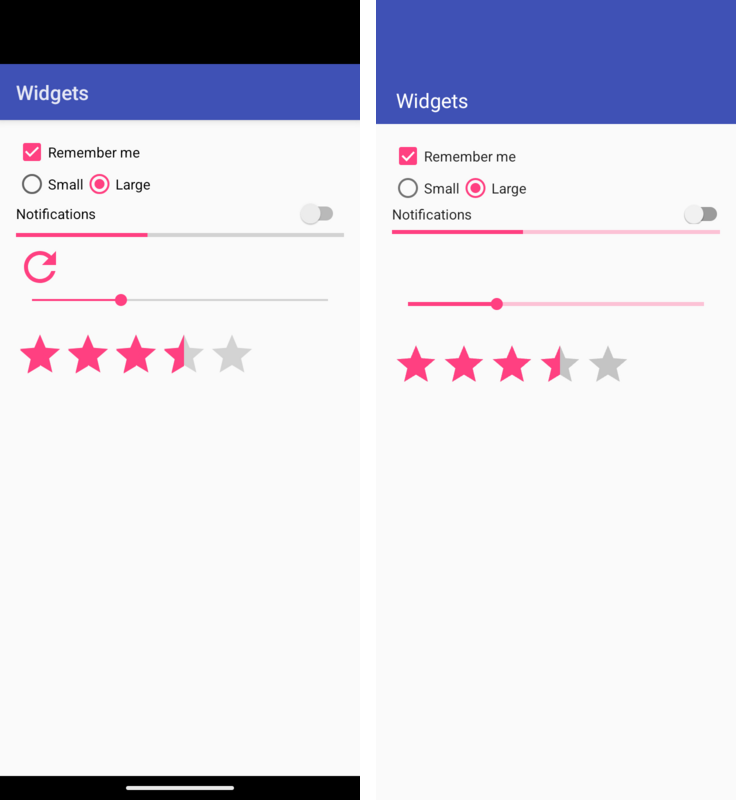
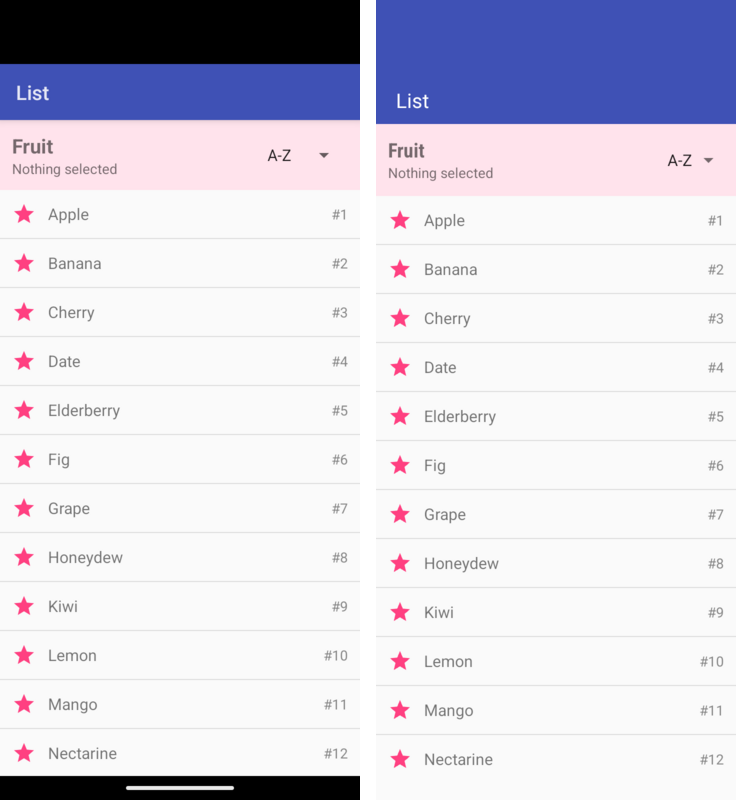
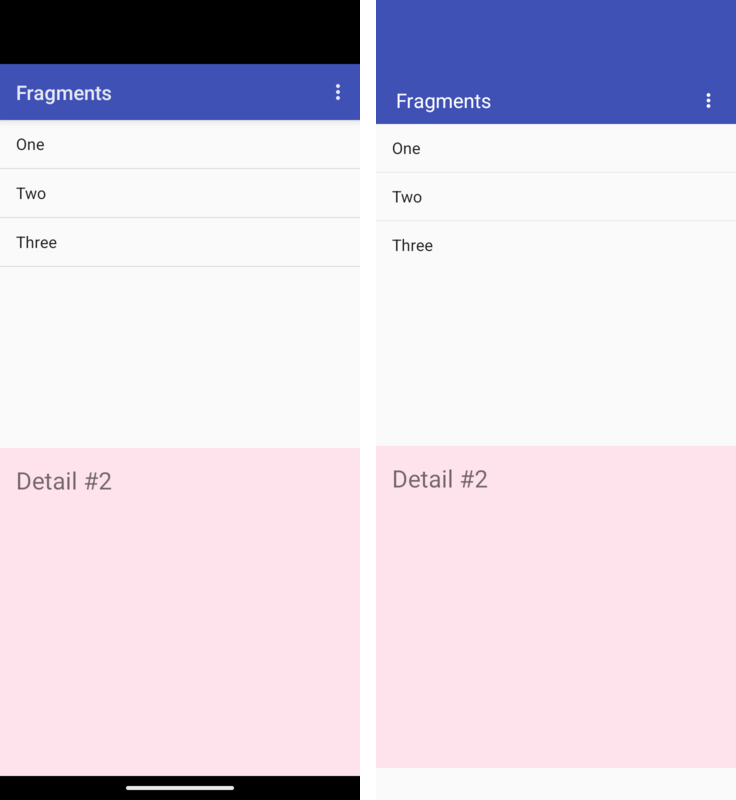
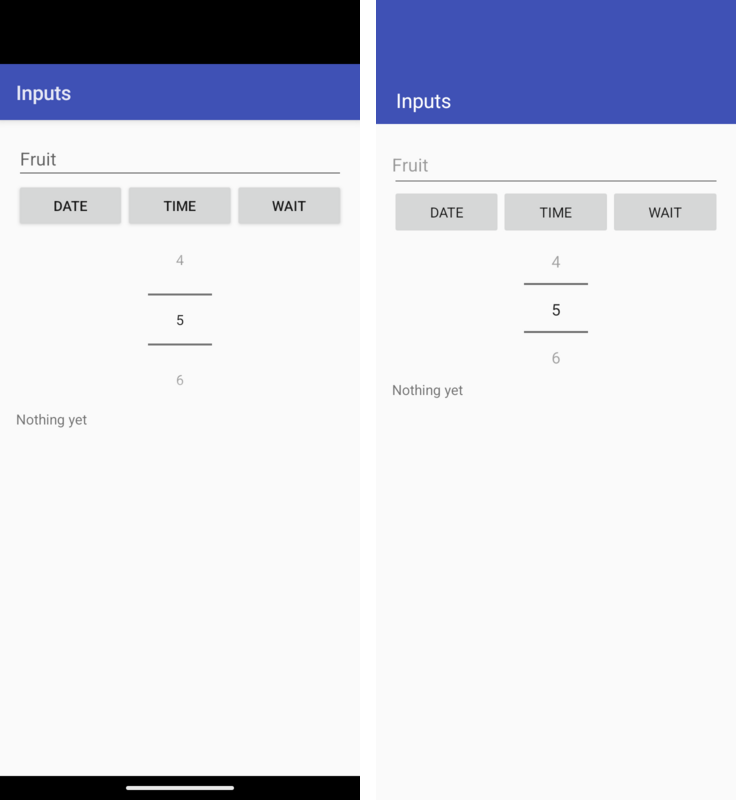
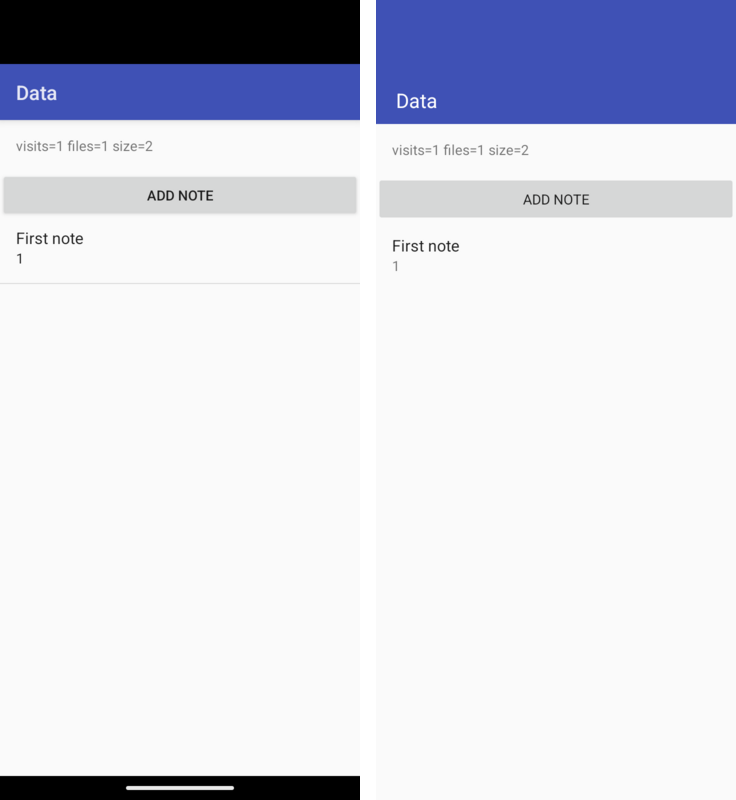
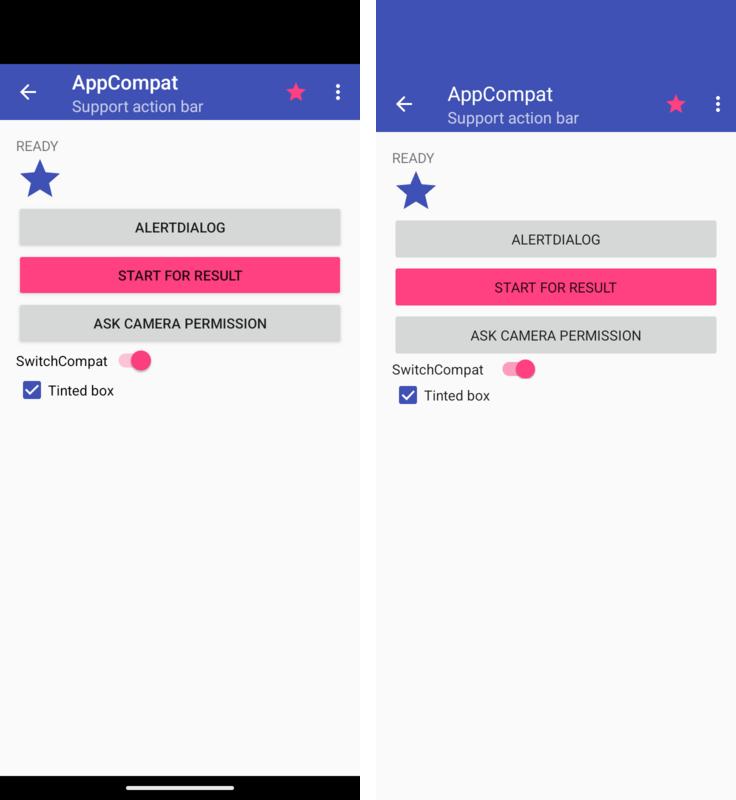
The gallery in scripts/android-compat-samples/gallery is an ordinary Android
Studio module. Each image below shows one of its screens twice, both captured
on the same Android 16 emulator (720 by 1600 pixels at 320 dpi). On the left,
the module is built by Android Studio against the real framework and AndroidX
libraries. On the right, the same unmodified sources are built as a Codename
One application; this is the screen the screenshot tests capture on every
port.
A few differences are expected:
On the left, the black band at the top is the emulator’s display cutout; a Codename One application paints its toolbar color under the status bar.
Codename One’s bold face on Android is Roboto Condensed, so bold text sets narrower and wraps later.
The native build targets API 34, so its window keeps the classic layout the sample was written for. From API 35, Android draws such an application edge-to-edge unless it handles the window insets itself.
The screenshot test hides the indeterminate progress spinner on the widgets screen, because it never stops moving.
Limitations
This is a compatibility layer for classic Android application code using the APIs described above. It doesn’t promise complete Android framework behavior. Validate the screens and data flows your application uses on its target ports; the gallery and automated tests cover a subset of those behaviors.
Parcelis an in-process value container, not Android’s serialization or IPC format. Positions count values rather than bytes.writeParcelable()andreadParcelable()retain and return the same object; they don’t invokewriteToParcel()orCREATOR. TypedParcelablelists also retain their elements. Code that depends on serialization making a snapshot, creator-side validation, or restoring state after process death needs an explicit storage or copy implementation.SQLite uses one Codename One database connection. While one thread’s transaction is open, another thread’s statements wait for it to end, as on Android, and throw
SQLiteDatabaseLockedExceptionafter ten seconds. On the main thread the wait is two seconds, because the UI is frozen while it waits and the other thread may be waiting for the main thread itself. Threads don’t read concurrently: one thread’s long transaction holds up every other thread’s queries.Switching only a locale’s script, such as
zh-Hanstozh-Hantwith the same region, updates resource selection but doesn’t notify or recreate existing activities. Already-inflated text and layouts can retain the old script until the activity is recreated. Automatic handling of this live configuration change is deferred.Configuration changes don’t call
Application.onConfigurationChanged(). Refresh shared resource-dependent state from an activity’sonConfigurationChanged()callback, or fromonResume()after recreation.The application’s own code must avoid the JDK classes Codename One doesn’t provide; the build’s bytecode check reports them. The runtime provides the
java.ioclasses Android code uses most (File, the file streams, readers and writers, the buffered streams andPrintWriter).Code that loads classes by name (
Class.forName, reflection-based libraries) doesn’t run on iOS, with or without this runtime.PackageManager.queryIntentActivities()exposes at most the activity the runtime would launch. It doesn’t enumerate every matching handler and uses the default-category restriction even withoutMATCH_DEFAULT_ONLY. Apps that present their own handler chooser need an explicit application registry.A stopped activity’s attached views can still report
VISIBLEfromgetWindowVisibility(). Pause rendering and other view work from the activity’sonStop()callback, then resume it fromonStart(), rather than waiting for a window-visibility callback.BitmapFactory.Options.inBitmapisn’t used as a decode target. Decoding allocates a new bitmap; applications that depend on bitmap pooling should leaveinBitmapunset and manage the old bitmap themselves.Canvas.setBitmap(null)unbinds the target and clears its dimensions and drawing state. Bind a live bitmap or view graphics before calling drawing or state methods on that canvas; unbound drawing isn’t supported.Give sibling fragments of the same class stable, distinct IDs or tags when using
registerForActivityResult(). Their launcher keys otherwise collide, and an outstanding result can be lost after activity recreation.Register or unregister
SavedStateRegistryproviders outside a provider’ssaveState()callback. Changing the registry during its save pass can abort state collection.Locale resources use exact region matches and language-only fallbacks. They don’t rank translations from other regions. Ship a language-only directory, such as
values-fr, for text shared across regions.LayoutInflater.Filterisn’t supported by compiled layout factories. Installing a non-null filter throwsUnsupportedOperationExceptionbefore inflation. Applications needing a class restriction must control their compiled layouts and factories.DigitsKeyListenerselects the keyboard input type but doesn’t enforce a custom accepted-character set. Use an explicitInputFilterand validate submitted text when the application requires a restricted alphabet.Gradle recompiles all Java sources in an imported Android project after a source edit, because relocation rewrites the compiler output. Unchanged builds still use Gradle’s up-to-date checks.
Content providers and broadcast intents from the system aren’t available; use the corresponding Codename One APIs through native interfaces or directly.
AndroidKeyStorekeys aren’t hardware backed or non-extractable. Their material is kept in Codename One’sSecureStoragewithout a prompt: the keychain on iOS, and a key of the platform’s own keystore on Android. A port without a secure store keeps the material in the application’s private storage, which a rooted device or a backup can read.setUserAuthenticationRequired()isn’t enforced; for a key the user must unlock, useSecureStoragewith a reason, which prompts for biometrics. GCM supports only 128-bit tags.Room rejects
@Relation,suspendDAO methods,Flow, RxJava and Paging return types,@AutoMigration,@DatabaseViewand full-text tables at build time, naming the member.createFromAsset()fails when the database is built.A
ListenableWorkersubclass returns ajava.util.concurrent.Futurerather than Guava’sListenableFuture;Workersubclasses are unaffected. A network constraint is treated as met, and charging, idle, battery and storage constraints are checked only where Codename One’sBackgroundWorksupports them. Work saved by an earlier run resumes once the application callsWorkManager.getInstance().A manifest that asks for location access gets the iOS location usage descriptions, and with
ACCESS_BACKGROUND_LOCATIONorFOREGROUND_SERVICE_LOCATIONthelocationbackground mode, added tocodenameone_settings.propertieswhen the project doesn’t set them. Edit the added text to change what the iOS permission prompt says.ViewModelProvidercreates view models without reflection: the build registers every public, concreteViewModelclass whose public constructor takes nothing, anApplication, aSavedStateHandle, or anApplicationand aSavedStateHandle. A view model with another constructor needs aViewModelProvider.Factoryof the application’s own, as on Android.The Kotlin extensions of the
-ktxlibraries (by viewModels(),lifecycleScope, thecommit { }transaction builder) and coroutines aren’t provided; use the Java API they wrap.An observer added to a
Lifecyclehears events throughDefaultLifecycleObserverorLifecycleEventObserver; methods annotated with@OnLifecycleEventaren’t called, because there’s no reflection.System insets are always zero: Codename One lays an application out inside the safe area itself, so edge-to-edge drawing has no effect.
ListViewandGridViewdon’t automatically restore scroll position or checked items after activity recreation. Save the first visible position and checked item keys in the activity state, then restore selection and checks after attaching and populating the adapter. Stable item keys belong to the application; positions alone may change when its data changes.RecyclerViewdoesn’t defer a saved layout anchor for an empty adapter.PREVENTandPREVENT_WHEN_EMPTYrestoration policies don’t gate that restore, so an empty first layout can consume the anchor. If data arrives later, save a stable item key or position in activity state and restore the scroll position after the adapter contains the items.Drawable selectors keep the window-focused appearance when a window loses focus. Applications needing a different appearance can update their drawables in
onWindowFocusChanged().Apply menu icon tint with
setIconTintList()after assigning the icon, and repeat after replacing it. A tint set before the icon, or on a previous icon, isn’t retained for the new drawable.ObjectAnimatorfinds a property by name only on the framework’s own classes (view transforms, colors, progress, drawable alpha and level), because there is no reflection. Animate a property of your own class through anandroid.util.Propertyinstead.TimeAnimatordoesn’t honor a nonzero start delay. Leave its start delay at zero and schedule thestart()call when delayed updates are needed.An anchored
PopupWindowkeeps its position untilupdate()is called. Applications must update or dismiss it when its anchor scrolls or moves. Automatic anchor tracking is deferred.Options menus use their last prepared contents. Call
invalidateOptionsMenu()after changing state that affects menu items; opening the overflow alone doesn’t prepare the menu again.Overloads that differ only by
CloseableandAutoCloseablecan’t survive remapping to the Codename One runtime. The build rejects these collisions with the class and method name; rename the overload or use one signature.XML
android:onClickhandlers must be declared in application output classes. The dispatcher doesn’t discover methods inherited only from dependency JARs. Add a public forwarding method in the application activity, or register an explicit click listener in code. Dependency-wide handler discovery is deferred.A subclass of
AnimationorAnimatorthat the application wrote must overrideclone()to be copied, for the same reason.MotionLayoutisn’t available. AConstraintSetcustom attribute sets the standard view and text properties (colors, alpha, rotation, scale, translation, text, text size, visibility and similar); a setter on a class of the application’s own isn’t called, because it’s found by reflection on Android.Methods a
WebViewexposes to JavaScript withaddJavascriptInterfacereturn a JavaScript promise rather than the value, and the object is available once the page has loaded rather than during its inline scripts.RecyclerViewitem animations are the simple kind: items that move slide, new items fade in and removed items fade out, but an item that a change moves out of view doesn’t slide out, and there are no predictive animations.ListAdapterandAsyncListDiffercompute the difference when the list is submitted, on the UI thread, and the scroll ends without an overscroll glow or a fast-scroll thumb.CoordinatorLayoutisn’t available, so alayout_behavior(a scrolling app bar, a button that hides on scroll) has no effect; aSnackbarappears at the bottom of the activity’s content.BottomSheetBehaviordrives the sheet of aBottomSheetDialogonly. Material elevation shadows are drawn by the runtime and are softer than the platform’s, a card doesn’t clip its children to its rounded corners, and badges, centered toolbar titles and theprefixTextandsuffixTextof a text field aren’t shown; the build’s compatibility report lists the ones an application uses.
Mixing Codename One and Android code
Any Android view can be placed in a Codename One form: its peer is an ordinary Codename One component.
android.view.View chart = new MyChartView(androidContext);
form.add(BorderLayout.CENTER, chart.getPeer());
Code in the application can also call Codename One APIs directly, which is how features the Android API surface doesn’t cover are added during a port.
A Codename One application can also open the screens of an Android module without handing it the whole app. Install the runtime once, without launching it, and start activities from its context:
AndroidRuntime rt = AndroidRuntime.getInstance();
if (rt == null) {
    rt = AndroidRuntime.install(new com.codename1.generated.android.AndroidAppImpl());
}
Context app = rt.getApplication();
Intent intent = new Intent(app, SettingsActivity.class);
intent.addFlags(Intent.FLAG_ACTIVITY_NEW_TASK);
app.startActivity(intent);
The form that was showing when the first activity started is remembered.
When the last activity finishes, through finish(), the back button or
ActivityThread.finishAllActivities(), that form is shown again instead of
the application exiting.