Codename One provides a pluggable advertising API under com.codename1.ads. The
framework defines the formats, the consent flow and the app/UI lifecycle
integration; an ad network is supplied by a separate library that implements the
provider interface. The reference implementation is the Google AdMob library
(cn1-admob), but the design is network agnostic - AdMob, AppLovin MAX, Unity
LevelPlay or a custom mediation layer all plug in the same way, with no changes
to the framework or the build.
The supported formats are:
Banner - a small inline ad that lives in the component hierarchy (
com.codename1.ads.BannerAd).Interstitial - a full screen ad shown at a natural break, such as between game levels (
com.codename1.ads.InterstitialAd).Rewarded - an opt-in full screen ad that grants a reward for watching (
com.codename1.ads.RewardedAd).Rewarded interstitial - an incentivized transition ad (
com.codename1.ads.RewardedInterstitialAd).App open - shown when the app is brought to the foreground (
com.codename1.ads.AppOpenAd).Native - assets you render with your own components (
com.codename1.ads.NativeAd).
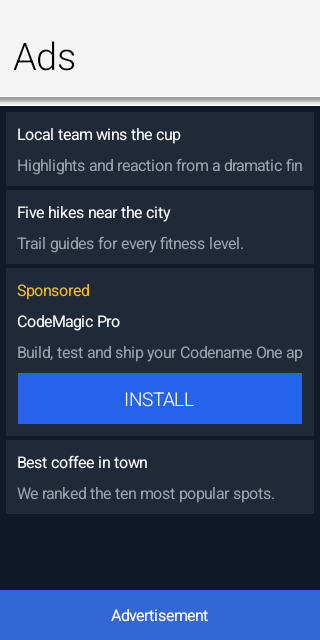
The screenshot below is the advertising sample running in the simulator against
the deterministic mock provider (cn1-ads-mock): a news feed with an in-feed
native ad (the "Sponsored" row, rendered with the app’s own components) and an
anchored banner at the bottom.
Ad provider cn1libs
Several provider libraries ship with the framework. They’re released to Maven
Central together with the core and the AI cn1libs, sharing the same version
(${cn1.version}), so you never mix versions. Each declares its own native SDK
dependencies (Pods / Gradle dependencies / permissions), applied automatically
when the library is on the classpath; you don’t edit build hints by hand,
except for the per-app id described under Configuring the AdMob application id.
| cn1lib | Provider class | Provides |
|---|---|---|
|
| Google AdMob on the Google Mobile Ads SDK (banner, interstitial, rewarded, rewarded interstitial, app open), with AdMob mediation behind it. |
|
| AppLovin MAX mediation (banner, interstitial, rewarded, app open). |
|
| Unity LevelPlay (ironSource) mediation (banner, interstitial, rewarded). |
|
| A deterministic, network-free provider that renders fixed labelled ads - for unit tests, screenshot tests and trying the API in the simulator. |
Add the matching dependency to your project’s common/pom.xml. The provider
libraries use a -lib aggregator with <type>pom</type> so Maven pulls in the
per-platform classifier jars:
<dependency>
    <groupId>com.codenameone</groupId>
    <artifactId>cn1-admob-lib</artifactId>
    <version>${cn1.version}</version>
    <type>pom</type>
</dependency>
cn1-ads-mock is a single cross-platform jar, so it needs no classifier:
<dependency>
    <groupId>com.codenameone</groupId>
    <artifactId>cn1-ads-mock</artifactId>
    <version>${cn1.version}</version>
</dependency>
Enabling a provider
Enable a provider once at startup, from your app’s init(Object), by calling
the static install() method on the provider class named in the table above — AdMobProvider.install(), AppLovinProvider.install(),
LevelPlayProvider.install() or MockAdProvider.install(). Each one registers
its provider with AdManager and takes no arguments.
That single call binds the provider; the rest of your code uses only the
framework API in com.codename1.ads. If no provider is registered the API
stays safe: format support reports false and loads fail with
AdError.CODE_UNSUPPORTED instead of throwing, so a build without an ad library
still runs.
Initialization and consent
Collecting privacy consent is mandatory on modern platforms before personalized ads can be served: in the EEA/UK the GDPR consent form must be shown (providers wrap Google’s User Messaging Platform or an equivalent), and on iOS the App Tracking Transparency prompt must be presented to access the advertising identifier. The recommended order is to initialize, gather consent, then load:
void startAds() {
    AdConfig cfg = new AdConfig()
            .testMode(true)
            .addTestDevice("YOUR_TEST_DEVICE_ID")
            .tagForChildDirectedTreatment(AdConfig.TAG_FALSE)
            .maxAdContentRating(AdConfig.RATING_G);

    AdManager.initialize(cfg, ready -> {
        // false when no provider was installed. It is not a report that
        // the network is up: every provider hands its config to the native
        // bridge and answers true straight away, while the SDK behind it
        // initializes asynchronously. Worth checking anyway, because with
        // no provider at all AdConsent reports consent as not required and
        // canRequestAds() answers true, so carrying on would walk into
        // loadAds() with nothing behind it.
        if (!ready) {
            showAdFreeUi();
            return;
        }

        // Consent has to be settled before the first load, not before
        // initialize: requestConsent presents the GDPR form and, on iOS,
        // the App Tracking Transparency prompt, and both need the SDK up.
        AdConsent.requestConsent(status -> {
            if (AdConsent.canRequestAds()) {
                loadAds();
            } else {
                // STATUS_REQUIRED with consent withheld. Personalized ads
                // are off the table; show the app without them rather
                // than blocking on a prompt the user already declined.
                showAdFreeUi();
            }
        });
    });
}

void loadAds() {
}

void showAdFreeUi() {
}
Two things about that flow are worth knowing before you rely on it.
The readiness flag says a provider was installed and took the config; it isn’t
a report that the network came up. Every provider passes the config to its
native bridge and answers true immediately, while the SDK behind it
initializes asynchronously — so an invalid SDK key surfaces as failing loads
later, not as false here.
And AdConsent.requestConsent presents a form only where the provider
implements one. AdMob does, through Google’s User Messaging Platform. AppLovin
MAX and Unity LevelPlay read consent from an external CMP and the IAB TCF
string instead, so their implementations report STATUS_NOT_REQUIRED at once
and canRequestAds() always answers true. On those two the consent flow is
the CMP’s, not this one, and it has to be in place before the first load for
EEA/UK users.
AdConfig also carries the global compliance flags every network requires:
test mode, test device ids, child directed treatment, under-age-of-consent
treatment and a maximum ad content rating.
testMode on, and never click live ads
during development - both violate ad network program policies. Use the test ad
unit ids while developing.Banner ads
BannerAd is a regular Codename One component. Add it to a form (typically
anchored at the top or bottom) and call load():
BannerAd banner = new BannerAd("ca-app-pub-xxx/yyy");
form.add(BorderLayout.SOUTH, banner);
banner.load();
The default SIZE_ADAPTIVE requests an anchored adaptive banner sized to the
available width, which is the recommended modern banner type.
Interstitial ads
Interstitials are event driven - load, then show when loaded, and preload the next one when the current ad is dismissed:
InterstitialAd ad = new InterstitialAd("ca-app-pub-xxx/yyy");
ad.setAdListener(new AdListener() {
    // Do not show from onLoaded(): onDismissed() loads the next ad,
    // which would then show itself the moment it arrives, and the user
    // never escapes the sequence.
    public void onDismissed() { ad.load(); } // preload the next
});
ad.load();

// Show it where an ad belongs -- a natural break such as the end of a
// level. Loading is asynchronous, so the readiness check belongs in the
// handler that runs at the break; straight after load() nothing is ready
// yet and the ad would never appear.
levelComplete.addActionListener(e -> {
    if (ad.isLoaded()) {
        ad.show();
    }
});
You can also let Codename One show an interstitial automatically on screen transitions, no more often than a given interval:
AdManager.bindInterstitialOnTransition(new InterstitialAd("ca-app-pub-xxx/yyy"), 60000);
Rewarded and rewarded interstitial ads
Register a reward listener and grant the reward when it fires. For valuable rewards, configure server-side verification. The network then posts the reward to your server, and that callback rather than the client one is what credits the user. The client listener still fires, before any verification has happened, so with verification configured it’s for presentation only — credit the user there as well and you’ll pay the reward twice:
RewardedAd ad = new RewardedAd("ca-app-pub-xxx/yyy");
ad.setServerSideVerificationOptions(new ServerSideVerificationOptions(userId, "level=7"));
// show() does nothing when no ad is loaded, so the offer starts disabled
// and goes back to disabled the moment it is spent.
watchForCoins.setEnabled(false);
watchForCoins.addActionListener(e -> {
    watchForCoins.setEnabled(false);
    ad.show(reward -> {
        // Server-side verification is configured above, so the network
        // posts the reward to your server and that is what credits the
        // user. This callback runs before anything has verified it, so
        // it is presentation only -- crediting here would pay twice.
        showRewardPending(reward.getAmount());
    });
});

ad.setAdListener(new AdListener() {
    public void onLoaded() {
        retryDelay = 1000;
        loadFailures = 0;
        // A rewarded ad is an opt-in format, so a loaded ad only enables
        // the offer. Showing it here would put a full screen ad in front
        // of a user who never asked for one.
        watchForCoins.setEnabled(true);
    }

    public void onDismissed() {
        // A shown ad is spent and a session cannot be shown twice, so
        // load the next one. Without this the offer is enabled once and
        // never again.
        ad.load();
    }

    public void onShowFailed(AdError error) {
        // Nothing was consumed, so put the offer back rather than
        // leaving it disabled for the rest of the screen.
        ad.load();
    }

    public void onFailedToLoad(AdError error) {
        // getCode() is provider specific and getDomain() says whose it
        // is: Codename One's own errors carry no domain, an adapter's
        // carry the SDK's. The numbers collide -- AppLovin reports -1
        // for an unspecified error and CODE_UNSUPPORTED is also -1 --
        // so read the constants only for a framework error. Those two
        // are genuinely permanent: an unsupported platform or a bad ad
        // unit id never becomes valid, and retrying them turns the
        // graceful no-ads path into a permanent timer.
        if (error.getDomain() == null
                && (error.getCode() == AdError.CODE_UNSUPPORTED
                    || error.getCode() == AdError.CODE_INVALID_REQUEST)) {
            return;
        }
        // A provider's code means nothing here, so treat it as possibly
        // transient -- bounded, so an unrecognized permanent failure
        // cannot retry for the life of the screen either.
        if (++loadFailures > 5) {
            return;
        }
        retryDelay = Math.min(retryDelay * 2, 60000);
        UITimer.timer(retryDelay, false, form, () -> ad.load());
    }
});
ad.load();
RewardedInterstitialAd has the same API but is shown on a transition rather
than opt-in.
App open ads
App open ads are shown while the app is brought to the foreground. Let the manager and provider handle the foreground hook and freshness window for you:
AppOpenAd appOpen = new AppOpenAd("ca-app-pub-xxx/yyy");
AdManager.enableAppOpenAds(appOpen);

// enableAppOpenAds() loads the ad and asks the provider to show it when
// the app returns to the foreground. Whether that happens is up to the
// provider's adapter, so if yours does not implement the hook, drive it
// from the lifecycle instead -- start() runs on every foreground:
//
//     public void start() {
//         if (appOpen.isLoaded()) {
//             appOpen.show();
//         } else {
//             appOpen.load();
//         }
//     }
//
// Do one or the other, not both, or a provider that honours the hook
// shows two ads.
Native ads
Native ads let you render the advertiser’s assets with your own components, so the ad matches the look and feel of the surrounding content. This is the format to reach for in content driven apps - a news or social feed, a store listing, a chat or a search results screen - where a banner feels bolted on but a row styled like the others fits in. The ad must still be clearly labelled (for example "Sponsored"):
if (NativeAdLoader.isSupported()) {
    new NativeAdLoader("ca-app-pub-xxx/yyy").load(null,
        ad -> feed.addComponent(buildSponsoredRow(ad)),  // your own layout
        err -> Log.p(err.toString()));
}
NativeAd exposes the headline, body, call-to-action, advertiser and rating
that you bind to your own components. Native ad support is an optional provider
capability; when the active provider doesn’t support it, NativeAdLoader
reports the format as unsupported.
Configuring the AdMob application id
The GMA SDK requires your per-app AdMob application id in the native project.
Because it differs per app it’s not baked into the library; set it with the
standard build hints in your project’s codenameone_settings.properties:
codename1.arg.android.xapplication=<meta-data android:name="com.google.android.gms.ads.APPLICATION_ID" android:value="ca-app-pub-XXXXXXXX~YYYYYYYY"/>
codename1.arg.ios.plistInject=<key>GADApplicationIdentifier</key><string>ca-app-pub-XXXXXXXX~YYYYYYYY</string>
The SDK dependencies themselves (the GMA pod / Gradle dependency and the
INTERNET permission) are declared by the cn1-admob library, so they’re added
automatically when the library is on the classpath.
Implementing a provider
Third party networks plug in by implementing com.codename1.ads.spi.AdProvider
(and the optional NativeAdProvider capability) and calling
AdManager.registerProvider(…) - conventionally from a static install()
method. No framework or build-tool changes are required.
For tests and screenshots the framework ships a deterministic, network-free
provider, MockAdProvider (in cn1-ads-mock), that renders fixed, labelled ads
with stable sizes and colours.