Apple’s design team doesn’t know what’s on your backlog. A new iOS appearance might be exactly what you want for your next release. It might also arrive halfway through a customer rollout, when changing the navigation is the last thing you need.
We want to support the new SDK without making that decision for you. This week, you can select Xcode 27 on our build servers with the returning ios.xcode_version hint. Local builds and CI also support Xcode 27, and our iOS 27 theme gets more detailed Liquid Glass effects. You choose when to adopt that appearance. Codename One renders most controls itself, so the theme ships with your app. Updating the SDK can leave that theme and your application CSS in place.
Last week we covered the build settings needed for Xcode 27. This week we’ll show the glass in motion, explain the theme switches, and take a first look at the foldable Duo in the simulator. There is substantial work beyond iOS, too. The JPA inspired ORM is probably the biggest addition: relationships and managed sessions now work in both the app and the backend. OpenTelemetry and WebSocket support give that backend more of what a real service needs.
Coming This Week
We’ll cover the release in six follow-ups, with code you can try and screenshots of the UI changes:
- Saturday, September 26: iOS 27 Glass You Can Choose, Measure, and Test. Try Xcode 27 with the returning build hint, choose your theme independently, and see the glass animation and Duo simulator work.
- Sunday, September 27: JPA Inspired ORM from SQLite to PostgreSQL. Model relationships, update managed objects, fetch the data a screen needs, and handle conflicting writes.
- Monday, September 28: OpenTelemetry Support from App to Database. Connect app and backend spans with OpenTelemetry and send them to your existing tracing infrastructure.
- Tuesday, September 29: WebSocket Support for Your Java Backend. Add persistent, two-way connections to your app. Our device-test screenshot receiver shows the server handling real traffic.
- Wednesday, September 30: Your Push Request Succeeded. The Device Key Is Dead.. Receive signed delivery digests and remove invalid targets without deleting devices after temporary failures.
- Thursday, October 1: Native Desktop Themes for Production Apps. Use Fluent, Aqua, or Adwaita with desktop dialogs and title bars. See them in our Settings app, then apply them to yours.
Xcode Selection Is Back
Long-time Codename One users might recognize this hint. In the Settings app, under Build Hints, you can now select Xcode 27 on the cloud build service:
ios.xcode_version=27
We discontinued Xcode selection because Apple’s upgrades kept requiring a macOS upgrade too. That isn’t required for 27 yet, and virtualization lets us offer the choice again. Xcode 26 remains the default. Leave the hint unset unless you’re testing or need a new SDK feature. We’ll add 27.1 after beta and move the default to 27 according to Apple’s requirements.
This hint only affects cloud builds. Local builds use the Xcode installation selected on your Mac. The theme is a separate choice: ios.themeMode=modern or the shared nativeTheme=native selects the modern family, and ios.themeGeneration=27 selects its iOS 27 appearance.
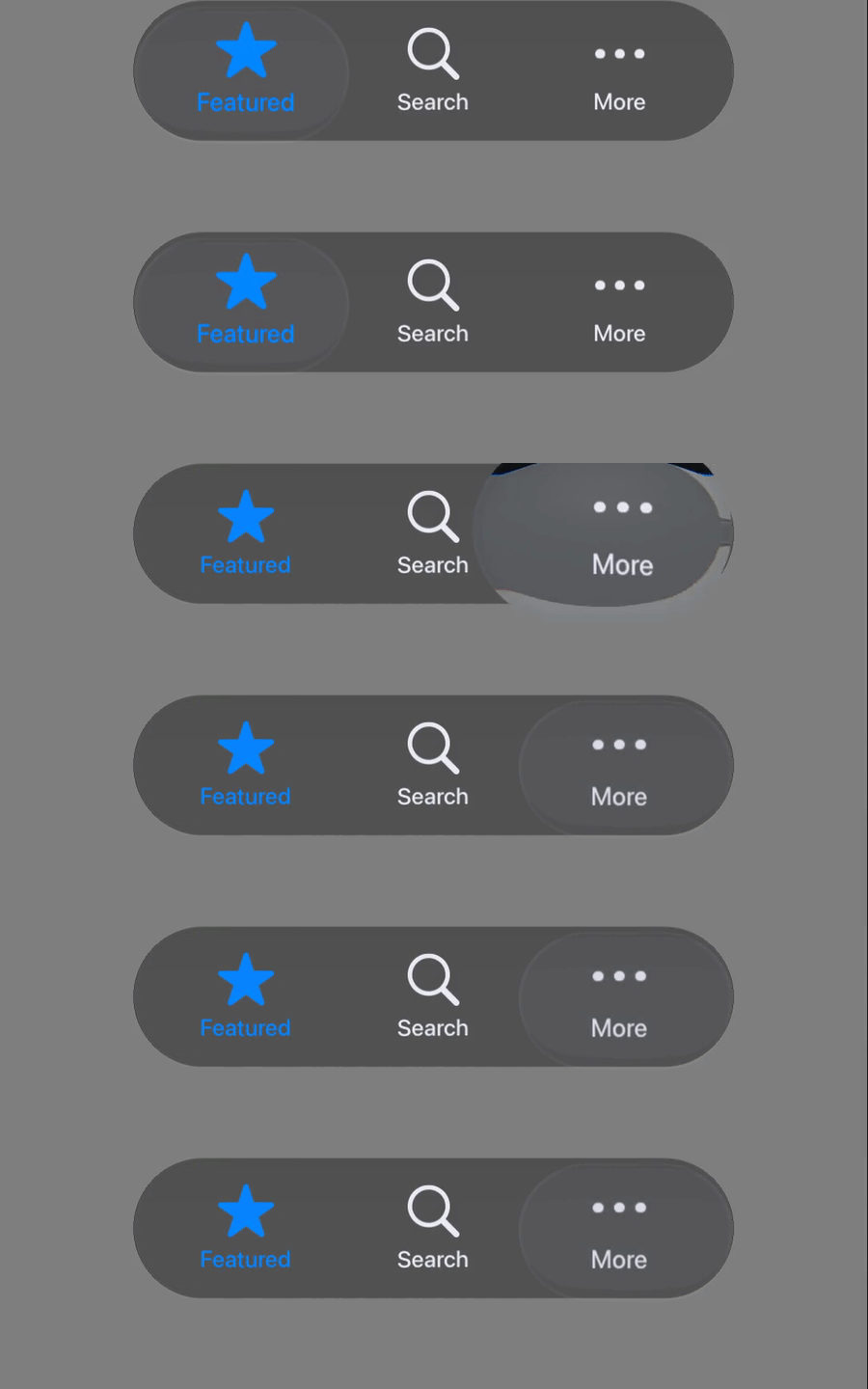
Deterministic samples of Codename One’s 480 ms tab-selection animation on an iPhone 16 simulator running iOS 27.0. The animation shows rendered motion, not a live frame-rate measurement.
Saturday’s follow-up covers the build and theme settings, refined glass materials, Health API changes, and local Duo testing. Read the iOS article. Duo hinge support needs a local Xcode 27.1 beta build; the cloud’s Xcode 27.0 SDK doesn’t contain the hinge API.
We also removed OpenGL ES. Metal is now the iOS renderer, and old projects should remove the obsolete ios.metal hint. Dropping that deprecated path removes compiler warnings and lets us concentrate rendering work on Metal. See PR #5875.
JPA Inspired ORM
Last week’s backend tutorial used explicit foreign-key fields and immediate DAO writes. The new managed ORM adds relationships and a session that tracks the objects involved in one unit of work. The same mapping annotations work with client SQLite and the backend databases.
Session session = entities.openSession();
try {
    session.beginTransaction();
    Customer customer = session.find(Customer.class, customerId);
    if (customer != null) {
        customer.name = "Updated name";
    }
    session.commitTransaction();
} finally {
    session.close();
}
Here entities is an EntityManager, Customer is a mapped entity, and customerId identifies the row. The session detects the changed field and writes it at flush time. Closing the session never commits unfinished work.
Relationships, lazy loading, version checks, and a supported JPQL subset make this a much larger change than another query convenience method. They also introduce choices a tutorial needs to explain: which side owns a relationship, when a query loads it, and what happens after the session closes. Sunday’s article works through those choices. This is a JPA-inspired API, with its own packages and documented limits, rather than a claim of complete JPA compatibility. See PR #5885.
OpenTelemetry Support
A slow screen can be waiting for the network, the service, or one database query. A server log alone can’t show where the user spent that time.
Our new OpenTelemetry integration connects the app’s network requests to backend request and database spans. A span records one operation; related spans form a trace. An annotation enables the instrumentation, and the spans use the standard OTLP transport to reach a collector.
That is useful for a team introducing a small service into a large organization. The new service can participate in the tracing system the operations team already uses. It doesn’t need its own isolated diagnostic UI. Monday’s article covers collector configuration, sampling, the app relay, and the exact instrumentation boundary in PR #5887.
WebSocket Support
Your backend can now keep a connection open and send data when it changes. Live status screens, chat, and progress updates can use WebSockets instead of repeatedly polling an HTTP endpoint. Register a Java endpoint with @WebSocketMapping, then handle text and binary messages through the backend API.
We use the same implementation to receive screenshots from our device tests. Metadata arrives as text, the image arrives as binary, and the server acknowledges the saved image before the device continues. That gives the public API a regular workload in our CI: a lost message can interrupt a test run we depend on.
Tuesday’s article includes a complete endpoint and explains connection limits, timeouts, and how slow clients affect sending. It also follows the screenshot receiver from PR #5880, including the legacy Windows test path that still uses the earlier server.
Push Delivery Callbacks
The cloud accepting a push request doesn’t mean the provider accepted every target. Delivery feedback gives your backend the later results in a signed daily digest. It is an organization-level setting on Pro and above.
The decision worth automating is narrow: remove a key after INVALID_TARGET. A temporary provider failure can exhaust its retry budget while the key remains valid. Wednesday’s article shows how to verify the digest, deduplicate on deliveryId, and acknowledge only after database writes commit. The examples in PR #5890 cover the CN1 backend, Spring, MicroProfile, and Node/serverless JavaScript.
Native Desktop Themes for Production Apps
Last week’s native desktop themes were an experiment. This release brings them into production use, with refined controls, light and dark appearances, and desktop window behavior integrated into the themes. Your app can select Fluent on Windows, Aqua on macOS, or Adwaita on Linux while keeping its own branding.
We’ve adopted them in the Codename One Settings tool. Its forms and dialogs helped us find and fix the details that isolated component screenshots missed.
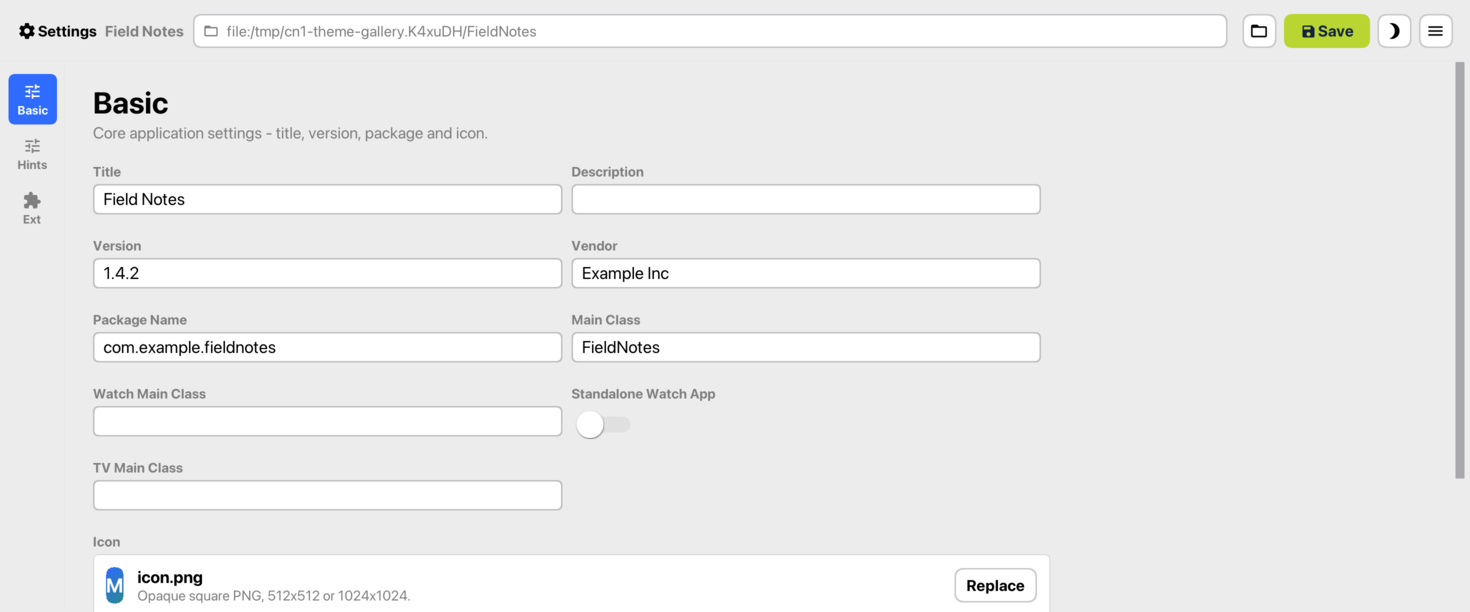
The Settings tool with the Aqua theme, captured on macOS. Thursday’s article includes all three theme families in light and dark appearances.
The change reaches the window as well as the controls. Desktop native themes open ordinary dialogs in real OS windows. Packaged JavaSE apps use native title bars with all three themes by default; the simulator can instead use the title-bar style declared by the theme. Existing projects still choose whether to adopt these themes. PR #5886 shows the application work that exposed and helped refine the defaults.
Shorten the trip from documentation to a running device
Two smaller changes make the rest easier to investigate.
The generated agent skill now explains the native-device debugger and MCP workflows. An agent can inspect and operate the running app through semantic UI tools, while a debugger handles breakpoints and stack inspection. For an MCP-only iOS session, ios.onDeviceDebug.waitForAttach must be false: otherwise the application waits before start() and never opens its MCP listener. Physical iPhones also need a USB relay for that loopback port. The on-device reference includes the commands and platform limits from PR #5864.
The Developer Guide now has chapter pages with site search, navigation, and links to individual sections. The single-page edition is still available. Following last week’s Javadoc work, guide links can take you to the relevant chapter instead of dropping you into the whole book. Both views come from the same AsciiDoc sources. PR #5860 contains the generator and compatibility routing.
Put the Next Release on Your Schedule
Supporting Xcode 27 is our job. Deciding when your app should look different belongs to you. The theme settings let you keep those decisions separate, whether you’re trying Liquid Glass on iOS or adopting a desktop theme for an app that started on a phone.
There’s plenty to use here even if you’re leaving the UI alone. A screen that edits related records can use a managed ORM session. A status screen can receive WebSocket updates. When a request is slow, OpenTelemetry can show which service or query needs attention. Those are changes you can put to work on the features already in your backlog.
Tomorrow we’ll start with the iOS changes, including the code to select a theme and the Duo simulator capture. Then we’ll spend the rest of the week working through the data, service, and desktop features in detail.
Discussion
Has an OS redesign ever forced work into a release you had already planned?