
This week we’re introducing native Windows support (no JVM!), a 3D graphics API, a gaming API, support for Apple Wallet, printing and more in what is probably our biggest update ever… But that’s not the thing that excites me the most.
The thing that excites me the most
I won’t tease you about this too much. The thing that excited me the most this week is this new article by Francesco Galgani introducing Codename One, published on Baeldung. Beyond the great writing and form, the excitement is about the community: the way you’re all using Codename One and helping us build it. The issues, the tracking, and the enthusiasm about upcoming features, like this one where a request to consolidate documentation chapters opens with a triple thank-you for the game development API before it even gets to the point.
Again, thank you all for being a part of this. We literally wouldn’t be doing this without you!
What shipped this week
Version 7.0.251 is live, and the four big items each get a full tutorial over the next few days. Here is a deeper look at what’s coming.
A portable 3D graphics API
com.codename1.gpu is a GPU-accelerated 3D API where the same Java code renders through Metal on iOS and Mac, OpenGL ES on Android, WebGL on the web, Direct3D 11 on the new native Windows port, and a dependency-free software rasterizer in the simulator. The trick that makes this portable is that you never write shader source: you describe a Material (lighting model, color, texture, shininess) and the engine generates the platform shader, GLSL, Metal Shading Language, or HLSL, depending on where it lands.
A lit, spinning cube is this short:
public void onInit(GraphicsDevice device) {
    cube = Primitives.cube(device, 1.6f);
    material = new Material(Material.Type.PHONG)
            .setColor(0xff3366ff)
            .setShininess(24f);
    camera.setPerspective(45f, 0.1f, 100f)
            .setPosition(2.6f, 2.1f, 3.4f)
            .setTarget(0f, 0f, 0f);
    device.setLight(new Light().setDirection(-0.4f, -1f, -0.55f));
}

public void onFrame(GraphicsDevice device) {
    device.clear(0xff101018, true, true);
    device.setCamera(camera);
    device.draw(cube, material, Matrix4.rotation(angle, 0.35f, 1f, 0.12f));
}
And it isn’t limited to primitives. A binary glTF model authored in any 3D tool loads with one call and renders with its own textures. This is the Khronos BoomBox sample model rendering on the native Mac target:
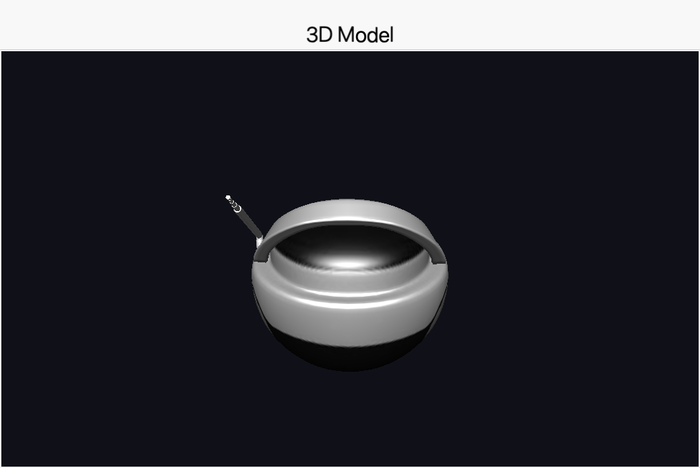
On iOS the vertex buffers are SIMD-aligned so the data is handed to Metal with no copy in between. The RenderView hosting all of this is a regular component, so a 3D view drops into a normal form next to buttons and text. We walk through the whole API in tomorrow's post.
Game development in the core
com.codename1.gaming builds a game surface on top of that 3D layer: a GameView with a tight update(dt) loop, sprites, scenes with cameras, pollable input, a low-latency SoundPool, and rigid-body physics powered by a Box2D engine that ships inside the core. This is the complete logic of a physics demo where every tap drops a bouncing ball:
protected void update(double dt) {
    if (getInput().wasPointerPressed()) {
        PhysicsBody body = world.createCircle(
            getInput().getPointerX(), getInput().getPointerY(),
            30, BodyType.DYNAMIC);
        body.setRestitution(0.7f);
        Sprite s = new Sprite(ballImage);
        body.setLinkedSprite(s);
        getScene().add(s);
    }
    world.step((float) dt);
}
No render code in sight: the linked sprites track their physics bodies and the scene draws itself. Here it is running in the simulator:
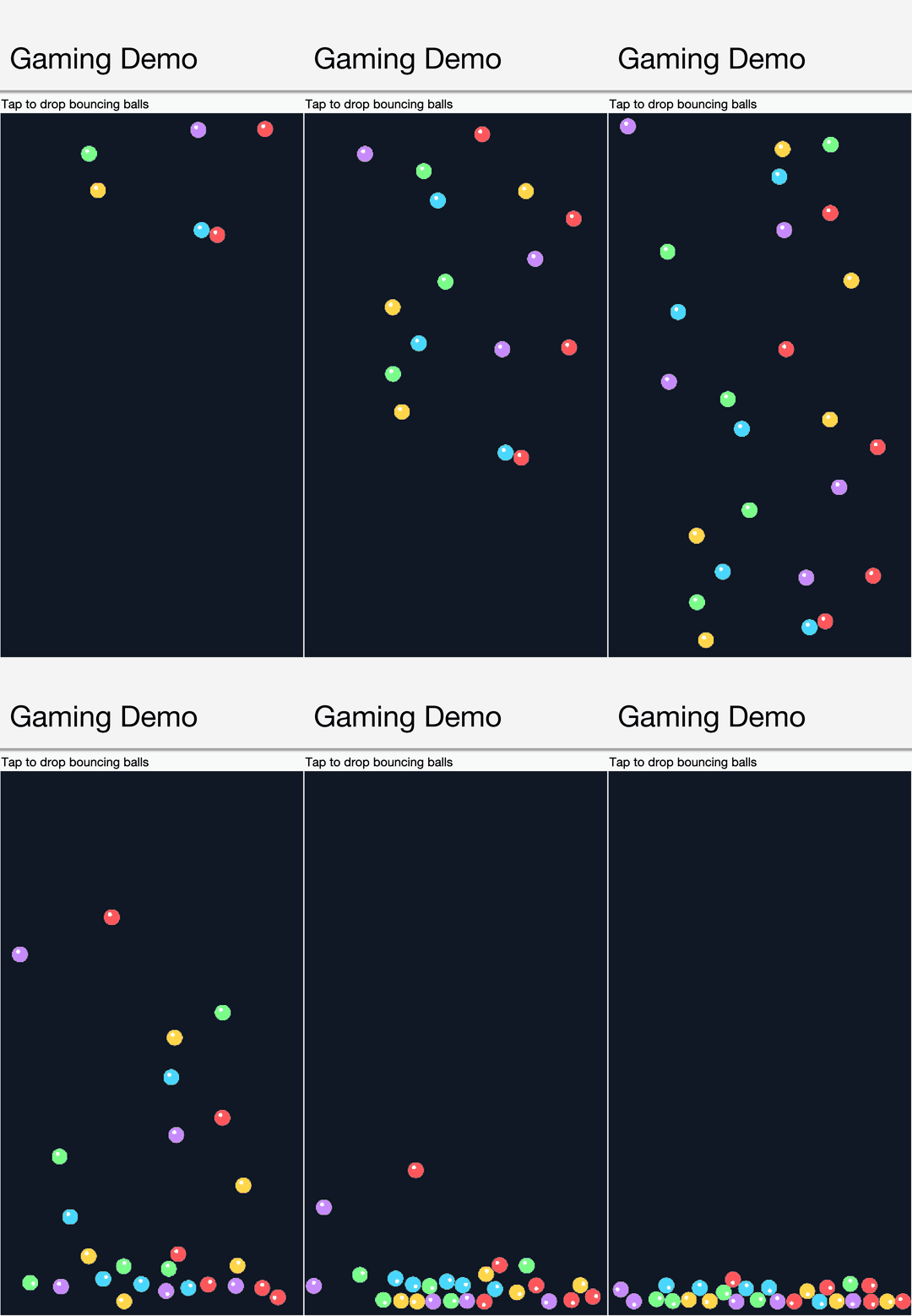
The physics engine is JBox2D repackaged under com.codename1.gaming.physics.box2d, with an idiomatic wrapper that keeps your code in screen pixels and hides the meters and the flipped y-axis. Because everything is pure Java where it matters, it runs unchanged on every target, including iOS. For years we said no to gaming APIs in Codename One; Sunday's full tutorial also explains what changed our mind.
Your Java app as a native Windows executable, no JVM
The new Windows target translates your Java/Kotlin bytecode to C through ParparVM, compiles it with clang-cl, and links a standalone Win32 .exe. Rendering is Direct2D, text is DirectWrite, networking is WinHTTP, the browser component is WebView2, and there is no JVM anywhere: not bundled, not downloaded, not required on the user’s machine. A hello world is around 4MB and the full Initializr app is around 8MB. One cloud build produces both x64 and arm64 executables.
Edit: Since publishing this post we found the binaries were carrying their debug and stack-unwind tables inline. We now split that data into a separate symbol file (kept only to symbolize crashes) and dead-strip code the app never reaches, which brings the sizes down further – the figures above reflect the leaner build.
To be clear about what this is, because “Java on Windows” carries old associations: there is no Swing here, no AWT, no JavaFX, and no bundled runtime. It is the full Codename One framework compiled to native code, and everything in it works there, including the new printing API and the 3D layer. This is the same app from the same code base, rendered by Direct2D and DirectWrite on Windows:
People have been asking how to turn Java into a real .exe since the late nineties, and the modern answer, GraalVM, is a tool designed for a different purpose. The architecture, the history, and how this completes the native desktop story the Mac target started are all in Monday's post.
Printing and Apple Wallet
Two platform integrations that apps keep needing. com.codename1.printing hands a PDF or image to the native print dialog on every port, including the new Windows one:
if (Printer.isPrintingSupported()) {
    Printer.printPDF(reportPath, result -> {
        if (result.isFailed()) {
            ToastBar.showErrorMessage("Print failed: " + result.getError());
        }
    });
}
And card issuers can now let users add cards to Apple Wallet from inside the Wallet app itself. The iOS build generates Apple’s issuer-provisioning extension pair from build hints, with zero native code on your side:
ios.wallet.extension=true
ios.wallet.appGroup=group.com.mybank.app
ios.wallet.issuerEndpoint=https://api.mybank.com/wallet/provision
Your app publishes its card list through the new WalletExtension API and the extension picks it up from the shared App Group. Both features get the full treatment in Tuesday's post.
Behind the scenes: the build cloud was rebuilt
Codename One was founded in 2012, when Docker was still a “new thing”, and a lot of the infrastructure we built back then was duct-taped together as we were working in startup mode. A big part of this week’s work happened at that infrastructure level: the build servers underwent a major rebuild and re-architecture, and more is going on there than is apparent from the outside.
We’re telling you this so you’re prepared: if a build behaves differently or something breaks where it didn’t before, please let us know right away through the issue tracker so we can fix it quickly. The goal of all this is a faster, more maintainable build cloud, and the transition is the risky part.
Simulator UX improvements
PR #5211 reworks the simulator chrome around several long-standing annoyances:
- Slow Motion is back. The 50x animation slowdown toggle had been commented out years ago; it’s now under Tools.
- Rotation keeps your zoom. Rotating the device used to discard the fit-to-screen factor, forcing you to re-toggle Zoom after every rotation. All rotate/zoom paths now share the same fit logic.
- The standalone simulator is the default. The plain device window is what you get out of the box; the multi-panel app frame is still available through the Single Window Mode preference, and explicit settings are honored.
- The menus make sense. The confusing Simulator vs Simulate split is gone: the device and its window live under one menu, simulated device state (location, push, biometrics, dark mode) under another, and developer tools under Tools.
A verification problem that was very hard to track
PR #5216 fixes a bug in the build pipeline’s bytecode compliance check that could silently lose its API rewrites when classes were recompiled with unchanged sources. The symptom was an iOS build failing deep inside Xcode with an error about an undeclared String.replaceAll function, and the only recovery was wiping the build directory. The check now detects recompiled classes and re-runs, and a failed check can no longer be skipped on the next build. If you ever hit that mystery error locally, this was it.
UIScene apps start up smoother
PR #5218 fixes the black flash at iOS app launch that arrived with the UIScene default. iOS wasn’t rendering the launch storyboard for scene-based apps, and the render surface was empty until the first form painted. The build now generates the modern launch-screen configuration and the native code covers the hand-off with a placeholder that matches the launch screen exactly, fading into the first form. The result: icon tap, launch screen, invisible hand-off, first form, with no black at any point. If you need the old behavior, the ios.launchPlaceholder=false build hint opts out.
Pin the browser appearance on iOS
Embedded web views on iOS follow the device’s light/dark appearance, and since the UIScene transition the app-wide plist override stopped affecting them. PR #5203 adds a per-component property to pin it:
browser.setProperty(BrowserComponent.BROWSER_PROPERTY_INTERFACE_STYLE, "light");
Valid values are light, dark, and auto. It’s safe to call in the constructor; the property is applied when the native peer is ready.
Upcoming attractions
Four tutorials follow this post, one per day; each link below goes live on its day:
- Saturday. The portable 3D graphics API. PR #5151.
- Sunday. Game development in the core, including Box2D physics. PR #5166.
- Monday. The native Windows port. PRs #5144, #5209.
- Tuesday. Printing and Apple Wallet. PRs #5217, #5227.
Wrapping up
The issue tracker is here and it is the best place to reach us right now. The discussion forum is here, and the Build Cloud console is at /console/. The Playground, Initializr, and Skin Designer are where they have always been.
Discussion
Join the conversation via GitHub Discussions.