Maven repository cutoff: update your POM today. August 28 is the day new Codename One releases stop going to Maven Central. PR #5611 makes the Codename One repository the only destination for new releases. Versions already on Central stay there, but the changes in this post and future updates resolve only from the Codename One repository. New projects already contain this configuration. Existing Maven projects need both blocks below because Maven resolves build plugins and ordinary dependencies from separate repository lists.
<repositories>
    <repository>
        <id>codenameone</id>
        <url>https://repo.codenameone.com/maven2</url>
        <releases>
            <enabled>true</enabled>
        </releases>
        <snapshots>
            <enabled>false</enabled>
        </snapshots>
    </repository>
</repositories>

<pluginRepositories>
    <pluginRepository>
        <id>codenameone-plugins</id>
        <url>https://repo.codenameone.com/maven2</url>
        <releases>
            <enabled>true</enabled>
        </releases>
        <snapshots>
            <enabled>false</enabled>
        </snapshots>
    </pluginRepository>
</pluginRepositories>
The migration post explains the cutover and retention policy. Add the blocks before running mvn cn1:update, or the newest version Maven Central can see will remain the last pre-cutover release.
More than one native window
Codename One was built for phones. A phone application had one current Form, one display size, one focus owner, and one paint target. Keeping those answers in global Display state made the mobile model simple. Display.getInstance().getCurrent() always had one answer.
The desktop ports inherited that assumption. An editor could show a document, inspector, and tool palette, but only by arranging them inside the same Form. A second operating-system window needs different answers to the same questions. It has its own component tree, size, focus owner, paint queue, and native input target. One global current form cannot describe both surfaces.
PR #5556 separates the state that belongs to each rendered surface from the state of the main application. A desktop application can now open several operating-system windows. Each window has its own Codename One component tree, focus owner, animation list, repaint region, native peers, and text editing. Form remains the application’s main surface, so existing mobile and single-window applications keep the model they already use.
We did not turn every screen into a window or replace Form. We separated the assumptions that were accidentally global from the parts that really belong to the main application surface.
TL;DR
Windowopens a real desktop window on Java SE, native Windows, native Linux, and Mac Catalyst. It supports ownership, modality, close policies, monitor placement, native peers, text editing, and independent capture.- Compiler-checked build hints move 87 common server settings onto the main class, where Java catches misspelled names, wrong types, and unsupported values before upload.
- Document Provider publishes a selected read-only file tree into the iOS Files app and Android storage picker without exposing the rest of the application sandbox.
- Nearby Devices adds UWB distance and direction, companion association, presence, and local device-to-device transport with explicit capability and platform boundaries.
- Wearable follow-through closes two gaps we named last week: generated watch complications and Tiles, plus a companion Wear APK beside the phone artifact. A separate fix repairs watchOS message callbacks and startup.
- Rootless jailbreak detection recognizes current rootless layouts such as
/var/jb, checks for hooked detection APIs, and reruns the gate when the app returns to the foreground.
Form stays central; Window adds another top level
Form and Window now implement TopLevelContainer. The interface contains the things both roots need: a content pane, layered panes, focus, commands, animation registration, editing state, and show or size listeners.
The main application still starts and navigates through forms. A window is created only when desktop code asks for one:
if (Desktop.isSupported()) {
    Window inspector = new Window("Inspector", new BorderLayout());
    inspector.add(BorderLayout.CENTER,
            new Label("Hello from a second window"));
    inspector.setWindowSize(420, 320);
    inspector.centerOnDesktop();
    inspector.show();
}
Constructing a Window on iOS, Android, JavaScript, or a phone-skinned simulator throws UnsupportedOperationException. There is no fake fallback to a form. A fallback would create a layout and lifecycle contract that changes by platform while pretending not to.
Inside a window, getComponentForm() returns null because there is no enclosing form. Window-aware code calls getTopLevelContainer() instead. This is the main migration point for third-party components that assumed every component must belong to a form.
existing navigation and mobile model] A --> D[Desktop capability] D --> W1[Window
component tree and paint surface] D --> W2[Window
component tree and paint surface] D --> W3[Window
component tree and paint surface] F --> T[TopLevelContainer contract] W1 --> T W2 --> T W3 --> T
The API exposes the window system through Desktop.getInstance(). Desktop.getInstance().getWindows() lists open windows. Desktop.getInstance().getMonitors() reports each monitor’s bounds, work area, DPI, and backing scale. A window dragged between a laptop display and an external monitor updates its scale and relays out its hierarchy instead of continuing with the main display’s pixel ratio.
One paint queue could not serve two windows
The visible API is the small part of this change. The old implementation held one current form, one graphics target, one paint queue, and one display size. Input events did not identify a surface because there was only one possible destination.
The new PaintSurface holds the state that belongs to one rendered top level. The main form is surface zero. Every secondary window gets another surface, another dirty region, and another native target. Existing method signatures remain intact, which lets mobile ports continue using surface zero without implementing a window manager.
Input packets now carry a window id. The value for the main surface remains zero, so its wire format and event coalescing stay compatible with the old path. A desktop port assigns an id when it creates a native window and sends that id back with pointer and key events.
This required real implementations on four desktop targets:
| Target | Native window path |
|---|---|
| Java SE | A separate AWT/Swing window and canvas per Codename One Window |
| Native Windows | An HWND with its own Direct2D render target |
| Native Linux | A GTK window with its own Cairo back buffer |
| Mac Catalyst | A UIWindowScene per secondary window, enabled by macNative.multiWindow=true |
iOS, Android, and JavaScript inherit the unsupported capability. Their single-surface behavior does not change.
These are native windows, not overlays with title bars
A second window can be owned, minimized, restored, centered on a monitor, or kept above other windows when the port supports it. It gets the platform’s own chrome and window controls. setCloseOperation() selects dispose, hide, or do nothing. A close listener can veto the user’s close request on targets that expose that step.
Modality is enforced in core so it has the same meaning on every desktop. A window-modal child blocks its owner. An application-modal window blocks the main form and other windows. The event dispatch thread continues painting and animating the rest of the application while showModal() parks the caller.
Window confirm = new Window("Confirm", new BorderLayout());
confirm.add(BorderLayout.CENTER,
        new Label("Delete the selected document?"));
confirm.setOwnerWindow(editorWindow);
confirm.setModalityType(Window.MODALITY_WINDOW);
confirm.showModal();
Native peers and native text editors attach to the window that contains them. That sounds obvious, but it was one of the hardest implementation boundaries. A browser or text caret attached to the main native view while its Codename One component lived in another window would look correct in a hierarchy dump and appear on the wrong monitor.
The conformance suite runs the same controls inside real secondary windows at 400 by 300, 900 by 700, and 1000 by 400 pixels. The deliberately wide case catches components that still use Display.getDisplayWidth() instead of their own top-level size.
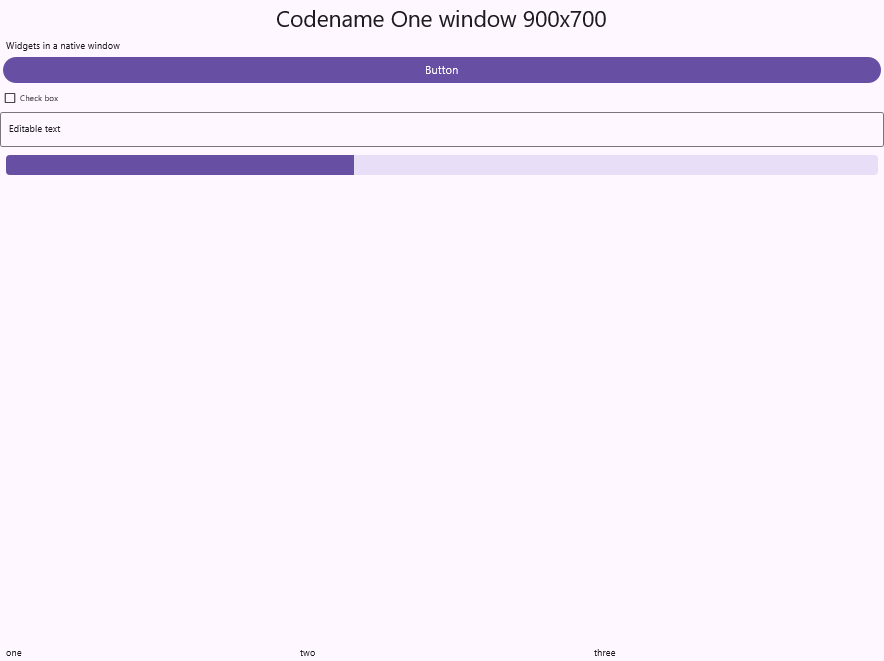
Native Windows: the secondary surface at 900 by 700.
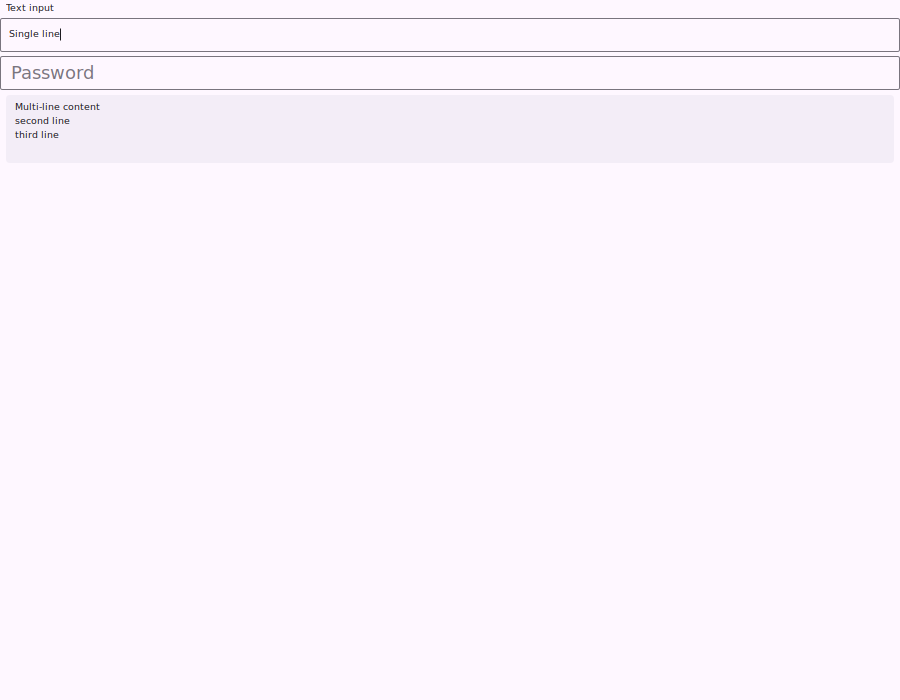
Native Linux: text editing attached to the secondary window.
Window.capture() captures the secondary window because Display.screenshot() can only see the main surface. The desktop ports read back the window’s pixels, including peers and native editors where the platform permits it. That makes screenshot tests verify what the user sees rather than repainting the component hierarchy into a convenient offscreen image.
The first release has explicit limits
Dialog, Sheet, ToastBar, and a ComboBox popup still resolve through the current form. They are not window-aware in this release. InteractionDialog can target a window, and you can build an overlay in the window’s own layered pane. Form transitions, HTMLComponent, tooltips, and accessibility on secondary windows are also outside the first release.
Update: every item in this paragraph has since been closed, and Dialog and InteractionDialog gained an opt-in that backs them with a real operating system window. A Picker in a window still uses its lightweight popup, Toolbar is still bound to a form, and Mac Catalyst still presents system sheets from its main scene. Form transitions between windows remain out, and the developer guide now explains why rather than listing them: two operating system windows are composited by the window server, so there is no shared graphics context to draw an in-between frame into.
Display.getDisplayWidth() and getDisplayHeight() continue to describe the main surface. Code inside a window should ask its top level for size. This preserves existing behavior, but it means a component with a hidden global display assumption needs to be corrected before it can live in a secondary window.
Mac Catalyst exposed a deeper problem. It can create a second scene, but several ordinary desktop operations are missing or incomplete. The multi-window opt-in also changes the main scene’s geometry. Catalyst was the wrong foundation for a first-class Mac desktop port.
We are working on a native AppKit port in PR #5601. It is still in development. The current release continues to use Catalyst, with multi-window support opt-in and the documented limits above.
Build hints can fail before upload
Build hints began as an escape hatch between two release clocks. The build server changed almost every week, while updating every IDE plugin was slower. A plugin could send codename1.arg.<name>=<value>, and the server could start reading a new setting without waiting for new client UI.
That design has lasted for more than a decade, but unchecked strings have a predictable failure mode. A misspelled name is accepted, uploaded, never read, and silently discarded. The build stays green while using a default the developer meant to override.
PR #5586 adds compiler-checked annotations for 87 common hints:
@Android(
        themeMode = ThemeMode.MODERN,
        minSdkVersion = AndroidMinSdk.API_24)
@Build(nativeTheme = ThemeMode.MODERN)
@DesktopBuild(
        titleBar = DesktopTitleBar.NATIVE,
        width = 1280,
        height = 800)
@Ios(newStorageLocation = Toggle.ON)
public class MyApplication extends Lifecycle {
}
The Java type is the hint type. Closed value sets become enums. List hints become arrays with their separator and CN1Lib merge behavior attached to the declaration. An omitted attribute emits nothing, so the build server still controls its current default.
The existing protocol and builders remain in place. BuildHintAnnotationProcessor turns the checked form back into the same name and string values. Properties remain supported for the long tail and dynamic families such as android.permission.<NAME>. Declaring the same hint in both forms is a build error.
The compile-time build hints post explains the catalog, merge order, source compatibility policy, and mvn cn1:migrate-build-hints migration goal.
Publish selected files into the system file browser
The Document Provider post covers PR #5607. It lets an application publish a specific read-only tree into the iOS Files app and Android storage picker.
DocumentNode root = DocumentNode.folder("root", "Invoices");
root.add(DocumentNode.file("inv-1042", "August.pdf")
        .setContentType("application/pdf")
        .setPath("invoices/august.pdf"));
DocumentProvider.publish(root);
On iOS the file provider is a generated extension running in another process. It may run while the application is dead, so Java callbacks cannot answer a browse request. The application publishes a serialized index and local or remote content metadata into an App Group container. Android serves the same model through a generated DocumentsProvider.
The provider exposes only the nodes the application publishes. It is read-only, and DocumentProvider.clear() withdraws the tree at logout. Remote nodes can be fetched on demand with the bearer token most recently published by the application.
Measure distance and direction to a nearby device
The Nearby Devices post breaks PR #5589 into three APIs: UWB ranging, companion association, and local transport.
session.addRangingListener(new RangingAdapter() {
    public void updated(RangingUpdate update) {
        if (update.hasDistance()) {
            distance.setText(Math.round(update.getDistance(
                    RangingUnit.CENTIMETERS)) + " cm");
        }
        if (update.hasDirection()) {
            arrow.setAngle(update.getAzimuth());
        }
    }
});
The APIs expose the platform differences instead of hiding them. UWB direction is optional even during a live session. Tokens must move over another channel before ranging begins. Nearby transport connects Android to Android or Apple to Apple because Google’s Nearby Connections and Apple’s MultipeerConnectivity do not share a protocol.
Each package is a separate opt-in. An application that imports only ranging gets the ranging frameworks and permissions, not transport or companion-device machinery. The simulator and desktop ports provide deterministic local sessions so the UI and failure states can be developed without UWB hardware.
Last week’s watch gaps are closed
Last week’s wearable post stated that the portable WATCH_* families did not yet produce the platform targets needed to appear on a watch face, and that Android did not generate a companion Wear artifact beside the phone APK. PR #5583 closes both gaps.
An Apple Watch build now embeds a CN1WatchWidgets WidgetKit extension. Wear OS generates a complication data source for each kind and a Tile for the rectangular family. A companion Android build returns both the phone APK and <yourapp>-wear.apk.
The wearable follow-up also covers a less visible release blocker in PR #5594. The watch slice called six translated Java callbacks without including their generated declarations, and it used the Swift-renamed activate selector from Objective-C. One path failed compilation; the other crashed the watch app at startup. Both are now pinned by the watch build.
Rootless jailbreaks need rootless signals
The old iOS detector looked for a writable root filesystem, Cydia-era paths, and Substrate-era injected libraries. Current rootless jailbreaks keep the signed system volume sealed and place their bootstrap under /var/jb. The old checks could all return clean on a device running palera1n, Dopamine, or XinaA15.
The rootless jailbreak post details PR #5584. It adds rootless path and mount signals, uses lstat so a dangling /var/jb symlink remains visible, checks Sileo before legacy Cydia, and compares independent system calls to detect an API hook that lies about the filesystem. The launch gate also runs when the application returns from the background.
codename1.arg.ios.detectJailbreak=true
Detection remains an on-device obstacle, not a trust anchor. A capable attacker owns the process and can patch its answer. Sensitive server actions should still require Apple App Attest or Google Play Integrity verification on the backend, either directly through DeviceIntegrity or through App Shield.
More surfaces, narrower exposure, stronger defaults
This week’s changes expand what one Codename One application can own without turning platform differences into pretend sameness. A desktop app gets multiple native windows, but a phone keeps one main form. Common build hints move into compiler-checked code, while dynamic and service-only hints keep their string escape hatch. A published document tree reaches the system browser, but the rest of the sandbox stays private. UWB, companion devices, and nearby transport have separate opt-ins and capability queries. Watch surfaces now reach actual watch faces and Tiles.
The security work follows the same discipline. Document Provider exposes a named read-only tree. Nearby transport gives Android a connection authentication token and says when iOS cannot. Rootless detection checks current jailbreak layouts, then stops short of claiming that local code can establish trust. The Maven cutover keeps signed artifacts and refuses partial releases before metadata advertises them.
Our security lead comes from those defaults. Ordinary cross-platform code starts with a narrow capability, an explicit failure mode, and no silent fallback that widens access. Compiler-checked @Hardening and @IosPrivacy settings also remove a class of silent configuration failure before a build leaves the machine. App Hardening raises the cost of modifying the binary. App Shield moves the final trust decision to the backend. The APIs in this release make the safer choice available before an application drops into native code.
Start by updating the two repository lists in your POM. Then open the desktop windows guide and run the inspector example in a desktop build.
Discussion
What is the first desktop tool window you would separate from your main application form?