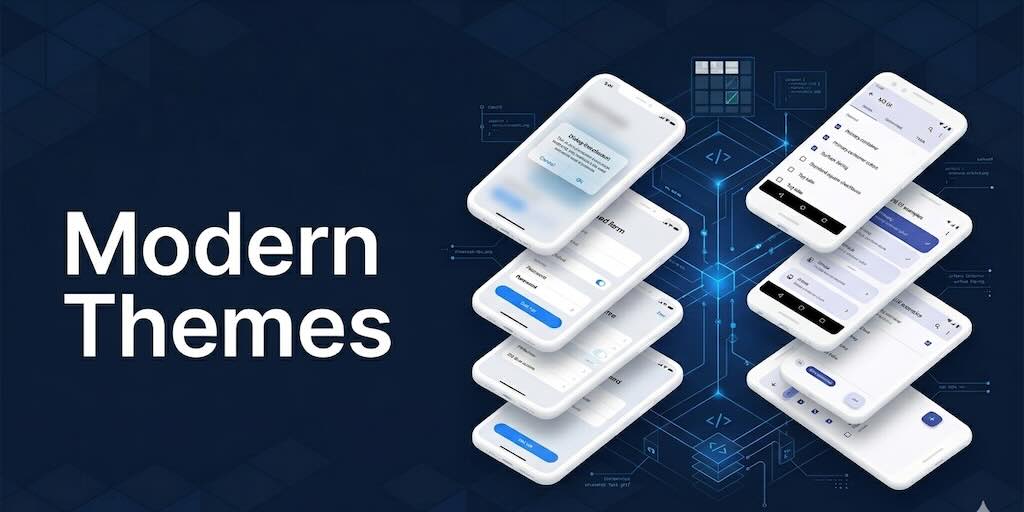
It has been one of those weeks where the diff is bigger than the headline. The headline is short — Codename One now ships modern native themes: an iOS “liquid glass” look and an Android Material 3 look, bundled into the iOS and Android ports, on by default in the Playground, and selectable from a brand new menu in the simulator. The diff behind that headline is several thousand lines across the platform ports, the simulator, the GUI plumbing, and a small army of screenshot tests.
The theme behind the work is simple: Codename One should look modern out of the box on every platform we ship to, and it should feel fast. Almost everything in the past week of commits is in service of one of those two goals.
Try it right now in the Playground
The easiest way to see any of this is the Playground. The Playground now defaults to iOS Modern when the device toggle is set to iPhone and Android Material 3 when it is set to Android, in both light and dark mode. No setup, no pom.xml, no build hints — just open the page, drop in any of the standard components, and the modern look is what you get. If the past releases of Codename One looked dated to you, the Playground is where to start.
The simulator is the second-easiest place. We will get to that.
The new native themes
For most of Codename One’s life the iOS native theme has been the venerable iOS 7 flat theme, and the Android native theme has been Holo Light. Both still ship — backwards compatibility has always been one of our most important goals — but they are no longer where we want a brand new app to start. We spent the bulk of this week building two new themes that target current platform aesthetics:
- iOS Modern — Apple system colors (accent
#007afflight /#0a84ffdark, grouped-form surfaces, the system separator palette), pill borders for tabs, an iOS-Settings-styleMultiButton,CHECK_CIRCLE-style checkbox glyphs, and translucent surfaces forDialogandTabsContainerso they read as glass-frosted on top of whatever is behind them. It is not a realUIVisualEffectViewbackdrop — that is a port-side primitive we have not built yet — but the look is much closer to the iOS 26 vibe than anything we have shipped before. - Android Material 3 — the Material 3 baseline tonal palette (primary
#6750a4light /#d0bcffdark, surface-container tiers, elevated containers approximated tonally because real elevation drop-shadows are still on the to-do list), plus all the Material density and padding choices — Roboto-ish proportions, a top-tab bar with the underline-by-color treatment, the standard square checkbox glyph.
Each theme covers the usual ~25 UIIDs: base (Component, Form, ContentPane, Container), typography (Label, SecondaryLabel, TertiaryLabel, SpanLabel*), buttons (Button, RaisedButton, FlatButton with .pressed and .disabled), text input, selection controls, toolbar, tabs, side menu, list, MultiButton, dialog/sheet, FAB, and all the supporting separator and popup pieces. Both themes have full light and dark coverage.
The shipping CSS sources sit in the repo at native-themes/ios-modern/theme.css and native-themes/android-material/theme.css for anyone who wants to read what each UIID is doing.
iOS Modern
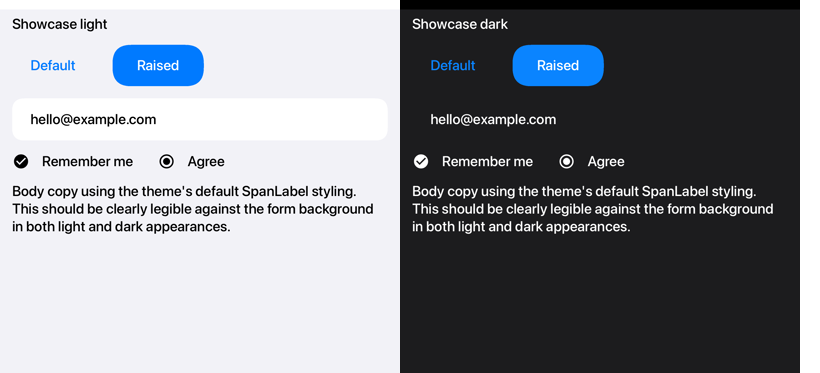
This is the ShowcaseTheme capture from the new screenshot suite, run on iOS in light and dark. Same Form, same components, swap Display.setDarkMode(...) and re-resolve. The form is built like this:
Container row = new Container(BoxLayout.x());
row.add(new Button("Default"));
Button raised = new Button("Raised");
raised.setUIID("RaisedButton");
row.add(raised);
form.add(row);

TextField tf = new TextField("[email protected]");
form.add(tf);

Container toggles = new Container(BoxLayout.x());
CheckBox cb = new CheckBox("Remember me");
cb.setSelected(true);
toggles.add(cb);
RadioButton rb = new RadioButton("Agree");
rb.setSelected(true);
toggles.add(rb);
form.add(toggles);

SpanLabel body = new SpanLabel("Body copy …");
form.add(body);
That gives you the full picture in one screen:
- The
Defaultbutton uses the stockButtonUIID. TheRaisedbutton usesRaisedButton, whichcn1-derives fromButtonand adds a tinted pill on top of the iOS system blue — that is the iOS Modern accent in both modes. - The
TextFieldis a single rounded-rect surface with the iOS system gray fill, the same shape Apple uses in Settings. CheckBoxandRadioButtonuse the new optional@checkBoxCheckedIconInt/@radioCheckedIconInttheme constants to swap toCHECK_CIRCLE/CHECK_CIRCLE_OUTLINEglyphs — Reminders-app aesthetic on iOS while Android keeps the standard square check.- The
SpanLabelbody uses the theme’s base font and inherits transparent backgrounds so it never paints over a translucent parent.
The full screen source is DarkLightShowcaseThemeScreenshotTest.java.
Android Material 3
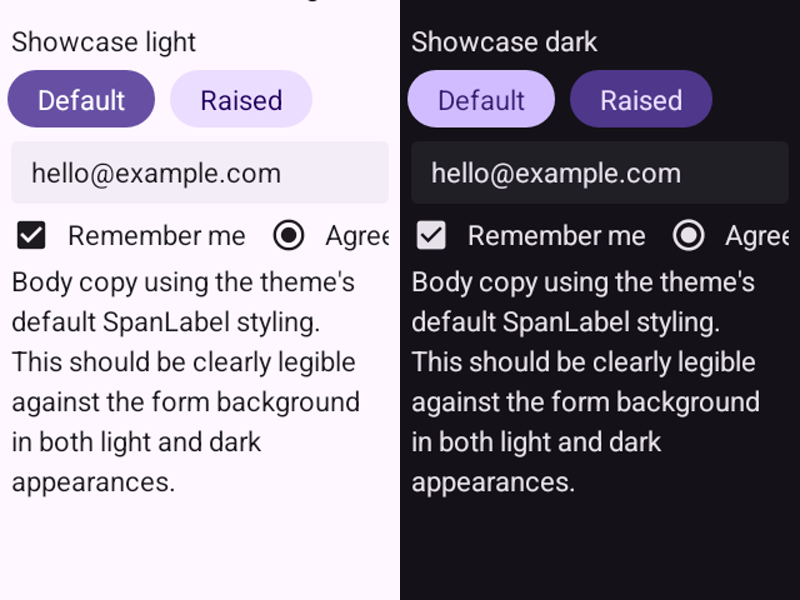
Same ShowcaseTheme source on Android. The Material 3 baseline palette gives Default the primary container color and Raised the elevated-surface tone, with the dark variant flipping the relationship correctly via the dark color-role mapping. Padding and font sizing follow Material density, which you can see in how compact the same Form lays out compared to iOS.
Translucent surfaces
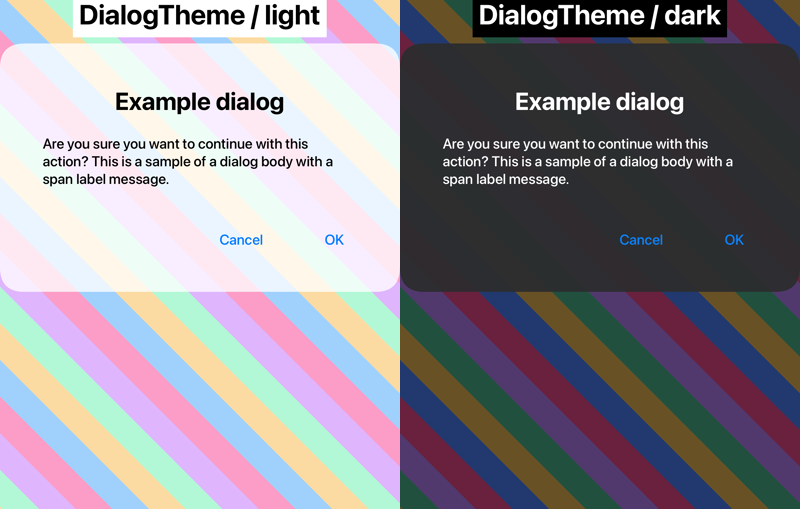
This is the DialogTheme capture against the screenshot suite’s textured diagonal-stripe backdrop. The backdrop is intentional — it lets reviewers see whether anything that is supposed to be translucent actually is. The iOS Modern Dialog uses an rgba surface fill (0.78 alpha in light, 0.95 in dark — dark needs more opacity because bright stripes bleed through) and its DialogBody, DialogTitle, ContentPane, CommandArea sub-UIIDs are transparent so the rounded corners read cleanly. The same trick is applied to TabsContainer and the iOS MultiButton.
Runtime palette overrides
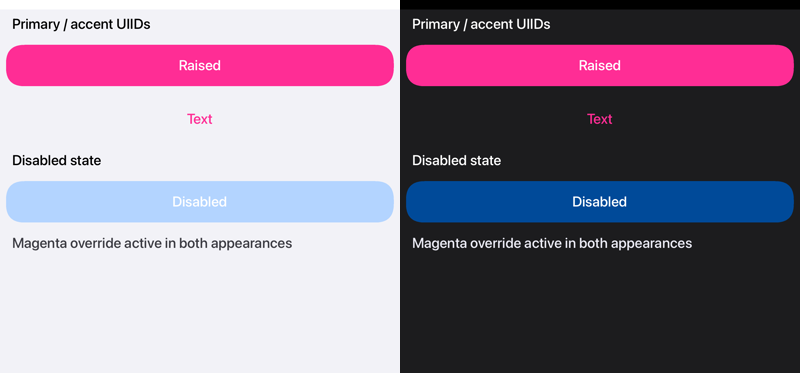
The native theme is meant to be a starting point — you can layer your own palette on top without forking the theme. Above is the PaletteOverrideTheme capture: the base is iOS Modern, but the test layers a magenta palette on top at runtime via UIManager.addThemeProps(...). RaisedButton, FlatButton, the disabled tone, and the body-copy span all pick up the override in both light and dark — the override seam works at the resource-bundle layer, exactly the same mechanism a user theme uses to override the native theme on a real app.
In the simulator
Three pieces, all live:
- Themes are bundled. The simulator jar-with-dependencies includes both modern themes alongside the four legacy themes (
iPhoneTheme,iOS7Theme,androidTheme,android_holo_light) at the root of the jar. The simulator can pick any one of them at runtime without touching the skin repo. - A new “Native Theme” menu. Right next to the Skins menu there is now a Native Theme menu with a radio group for the six themes plus “Auto” and “Use skin’s embedded theme”. Selecting one writes the
simulatorNativeThemePreference, flips the simulator-reload flag, and disposes the current window so the skin reloader kicks in with the new theme. You can sit on a single skin and flip through every native theme in seconds. - Build hints know about it. The new
nativeTheme,ios.themeMode, andand.themeModebuild hints are registered with the simulator’s Build Hints UI on launch — labels, types, value lists, descriptions, the lot. (The legacy keyscn1.nativeThemeandcn1.androidThemeare still honored for back-compat.) Set them in the Build Hints dialog, incodenameone_settings.properties, or via-Dsystem properties; they flow through to the device build and the simulator both.
The “Auto” choice in the Native Theme menu defers to those build hints — set ios.themeMode=modern in your project’s settings and “Auto” previews iOS Modern; flip the same project to ios.themeMode=ios7 and “Auto” previews iOS 7. The explicit menu entries (iOS Modern, iOS 7, etc.) override the hints regardless. -Dcn1.forceSimulatorTheme is still honored as the highest-priority override; pick “Use skin’s embedded theme” to bypass the framework theme entirely and get whatever the skin shipped with.
On devices
The opt-in is the same on iOS and Android. The platform knobs follow a single naming pattern — ios.themeMode and and.themeMode — and accept modern / liquid / auto / ios7 / flat on iOS, modern / material / auto / hololight / legacy on Android. There is a single cross-platform shortcut, nativeTheme=modern, which the iOS builder consults when ios.themeMode is unset and which the Android port reads at runtime as a default for and.themeMode. The legacy aliases cn1.androidTheme and cn1.nativeTheme are still honored for back-compat, as is and.hololight=true.
The default for an existing app stays on legacy on every platform. We do not flip a 15-year-old app’s look without an opt-in. New apps generated from the initializr ship with nativeTheme=modern, ios.themeMode=modern, and and.themeMode=modern already set in codenameone_settings.properties, so a brand new project starts with the modern themes preselected. The Playground does the same, and Playground project downloads carry the same defaults into the generated codenameone_settings.properties.
The HTML5 port has the runtime support for the modern themes but does not bundle them with user apps yet — that is one of the loose ends we want to close in the next round.
Sticky headers
The other piece of look-and-feel that we want to highlight is StickyHeaderContainer, which finally has a proper home in the framework. It is the iOS-contacts-list / sectioned-material-list component: scroll past a section boundary and the previous header is replaced by the next one. New this week, the swap is animated. A directional slide moves the outgoing header up on a forward scroll and down on a reverse scroll, or you can pick a cross-fade.
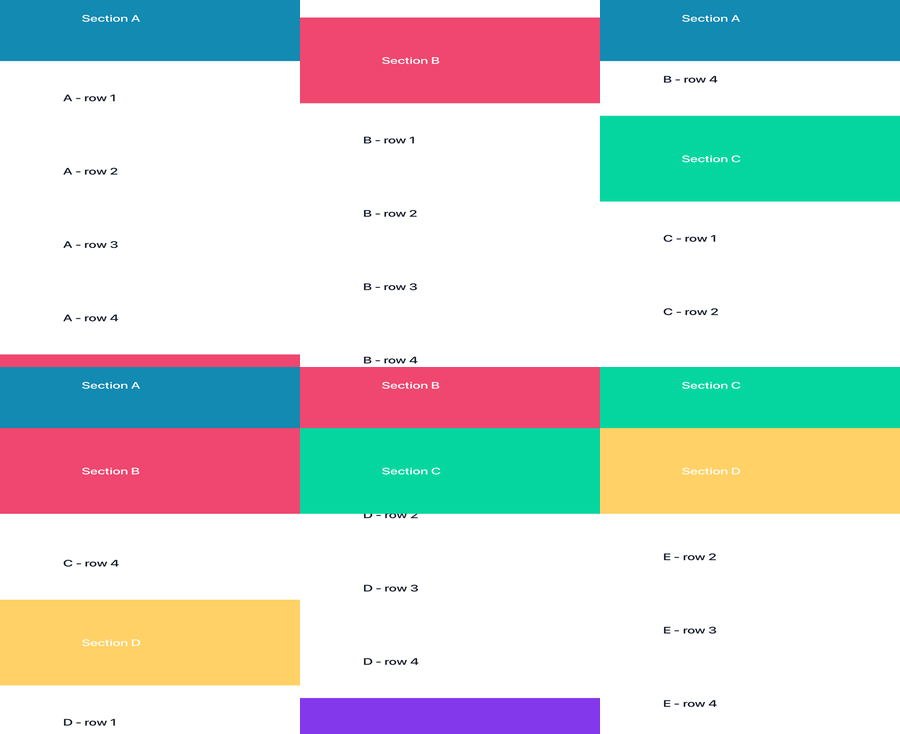
Above is a six-frame sweep from the screenshot test — the user scrolls through sections A, B, C, D, E and the pinned header recolors to whichever section is currently active at the top of the viewport.
The API is small. Build the container, register sections with addSection(header, content), configure the transition style and duration, and add it to a Form:
StickyHeaderContainer sticky = new StickyHeaderContainer();
sticky.setTransitionStyle(StickyHeaderContainer.TRANSITION_SLIDE);
sticky.setTransitionDurationMillis(250);
for (char c = 'A'; c <= 'Z'; c++) {
    Label header = new Label("" + c, "StickyHeader");
    Container items = new Container(BoxLayout.y());
    for (int i = 0; i < 5; i++) {
        items.add(new Label(c + " entry " + i));
    }
    sticky.addSection(header, items);
}
form.add(BorderLayout.CENTER, sticky);
TRANSITION_SLIDE is the default. TRANSITION_FADE cross-fades the outgoing header on top of the incoming one. TRANSITION_NONE keeps the prior instantaneous swap if you want it. Issue #4807 for the original request.
How we test this
Every screenshot in this post is captured by a test that runs the app on a real iOS device, an Android emulator, and headless Chrome, then diffs each capture against a stored golden image. The diff is the test — if the rendered pixels drift, the run fails.
For animations the test grabs a series of frames over a fixed-duration transition, then composites them into a single index image. That is how the dual-appearance shots end up as one side-by-side picture per test:
…and how the sticky-header animation ends up as a six-frame strip stitched into a GIF:
If you want to read the source, the suite lives at scripts/hellocodenameone/common/src/main/java/com/codenameone/examples/hellocodenameone/tests/.
Bugs and misc features from this week
The theme work was the loudest thing this week, but plenty of other commits landed alongside it:
- SIMD large-allocation fallback. The SIMD path on iOS allocates its working buffers on the stack via
allocafor speed. Past a certain buffer size the stack allocation simply fails — there is not enough stack to give, and the request crashes the process. The fix detects that case and falls back to a regular heap allocation when the request is too large to live on the stack. Small SIMD ops keep the fastallocapath; large ones no longer crash. - Pluggable AnimationTime clock.
Motion,Timeline,MorphAnimation,Image.animate, andLabeltickers now all route through a newAnimationTimeclass that defaults toSystem.currentTimeMillis()but can be overridden. Tests can drive animations deterministically frame by frame; demos can run in slow motion or fast forward;Motion.slowMotionis no longer the only lever. - POSIX character classes for non-ASCII letters.
[[:alpha:]],[[:alnum:]],[[:lower:]], and[[:upper:]]silently failed to match anything outside the basic ASCII range — Greek, Cyrillic, CJK ideographs, accented letters, vulgar fractions, currency symbols. They now match the way you would expect, with five regression tests covering the failing cases from the issue. - Fail-fast on JDK < 11. The simulator and “Run as desktop app” goals fork the JVM with
--add-exports=java.desktop/com.apple.eawt=ALL-UNNAMED, which JDK 8 rejects with the unhelpful “Could not create the Java Virtual Machine”. Now the Maven plugin checks the runtime JDK version on entry tocn1:runandcn1:debugand aborts with a friendly message naming the detected version,JAVA_HOME, and a pointer to Adoptium. JDK 11 through 25 is the supported runtime range for the simulator, JDK 8 stays the build-time requirement for the core framework, and JDK 8 is still fully supported at runtime for shipped desktop apps — only the simulator / “Run as desktop app” Maven goals require JDK 11+. - Sheet scrolling swipe and animation.
Sheetfinally drags from the bottom with a real animation instead of snapping in. Issue #4825. - Picker positioning.
Pickergot additional button-positioning options and a small batch of coverage tests. - Playground polish. The Playground moved every
Dialog.show(...)toInteractionDialogmode so user code callingDialog.showdoes not blow away the editor chrome — it renders into the layered pane instead. Error messages got a substantial overhaul. The preview-resolution syntax expanded so the Playground can pick previews from a much wider set of expressions, with a new harness keeping it honest in CI. - Deeper
refreshTheme().Form.refreshTheme()has been around forever — it re-resolves the styles on a single Form. The new thing this week isUIManager.getInstance().refreshTheme(), which snapshots the current theme props and theme constants, clears the resolved-style caches, and re-applies the lot. This is what lets the screenshot suite flip dark mode mid-suite and see fresh styles, and what lets a runtime palette override take effect immediately. Most apps will never need to call it directly — palettes typically don’t change at runtime, and aDisplay.setDarkMode(...)call already triggers the right invalidation. It is there if you do change the palette and want the change to stick on the next paint without reloading the theme from disk.
Where this is going — and a thank-you
Last week’s post was about Codename One feeling faster: corrected pixel densities, principled scroll physics, SIMD on iOS, accessibility text scaling. This week is the symbiotic other half — Codename One looking like it belongs on a 2026 phone. Both halves are the same project. There is not much point in shipping a SIMD-accelerated Base64 if the surrounding UI looks like a 2014 app, and there is not much point in shipping a glass-frosted Dialog if the scroll underneath it judders.
Neither half is finished. They are both ongoing, and they both depend on community help — bug reports, RFEs, the patient back-and-forth on issue threads where somebody describes a layout problem on an iPhone you do not own. A specific thank you to the people who drove the issues that turned into this week’s commits: Thomas (@ThomasH99) filed #4781 (the original “build a liquid glass example” RFE that started this whole effort), #4807 (sticky headers), #4838 (sideways tab swipe), #4841 (the POSIX regex fix), #4819 (picker buttons), and several others; Francesco Galgani (@jsfan3) filed #4825 (sheet swipe animation) and #4824 (light + dark theme by default in initializr); @ddyer0 caught #4811 (the EDT stack overflow) and #4767 (iPad restart Form size); Lucca Biagi (@LuccaPrado) filed #4817 (form creation in IntelliJ). Several of those are RFEs you would not file unless you actually use the framework day-to-day, and that is the kind of feedback that turns into shippable work.
We are sitting at 496 open issues as of this post. That is slow but steady progress — the number is moving in the right direction week over week, and the issues that close tend to ship as features or fixes you can see, not as silent triage. If you have a problem, file it. If you have an RFE, file that too. The themes you saw above started as an RFE.
You can try the new themes today by opening the Playground, by setting nativeTheme=modern (or ios.themeMode=modern / and.themeMode=modern for finer control) in your project’s codenameone_settings.properties, or by picking them from the simulator’s new Native Theme menu. New projects from the initializr already have them on. The shipping resources are bundled in the iOS and Android ports as of this week.
Discussion
Join the conversation via GitHub Discussions.