
One of the common requests we received over the years is a way to let text “fit” into the allocated space so the font will match almost exactly the width available. In some designs this is very important but it’s also very tricky. Measuring the width of a String is a surprisingly expensive operation on some OS’s. Unfortunately, there is no other way other than trial & error to find the “best size”.
Still despite the fact that something is “slow” we might still want to use it for some cases, this isn’t something you should use in a renderer, infinite scroll etc. and we recommend minimizing the usage of this feature as much as possible.
This feature is only applicable to Label and its subclasses (e.g. Button), with components such as TextArea (e.g. SpanButton) the choice between shrinking and line break would require some complex logic.
To activate this feature just use setAutoSizeMode(true) e.g.:
Form hi = new Form("AutoSize", BoxLayout.y());

Label a = new Label("Short Text");
a.setAutoSizeMode(true);
Label b = new Label("Much Longer Text than the previous line...");
b.setAutoSizeMode(true);
Label c = new Label("MUCH MUCH MUCH Much Longer Text than the previous line by a pretty big margin...");
c.setAutoSizeMode(true);

Label a1 = new Button("Short Text");
a1.setAutoSizeMode(true);
Label b1 = new Button("Much Longer Text than the previous line...");
b1.setAutoSizeMode(true);
Label c1 = new Button("MUCH MUCH MUCH Much Longer Text than the previous line by a pretty big margin...");
c1.setAutoSizeMode(true);
hi.addAll(a, b, c, a1, b1, c1);

hi.show();
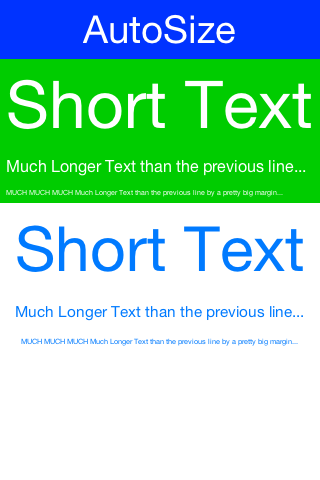
Figure 1. Automatically sizes the fonts of the buttons/labels based on text and available space
Add All
You will notice in the code above we added a new method: addAll.
addAll is a shortcut that allows the code above to be written as:
hi.addAll(a, b, c, a1, b1, c1);
Instead of the more verbose syntax:
hi.add(a).
    add(b).
    add(c).
    add(a1).
    add(b1).
    add(c1);
It’s not a huge difference but at least when building demos/test cases it’s nice.
Redirects on iOS
One of the big decisions we made in Codename One was to not copy java.io wholesale. This has been a double edged sword…
It has made us far more portable and also provided reliability that no other competing service can match in terms of networking. However, the differences within the network stack between OS’s are second only to the GUI differences. One such painful difference is the fact that iOS requires HTTPS now.
Another such painful difference is redirect behavior. Codename One handles redirect by returning the 30x HTTP response and redirecting seamlessly. However, you can override that behavior and grab the 30x redirect. This also means the behavior of redirect (which is one of those gray areas in HTTP implementations) is consistent.
But this isn’t the case on iOS where it handles redirect internally and we are faced with this after the fact.
In the past we evaluated this and determined that this wouldn’t be an easy fix, I’m not sure if this is something we missed or something that changed in recent iOS versions but it looks like the fix isn’t as hard as we feared as we got this pull request & merged it.
We might still revert this fix if we run into too many problems so with this Friday update check out your networking code and make sure everything is in order, if not we might need to provide a build hint to toggle this.
Archived Comments
This post was automatically migrated from the legacy Codename One blog. The original comments are preserved below for historical context. New discussion happens in the Discussion section.
João Bastos — February 13, 2017 at 12:32 pm (permalink)
Is the addAll shortcut already available? Cant see it in netbeans…
Shai Almog — February 14, 2017 at 8:05 am (permalink)
Shai Almog says:
It should be. Use the Update Client Libs button in Codename One Settings.
João Bastos — February 14, 2017 at 5:23 pm (permalink)
João Bastos says:
Solved! Thanks Shai!
Denis — September 20, 2018 at 8:06 pm (permalink)
Denis says:
Hi Shai,
setAutoSizeMode(true) doesn’t work for my app, more over it makes text to disappear
please take at screenshots, this is before AutoSize set to true, text is very tiny in tablets
https://uploads.disquscdn.c…
and this is after AutoSize set to true for first (top) label
https://uploads.disquscdn.c…what can a reason for that ?
Thanks,
Denisp.s. CodenameOne version 5.0
Denis — September 21, 2018 at 10:38 am (permalink)
Denis says:
update, text appears on real devices, but it’s very very tiny
Shai Almog — September 22, 2018 at 6:09 am (permalink)
Shai Almog says:
It looks like you used something such as absolute center or flow layout. That won’t work. These layout managers give components their preferred size which means the resizing text will shrink and won’t grow. You need to use a layout that gives out the full width.
Denis — September 23, 2018 at 9:02 pm (permalink)
Denis says:
yes, you are right, in some parts of UI I used flow layout. Is there any other way to make text bigger on tablets ? because it’s really very very tiny on 10 inch tablets, is it possible to set font size for “Label” UUID (to apply it to all labels at once) depending on device screen size ?
Shai Almog — September 24, 2018 at 4:33 am (permalink)
Shai Almog says:
You can do that in the theme. See the section in the developer guide about theme layering. You can add a theme on top of the current theme.
Denis — September 24, 2018 at 6:54 am (permalink)
Denis says:
I see, that’s better than maintain different APKs for different devices (phones, tablets), but still needs some logic to figure out on which device app is currently running and there should it load secondary theme or not, is there some handy way ?
or I just go with one of these
Display.getInstance().getDeviceDensity()
Display.getInstance().getDisplayWidth()
Display.getInstance().getDisplayHeight()
Shai Almog — September 25, 2018 at 8:23 am (permalink)
Shai Almog says:
There’s isTablet() both in Display & the CN class.
Denis — September 25, 2018 at 12:05 pm (permalink)
Denis says:
cool, thanks ! just tried that, interesting, but font changes doesn’t apply, background color does, i.e. I have correct layered theme and code setup, I see different background for tablets, but font size doesn’t change, I am trying t set to “True Type: native:MainRegular” and “True Type Size: Large”, but nothing happens on tablets, I tried both “[Default Style]” and “Label”, “Button” individually, can you please advise ?
Denis — September 26, 2018 at 9:01 pm (permalink)
Denis says:
setting “True Type Size” to millimeters value on component level helped, [Default Style] still doesn’t work even with millimeters value, I set font site for Buttons and Labels, but for example Dialog title is still very tiny, looks like I should set values for all components individually
Denis — September 27, 2018 at 8:48 am (permalink)
Denis says:
also Dialogs for some reason looks differently on mobile and tables, with the same theme (and no layered themes)
mobile
https://uploads.disquscdn.c…
tablet https://uploads.disquscdn.c…all in simulator haven’t test on real devices yet
Denis — September 27, 2018 at 10:43 am (permalink)
Denis says:
on real tablet device dialog title appears similar to mobile, but with less spacing from top and bottom
Shai Almog — September 28, 2018 at 5:31 am (permalink)
Shai Almog says:
Which tablet skin? It’s possible the skin is out of date and needs a new theme
Denis — September 28, 2018 at 7:17 am (permalink)
Denis says:
there are different skins for the same device name, for example for iPad Pro (ipad-pro.skin and iPadPro.skin), iPhoneX (this one is strangest iPhoneX.skin and /iPhoneX.skin) and Galaxy S7 (GalaxyS7.skin and SamsungGalaxyS7.skin), which is a bit confusing, but it would be easier if skins sorted by device name
the skin in above mentioned issue is IPadPro.skin, but I have compared to Nexus5.skin, different platform, I didn’t though about that, MicrosoftSurfacePro4.skin also have different view of Dialogs, but again it’s another platform, so may there is no issue at all, I have’t real Apple device to compare
p.s.
I also get these errors when I changing a skin, simulator crashes and I have to start it again, but it works after that
java.lang.UnsatisfiedLinkError: Native Library C:UsersDenisAppDataLocalTempsqlite-3.7.151-amd64-sqlitejdbc.dll already loaded in another classloader
java.lang.UnsatisfiedLinkError: org.sqlite.NativeDB._open(Ljava/lang/String;I)V
Shai Almog — September 29, 2018 at 4:27 am (permalink)
Shai Almog says:
Did you refresh theme? It’s a bit hard to guess with that amount of information.
Shai Almog — September 29, 2018 at 4:31 am (permalink)
Shai Almog says:
The iPad skin will look like iOS where the dialogs have a different default design inherited from te native theme.
The simulator crash is due to sqlite, we tried multiple ways to workaround it but it seems that the sqlite JDBC support is averse to class loaders. If you use sqlite switching skins will crash and you’ll have to re-run the app. There’s this issue which we tried and failed to fix multiple times https://github.com/codename…
Shai Almog — September 30, 2018 at 9:27 am (permalink)
Shai Almog says:
Default will only work for things that aren’t explicitly defined. Since the title is explicitly defined in the native theme you need to override that.
Shai Almog — September 30, 2018 at 9:28 am (permalink)
Shai Almog says:
That mostly relates to the density of the device
Denis — October 1, 2018 at 9:07 am (permalink)
Denis says:
that makes sense, and I thought the same, the only problem is that we can’t see what defined in native theme ))) I have just 6 items in theme settings, Default style, Button, Container, Label, Multibutton and Toolbar (only Padding/Margin) and as I understand because they are explicitly defined in main theme I have to define them also in layered theme, [Default Style] in layered theme will not override their parameters from main theme, is that correct ?
Shai Almog — October 2, 2018 at 4:49 am (permalink)
Shai Almog says:
Technically you can open the native theme file from our git repo, but that’s probably not a good idea since that might change. Yes you need to explicitly define things you want to change. E.g. the title in iOS is center aligned and in Android it’s left aligned. We usually don’t override alignment to keep that default behavior.
The nice thing is that most of these things can be tested live with the simulator and switching is relatively quick (with the exception of the SQLite problem).
Denis — October 2, 2018 at 12:21 pm (permalink)
Denis says:
Thank you Shai, I do exactly the same, use emulator to adjust components, it’s very useful, thanks !
Discussion
Join the conversation via GitHub Discussions.