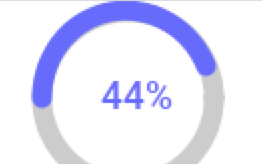
Chen just released a new cn1lib for circular progress indicators
of various types. This is an often requested feature and there were many ways to implement this in the past
but it is now far easier to do this with shape clipping.
You can use the circular progress API using code such as:
Form hi = new Form("Circle Progress");
hi.setLayout(new BoxLayout(BoxLayout.Y_AXIS));
final CircleProgress p = new CircleProgress();
p.setProgress(100);
p.setClockwise(true);
p.setStartAngle(CircleProgress.START_9_OCLOCK);
hi.add(p);

final ArcProgress p2 = new ArcProgress();
p2.setProgress(70);
hi.add(p2);

final CircleFilledProgress p3 = new CircleFilledProgress();
p3.setProgress(70);
hi.add(p3);

Slider slider = new Slider();
slider.setEditable(true);
slider.addDataChangedListener(new DataChangedListener() {

    @Override
    public void dataChanged(int type, int index) {
        p.setProgress(index);
        p2.setProgress(index);
        p3.setProgress(index);
    }
});
hi.add(slider);

hi.show();
Which results in this:

Figure 1. Circle progress indicators in action
IntelliJ/IDEA Rewrite
This has been a very slow news week due to many reasons but a big chunk of that is our focus on some big
tasks.
I’m working on a complete rewrite of the IntelliJ/IDEA plugin, I hope to have it out next week. This
should bring IntelliJ/IDEA into par with the rest of the IDE’s and in my humble opinion it might leapfrog other IDE
plugins.
Archived Comments
This post was automatically migrated from the legacy Codename One blog. The original comments are preserved below for historical context. New discussion happens in the Discussion section.
Msizi — March 31, 2016 at 5:06 pm (permalink)
Great work!!!! just a question, how to change the color of the circle. instead of blue maybe use red or any different color
Chen Fishbein — April 1, 2016 at 6:38 am (permalink)
Chen Fishbein says:
Thanks, the colors are coming from the “Slider” theme entry, just modify the Slider colors on the theme to change the colors
Discussion
Join the conversation via GitHub Discussions.